Home > SEELEY > SEELEY Ducted Gas Heater with MagiQtouch Controller or Manual Thermostat Owner’s Manual

SEELEY Ducted Gas Heater with MagiQtouch Controller or Manual Thermostat Owner’s Manual

HOME OWNER’S MANUAL  
DUCTED GAS HEATER  
(with MagIQtouch Controller or Manual Thermostat)  
GeneralDetails
NameSEELEY Ducted Gas Heater with MagiQtouch Controller or Manual Thermostat Owner’s Manual
MakeSEELEY
LanguageEnglish
FiletypePDF (Download)
File size0.49 MB
Download PDF
1 Star2 Stars3 Stars4 Stars5 Stars (1 votes, average: 5.00 out of 5)
Loading...

SEELEY Ducted Gas Heater with MagiQtouch Controller or Manual Thermostat Owner’s Manual
Get the free PDF manual for the SEELEY Ducted Gas Heater with MagiQtouch Controller or Manual Thermostat Owner’s Manual and access setup steps, usage instructions, and troubleshooting tips. 👉 View online or download now to keep your thermostat running smoothly!

SEELEY Ducted Gas Heater with MagiQtouch Controller or Manual Thermostat Owner’s Manual Overview

Summary of Contents

  • Page 1: Home owner’s manual Ducted gas heater With MagIQtouch controller or manual thermostat
  • Page 2: Page 2
  • Page 3: This document is the Owner’s Manual for your ducted gas heater. Heater identification and installation information is to be completed by the installer. Important safety information includes that the appliance must be installed and serviced by authorized personnel only. Do not operate this appliance before reading the instruction booklet. Do not place articles on or against this appliance. Do not store chemicals or flammable materials, or spray aerosols near this appliance. Children should be supervised to ensure that they do not play with the appliance. If the supply cord is damaged, it must be replaced by qualified persons to avoid a hazard. Ensure that the gas cylinder is maintained at or above 30% full to avoid incorrect heater operation. The cost of service and repairs resulting from low gas supply pressure are not covered by your product warranty.
  • Page 4: Important maintenance and warranty information is crucial for the proper functioning of your ducted gas heater. Regular servicing is necessary to maintain the heater and comply with warranty conditions. Compliance with maintenance and service requirements will extend the heater's lifespan. Each item in the maintenance schedule must be performed by a qualified technician. The maintenance schedule should be filled out with names, signatures, dates, and actions taken. Failure to carry out required maintenance will void your warranty. The document includes sections on operating the heater, homeowner/user maintenance, troubleshooting, and warranty registration.
  • Page 5: Adjusting the room fan speed is important for optimum performance and efficiency. The room fan settings set by your installer are recommended for use. In systems with a single MagIQtouch Controller, the room fan speed can be adjusted by the user. In systems with multiple MagIQtouch Controllers, the room fan speed is not user adjustable. When operating in manual mode, the heater will turn on and off to maintain the set temperature. In program mode, the heater will automatically turn on and off for the current time period. The MagIQtouch Controller divides each day into four time periods that you can customize. You can change the minimum and maximum temperature displayed on your slider. Night quiet mode reduces fan speed over the night period for a quieter sleep. Some settings are only available to trained service agents or installers and require a pin code.
  • Page 6: Advice for the home owner Gas rate and fan speed adjustment Adjusting the maximum gas rate If your home is not reaching the temperature you set on your MagIQtouch Controller, please check the maximum gas rate setting and increase it, if not already set to the maximum 100%. Increasing the maximum gas rate setting to 100% will increase the heat output to the heater’s maximum design output. The maximum gas rate setting can be adjusted by selecting: SETTINGS > HEATER > GAS RATE on your MagIQtouch Controller. A reduced maximum gas rate setting should only be used when the heater output needs to be reduced. Adjusting the room fan speed If your home is not reaching the temperature you set on your MagIQtouch Controller, please check the room fan speed setting and increase it, if not already set to the maximum 10. This will increase the heat output and increase the distribution of heated air through your home. The maximum room fan speed can be adjusted by selecting: SETTINGS > HEATER > SET FAN SPEED on your MagIQtouch Controller. Reducing the maximum room fan speed will reduce air flow noise, reduce heat output, and reduce the distribution of heated air around your home.
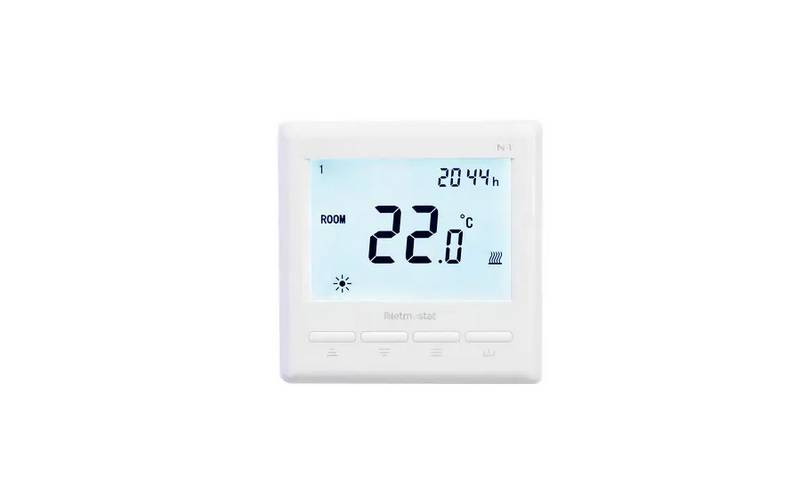
  • Page 7: Operating your heater Using the manual thermostat Button functions Turning heater on Press ON/OFF button. The heater and room fan will start after a short delay provided set temperature is greater than room temperature. Turning heater off Press ON/OFF button. Heater will turn off, room fan will stop after approximately 60-90 seconds. Adjusting set temperature Press UP or DOWN ARROW button to increase or decrease setting. Each press will increase or decrease the setting by 1°C. Replacing the batteries When the battery symbol appears, new batteries are required. Fit 2 x AA batteries and clip front of thermostat back in place.
  • Page 8: Home owner/user maintenance Important maintenance and warranty information The return air filter must be checked and cleaned by the owner/user at least once every 2 weeks during the heating season. Cleaning the return air filter regularly will help to keep the heater running efficiently. An inefficient heater results in higher gas bills. It is very important to maintain your ducted gas heater and have it regularly serviced. Compliance with maintenance and service requirements will prolong the life of your ducted gas heater. It is a condition of warranty cover that each item in the maintenance schedule is performed by a qualified, licensed technician. The owner/user must do a yearly visual check if the heater is installed outside the home. The external cabinet must be clean and free from debris that may build up over time. Failure to carry out the required maintenance will void your warranty.
  • Page 9: Maintenance schedule requires checks every two years by a qualified technician. The schedule must be filled out with technician's name, signature, date, and actions taken. Continued maintenance after warranty expiration is recommended to prolong product life. Key components to be inspected include cabinet, heat exchanger, and combustion air inlet louvres. General installation aspects such as return air grille and filter, duct condition, and flue system should also be checked. Electrical components including wiring, room fan motor, and PCB’s need regular inspection. Gas components such as burners, ignition electrode, and flame sense electrode are critical for operation. Operational checks include start-up sequence, control operation, and gas inlet pressure. Action taken during maintenance can include inspection, adjustment, cleaning, or replacement of parts. Installation aspects like ductwork and connections are not covered by warranty but still require checks for performance and safety.
  • Page 10: Troubleshooting using the MagIQtouch controller includes checking that the controller is set to heat mode and the required temperature. For effective heating, ensure that outlets/zones are open and the return air grille is not obstructed. The heater may operate at wrong times in program mode if the time and day displayed are incorrect. If the heater does not start, check that gas is turned on at the gas meter. For the manual digital thermostat controller, ensure the thermostat is set above room temperature for the heater to start. Cleaning the return air filter is required at least once every two weeks. If the heater does not start, reset the heater by turning the thermostat off and on with a wait in between. Check that external doors and windows are closed to maintain effective heating. If prompted by the controller, contact your local dealer or service number for assistance. In case of a power outage, set the date and time to resume heater operation.
  • Page 11: How to register your product warranty (Australia & New Zealand only) Please register your warranty online by visiting seeleyinternational.com. Step 1: Select SUPPORT then REGISTER A PRODUCT FOR WARRANTY. Step 2: Enter your product serial number and “SUBMIT”. Step 3: Enter the required information and “SUBMIT”. You need to have the following information to complete your registration: your unit model and size, serial number, date your system was installed, name of the dealer you purchased it from. Please retain your purchase receipt, and if your warranty period was extended, your proof of the extension. Privacy notice: Seeley International Pty Ltd will use the personal information you provide to offer warranty support and inform you about other products and services.
  • Page 12: warranty terms and information We or us means Seeley International Pty Ltd. You means the original end-user purchaser of the Goods. Supplier means the authorised distributor or retailer of the Goods. Goods means the product purchased in Australia or New Zealand. Relevant warranty period means the various warranty periods as described in the document. For Australian customers, Goods come with guarantees under the Australian Consumer Law. You are entitled to a replacement or refund for a major failure. The warranty applies to all components of the original Braemar gas heater but does not cover fair wear and tear. You will be responsible for any costs of labor for repairs or replacements under the warranty. Failure to carry out required maintenance will void your warranty.
  • Page 13: Warranty terms and information for Australia and New Zealand only. The warranties do not cover damage from acts of God. No other person or entity is authorized to offer additional warranties on behalf of the company. The benefits conferred are in favor of the original purchaser and any subsequent title holder of the gas heater. To claim under the warranties, contact the company within the relevant warranty period. You must provide original proof of purchase and service records for warranty claims. Costs incurred for service may be the responsibility of the owner if the goods are in remote locations. The company is not liable for failures due to non-genuine spare parts. This warranty is only valid in Australia and New Zealand. Service technicians' safety and privacy must be protected during service calls.
  • Page 14: Page 14
  • Page 15: Page 15
  • Page 16: When your product requires servicing, please quote serial number and model number. Warranty (Australia only). To register your warranty, go to the specified website. It is the policy of Seeley International to introduce continual product improvement. Accordingly, specifications are subject to change without notice. Please consult with your dealer to confirm the specifications of the model selected.