
SALUS Wired Digital Thermostat – Non-programmable HTRS230 User Manual
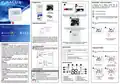


Package content
Montage
Manual mode – temperature setpoints
3
temperature levels are available. In manual mode, only
one temperature level is maintained for the entire day.
Icon in the frame indicates which mode is currently active.
1
2
Wired digital thermostat - non-programmable
Model: HTRS230(30)
A different temperature can be set for each level.
- Comfort temperature mode
- Economic temperature mode
Front housing
of the thermostat
Back housing
of the thermostat
Make sure that the thermostat is not connected to the 230V AC.
Then open the front housing using a screwdriver as shown above.
Digital non-programmable thermostat
Model: HTRS230(30)
- Frost protection mode Usually used during the period of longer
absence, or during the holidays (only available in HEATING
mode).
3
User manual
User manual
Mounting screws
Ver. 1
Date of issue: 24 VI 2020
Power supply: 230V
User manual
Press any button to highlight the screen, then follow the steps
below:
Proper thermostat location
IMPORTER:
QL CONTROLS Sp. z o.o. Sp. k.
ul. Rolna 4, 43-262 Kobielice
PRODUCER:
Salus Limited
6/F, Building 20E, Phase 3, Hong Kong Science
Park, 20 Science Park East Avenue, Shatin,
New Territories, Hong Kong
1
2
Connect the thermostat properly. Please refer to the “Connection
description”section. Mount the thermostat using
the designed screw holes.
4
SALUS Controls is a member of the Computime Group.
The ideal position to thermostat mounting is about 1,5m under floor
level far from heating or cooling sources. In addition, the thermostat
should not be installed behind curtains or other obstacles or in places
with high humidity, as this will prevent accurate measurements of room
temperature. The thermostat must not be exposed to sunlight. Do not
place the thermostat on an outer wall.
Select the temperature mode
using or buttons.
In accordance with the product development policy, SALUS Controls plc reserves
the right to change specifications, design, and materials used in production,
presented in this manual, without prior notice.
Slide the thermostat on the back cover. The thermostat is configured for
operation. Use buttons to set the temperature setpoint.
Introduction
The HTRS230V(30) from SALUS Controls is a digital, wired and surface-
mounted (or on
a
flush-box) non programmable room thermostat,
Connection description
Button functions
dedicated for surface heating / cooling control, characterized by high
thermal inertia. It is connected to the wiring centre. The thermostat does
not have the function of creating schedules - it lowers the set temperature
via wiring centre after receiving the NSB signal from the weekly
thermostat. Thanks to the built-in algorithms, it offers much better
temperature control accuracy than traditional mechanical thermostats.
The thermostat is characterized by silent operation. The controller is
characterised by silent operation.
Note:The thermostat is compatibile with the following Salus
wiring centre models:KL06 230V, KL08NSB 230V, KL04NSB 230V
or directly to the actuator.
Temperature setpoint
Increase /or decrease setpoint temperature setpoint
or value
Press any button to highlight the screen, then follow the steps
below:
NSB input
Actuator
CO
Thermostat
Mode selection
N
/
2
1
L
Product compliance
Short press to confirm selection
Press and hold – enter / exit the menu
The product complies with the following EU directives:
2014/30/EU, 2014/35/EU, 2011/65/EU. Full information is available at
L
N
SL
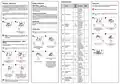
LCD icon description
Note!
CO
Thermostat
Wiring centre
L
L
This document is a quick guide to the installation and operation of
the product and indicates its main features and functions. Detailed
controls.eu and which must be used for proper installation and operation
of the product.
N
N
Current temperature.
Temperature setpoint
in the selected work mode.
4
5
6
7
3
2
4
3
Symbols explanation
8
9
Safety informations:
Use in accordance with national and EU regulations. Use the device as
intended and keep it dry. Product for indoor use only. Please read the
entire manual before starting the installation and using the product.
Installation:
Installation must be carried out by a qualified person, with appropriate
electrical authorisations, in accordance with national and EU standards
and regulations. The manufacturer shall not be liable for failure to comply
with the manual.
Terminal Description
1
L, N
Power supply (230V AC)
10
NSB Night temperature reduction (230V output)
SL 230 V AC output signal 230V AC
1. Heating mode
2. Cooling mode
3. Active work mode
4. Comfort temperature mode
5. Economic temperature mode
6. AUTO mode
7. Frost protection mode
8. Temperature unit
Set the temperature
using
or buttons.
Confirm selection
by button.
CO
Switching jumper between heating and cooling (input 230V AC)
9. Current / set temperature
10. Manual mode / temp. override
Note: The following designations are used interchangeably for products:
NOTE:
re may be additional protection requirements for the entire installation.
installer shall be responsible for compliance with such requirements.
=
=
SL
NSB


| General | Details |
|---|---|
| Name | SALUS Wired Digital Thermostat – Non-programmable HTRS230 User Manual |
| Make | SALUS |
| Language | English |
| Filetype | PDF (Download) |
| File size | 0.23 MB |
 (1 votes, average: 5.00 out of 5)
 Loading...

SALUS IT800 WIFI Smart Thermostat Installation Guide

SALUS 091FLRF Wireless Room Thermostat User Guide

SALUS Thermostat Sensor TS600 User Guide

SALUS Thermostat and Smart Plug Installation Guide

SALUS Programmable Wired Thermostat VS30W/VS30B Installation Guide

SALUS Wired Thermostat Installation Guide

SALUS RT520 Radiator Thermostat User Guide

SALUS RT310 Thermostat User Manual

SALUS Thermostat RT520 User Manual

SALUS BTR230 Room Thermostat User Guide

SALUS Wired Digital Thermostat – Non-programmable HTRS230 User Manual Overview
Summary of Contents
- Page 1: Package content Manual mode – temperature setpoints Temperature levels are available. In manual mode, only one temperature level is maintained for the entire day. A different temperature can be set for each level. Comfort temperature mode Economic temperature mode Frost protection mode is usually used during the period of longer absence or during the holidays. The ideal position for thermostat mounting is about 1.5m under floor level, away from heating or cooling sources. The thermostat does not have the function of creating schedules. The product complies with the following EU directives: 2014/30/EU, 2014/35/EU, 2011/65/EU. Installation must be carried out by a qualified person, with appropriate electrical authorizations.
- Page 2: Installer parameters The NSB (Night Setback) function enables automatic reduction of the temperature setpoint on the HTRS230(30) SLAVE thermostat. Modes are indicated by symbols. To activate AUTO mode, select the icon. The heating/cooling mode can be changed automatically via the CO terminal in the thermostat. When the cooling function is blocked, no message is displayed. The thermostat allows correcting the displayed temperature by 3.0°C. Frost protection setpoint is between 5.0 – 17.0°C. Maximum temperature for heating can be set to 35.0°C. Minimum temperature for cooling can be set to 40.0°C. Temperature calibration can be made in the range from -3.0°C to +3.0°C.

IMMERGAS 3.030909 Smartech Plus Smart Chrono Thermostat Installation Guide

OJ ELECTRONICS MWD5-1999-R3C3 Voice Thermostat Instructions

SHANGHAI TR9B Ultra Large Colorful Screen Capacitive Touch LCD Smart Thermostat User Guide

FantiniCosmi C820RQ LED Thermostat Instruction Manual

BEOK CONTROLS TDR89 Thermostat User Guide

namron 4512738 Touch Zigbee 16A Thermostat Instruction Manual

INKBIRD ITC-306A Digital Thermostat User Manual

HEATIT Z-TRM6 Matt Z-Wave Thermostat User Guide

KETOTEK F0155 WiFi Thermostat Instruction Manual

Aprilaire S86N MUPR Multi Stage Universal Thermostat Owner’s Manual