
SALUS Wired Digital Thermostat – Non-programmable HTRS230 User Manual
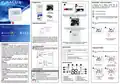
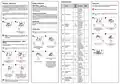


Installer parameters
AUTO mode – NSB function
Heating / Cooling mode
Factory reset
Param-
eter
Values
The NSB (Night Setback) function enables automatic reduction of
the temperature setpoint on the HTRS230(30) SLAVE thermostat, via
the HTRP230(50) programmable MASTER thermostat connected to the
wiring centre (or other external clock). The temperature change takes
place between the comfort temperature mode and economic
temperature mode.
Manual change:
Modes are indicated by
Press and hold button to enter the menu, then use button to select
the Heating / Cooling mode change setting. Confirm changes using
button. Now use or buttons to set the heating or cooling mode.
Confirm by button.
If you made a mistake, want to change the thermostat parameters or
return to factory settings, follow the steps below.
Default
Values
Function
Description
symbols.
According
to the PWM
algorithm
Note:This action will permanently delete all current settings.
0
1
2
To activate AUTO mode, select the icon. Together with the icon,
the thermostat shows the active temperature mode on the display:
Hysteresis:
0.5 °C
Automatic change (via CO terminal):
Press any button to highlight the screen, then follow the steps
below:
d01 Heating Control
0
The heating/cooling mode can be changed automatically via the CO
terminal in the thermostat. If 230 V AC power supply is connected to the
CO terminal – then thermostat automatically switches to cooling mode.
If you want to use this function, then you have to change the value of the
d18 parameter to "1".
or
.
(
0.25 °C)
Hysteresis:
1.0 °C
0.5 °C)
1
2
Press any button to highlight the screen, then follow the steps
below:
(
Cooling blocking:
1
2
If the thermo-
stat indicates
an incorrect
When D19 thermostat parameter is set to "1", then cooling is blocked
for a single room. When the cooling function is blocked, no message is
displayed.
Displayed
d02 temperature
correction
from
-3.0°C temperature,
to +3.0°C then it can
be corrected
0.0°C
3 sec.
3 sec.
Select the 49 code using or
buttons.
Press and hold and
buttons simultaneously for
3 seconds.
3.0°C
Installer mode
Hysteresis:
0.5 °C
0.25 °C)
Select AUTO mode using
or buttons.
1
2
Press any button to highlight the screen, then follow the steps
below:
(
3
4
d05 Cooling Control
2
1
Hysteresis:
1.0 °C
0.5 °C)
Note:For the proper NSB function work, an appropriate cable
connection is required.The connection description is on the
previous page.
1
2
(
0
1
Disabled
Enabled
d07 Valve Protection
Calibration of displayed temperature – "offset"
function
The frost
protection
Confirm by button.
Press button to reset the
thermostat.
3 sec.
3 sec.
The thermostat allows to correct the displayed temperature by 3.0°C.
Follow the steps below:
temperature is
maintained for
example during
active holiday
mode.
Frost protection
setpoint
5.0 –
17.0°C
Select the 47 code using
or buttons.
Press and hold and
buttons simultaneously for
3 seconds.
d08
5.0°C
Press any button to highlight the screen, then follow the steps
below:
5
3
4
1
2
Maximum
temperature
35.0°C which can be
set for heating
Heating setpoint
limits
5.0 –
d12
35.0°C
5.0°C
Minimum
temperature
You are now in the installer
menu.
5.0 –
d13 Cooling setpoint limits
which can be
40.0°C
set for cooling
Confirm "offset" setting by
button.
Press and hold button to
enter the menu.
Select the parameter you wish
to change by or buttons
and enter using button.
Use and to set the value
of the parameter, and then
Confirm by button.
Manual by
buttons use
0
3
4
Heat/Cool Mode
Selection
d18
0
0
Automatic by
the CO terminal
confirm it with
.
1
Cooling
allowed
0
Cooling Blocking
function
d19
Cooling
disabled
1
Set the temperature
calibration value using
or buttons.
Temperature calibration can be
made in the range from -3.0°C
to +3.0°C. Confirm the selected
Numbers 1
to 5 are the
numbers of
actuators con-
nected to the
thermostat.
Actuators loading
selection for different
temperature
compensation
value by
button.
d20
0 – 5
0
Note:Calibration of the temperature can also be set in the
installer parameters (parameter d02).

| General | Details |
|---|---|
| Name | SALUS Wired Digital Thermostat – Non-programmable HTRS230 User Manual |
| Make | SALUS |
| Language | English |
| Filetype | PDF (Download) |
| File size | 0.23 MB |
 (1 votes, average: 5.00 out of 5)
 Loading...

SALUS IT800 WIFI Smart Thermostat Installation Guide

SALUS 091FLRF Wireless Room Thermostat User Guide

SALUS Thermostat Sensor TS600 User Guide

SALUS Thermostat and Smart Plug Installation Guide

SALUS Programmable Wired Thermostat VS30W/VS30B Installation Guide

SALUS Wired Thermostat Installation Guide

SALUS RT520 Radiator Thermostat User Guide

SALUS RT310 Thermostat User Manual

SALUS Thermostat RT520 User Manual

SALUS BTR230 Room Thermostat User Guide


tado Smart Radiator Thermostat Installation Guide

Amana DS01 PTAC Wireless Thermostat User Manual

hansgrohe AXOR CARLTON Thermostat Mixer Instruction Manual

Honeywell T6 Smart Thermostat User Guide

Danfoss 013R9355 Radiator Thermostat Instructions

HONEYWELL RTH5160 Series Non-Programmable Thermostat Installation Guide

WATTS Tekmar Wi-Fi Thermostat Instruction Manual

Smart Temp SMT-850 Halo Thermostat User Guide

Decdeal HY607 WIFI Digital Heating Thermostat User Manual

INTIEL Controllers DT 3.1 Programmable Differential Thermostat User Guide