
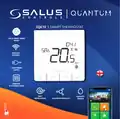
SALUS SQ610 Smart Thermostat User Guide




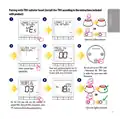
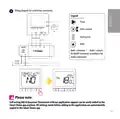



Pairing with TRV radiator head (Install the TRV according to the instructions included
with product)
5 sec
3
1
2
OR
5 sec.
Open the ZigBee network
4
5
6
10 sec
You can pair up to 6 TRV’s with
1 Thermostat. All TRV’s have
to within the same room with
Thermostat.
Now hold antenna button for 10
sec. on all TRV’s which you want
to pair with your Termostat.
Select system type:
RADIATORS
7
8
9
5 sec
3
OR
5 sec
3
Close the ZigBee network
On the LCD you will see the number of
paired TRV’s. Once all TRV’s are paired - press
button to finish the pairing process.
11

| General | Details |
|---|---|
| Name | SALUS SQ610 Smart Thermostat User Guide |
| Make | SALUS |
| Language | English |
| Filetype | PDF (Download) |
| File size | 1.12 MB |
 (1 votes, average: 5.00 out of 5)
 Loading...


SALUS IT800 WIFI Smart Thermostat Installation Guide

SALUS 091FLRF Wireless Room Thermostat User Guide

SALUS Thermostat Sensor TS600 User Guide

SALUS Thermostat and Smart Plug Installation Guide

SALUS Programmable Wired Thermostat VS30W/VS30B Installation Guide

SALUS Wired Thermostat Installation Guide

SALUS Wired Digital Thermostat – Non-programmable HTRS230 User Manual

SALUS RT520 Radiator Thermostat User Guide

SALUS RT310 Thermostat User Manual

SALUS Thermostat RT520 User Manual


EUROTRONIC COMET Programmable Energy Saving Radiator Thermostat User Manual

HomeHome App ESP01V2 Mini Relay Thermostat Installation Guide

AIRZONE Blueface Zero Thermostat User Manual

GENERAL LIFE Mitra 230S RF Wireless Room Thermostat User Manual

warmup RFT-P Programmable Radiant Floor Thermostat User Manual

namron 4512738 Touch Zigbee 16A Thermostat Instruction Manual

SASWELL T11FHL Heated Floor Thermostat User Manual

ESi ESRTP4 TOUCH Programmable Room Thermostat Instruction Manual

neptronic TMA54-EXT1 Thermostat Instruction Manual

GENERAL LIFE SENNA 300S Ignite Digital Room Thermostat User Manual