
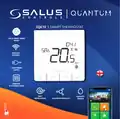
SALUS SQ610 Smart Thermostat User Guide


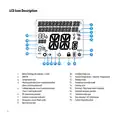
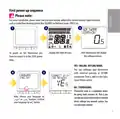

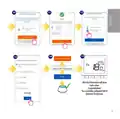

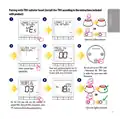
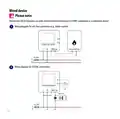
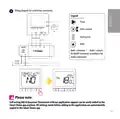



LCD Icon Description
1
2
3
4
5
19
18
17
16
6
7
15
14 13 12 11 10
8
9
1. Menu/Settings description + Clock
2. AM/PM
3. Temperature unit
4. Heating indicator (icon is animating when
there is heating demand)
10. Standby mode icon
11. Current Temperature / Setpoint Temperature
12. Holiday mode
13. Temporary override mode
14. Settings icon
5. Cooling indicator (icon is animating when
there is cooling demand)
6. RF Connection indicator
15. External / Floor temp sensor indicator
16. Schedule program number
17. Schedule mode icon
7. Internet connection indicator
8. Occupancy sensor (hotel card)
9. Key lock function
18. Day indicator/ SET information
19. Current Humidity value
4

| General | Details |
|---|---|
| Name | SALUS SQ610 Smart Thermostat User Guide |
| Make | SALUS |
| Language | English |
| Filetype | PDF (Download) |
| File size | 1.12 MB |
 (1 votes, average: 5.00 out of 5)
 Loading...


SALUS IT800 WIFI Smart Thermostat Installation Guide

SALUS 091FLRF Wireless Room Thermostat User Guide

SALUS Thermostat Sensor TS600 User Guide

SALUS Thermostat and Smart Plug Installation Guide

SALUS Programmable Wired Thermostat VS30W/VS30B Installation Guide

SALUS Wired Thermostat Installation Guide

SALUS Wired Digital Thermostat – Non-programmable HTRS230 User Manual

SALUS RT520 Radiator Thermostat User Guide

SALUS RT310 Thermostat User Manual

SALUS Thermostat RT520 User Manual


GENERAL FH260S Underfloor Heating Thermostat User Manual

JUNG RTR230 230V Room Thermostat User Manual

Danfoss RET1000 Series Electronic Thermostat User Guide

BOSCH 6721807275 Smart Radiator Thermostat Installation Guide

COMPUTHERM E800RF Multizone Wi-Fi Thermostat Instruction Manual

HIVE 852031 Mini Wireless Heating Smart Thermostat Instructions

WIFI Temp2 Battery Operated Thermostat Installation Guide

Danfoss GreenCon RC-C2/C4 Room Thermostat Installation Guide

Honeywell RCH9310 Lyric Round WiFi Thermostat User Guide

OLIMPIA SPLENDID 9899 Thermostat User Manual