
namron Touch Z Wave 16A Thermostat Instruction Manual


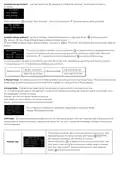




Settings Menu
How to enter settings menu:
1. Under Home Interface, meanwhile the device is at OFF mode
same time for over 5 seconds to enter Settings Menu.
, press and hold up and down buttons at the
2. Short press move up and down button to select a settings item, then short press button F to enter selected item.
3. Settings menu include, Preview menu, Z-Wave settings, Schedule, Monitor settings, Time/Date settings, Other settings.
Time Setting
Select TIME/DATE on Home Interface to enter into TIME/DATE SET interface as follow:
Short press button
to select the item you would like to modify, then short press up and
to save and quit,
down buttons to modify value of selected item, then short press button
F
short pressing button
only quits without saving.
2. Preview interface
On Home Interface, user can enter into PREVIEW
consumption, date, floor temperature etc.
interface, the interface will display some basic configurations, energy
Control Mode
Short press
will be displayed alternatively for 3 seconds and last displayed mode will be selected, or just short press F button to select
a desired mode when the modes’ icon displayed alternatively. Press and hold button on Home interface for over 3
seconds to select Away mode directly, then Press and hold button for 3 seconds to quit Away mode.
button on Home Interface to switch operation modes: the icons of Away, Auto, Manual, Drying, Off modes
1.Away Mode: the device will control the heating system according to the set temperature within the set period.
User can set time to leave home and time to go home according to the requirements of themselves, and set how the
device will control the temperature during this period.
1.1. If away mode has already been activated, the end time for away mode is valid, the device will execute Away Mode
Temperature Schedule before the end time.
1.2. If away mode has already been activated, the values of end time for away mode are set as 0, the device will always
execute current set temperature with no time limitation. The device will consider the mode as anti- freeze mode, the
recommended temperature setting is 4-10°C.
2. Auto Mode: the device will control the heating system according to the configured time schedule or Z-Wave protocol
Energy_Save_Heating Setpoint.
2.1. When configuration parameter 8 value set as 1, the device will control the temperature of energy save mode accord
ing to the temperature set by Command Class Energy_Save_Heating Setpoint or set by using the move up and down
buttons, following mentioned schedule will be invalid.
-
2.2. When configuration parameter 8 value set as 0, the temperature set by Command Class Energy_Save_Heating
Setpoint and set by using the move up and move down buttons will both be invalid, Energy Save Mode will control
temperature according to following user schedule.
For instance, if user would like to keep room temperature at 18C during 18:00-23:00 on every Monday, and keep room
temperature at 20C after 22:30 on every Monday, then user can set schedule by himself.

| General | Details |
|---|---|
| Name | namron Touch Z Wave 16A Thermostat Instruction Manual |
| Make | NAMRON |
| Language | English |
| Filetype | PDF (Download) |
| File size | 0.54 MB |
 (1 votes, average: 5.00 out of 5)
 Loading...


namron 1402746 Touch Thermostat Instruction Manual

namron 4512738 Touch Zigbee 16A Thermostat Instruction Manual

namron 4512737 Touch Zigbee 16A Thermostat Instruction Manual

namron 16A 2.0 Zigbee Touch Thermostat Instruction Manual


Honeywell CT87N The Round Non Programmable Thermostat Owner’s Manual

SITERWELL GS368 Smart Programmable Thermostat User Manual

SIEMENS RDG400 Room Thermostat Instruction Manual

Honeywell TH1100DH Non Programmable Thermostat Instruction Manual

Google Cloud 2024 Nest Learning Thermostat Instructions

Fantini Cosmi CH180-230V Touch Screen Programmable Thermostat Instructions

GENERAL LIFE NORA 270S RF Wireless Room Thermostat User Manual

BOSCH Thermostat atmosphere Smart Home 230 V Instruction Manual

GENERAL ARUNA 300S Smart Room Thermostat User Manual

BEOK CONTROLS TS4-EP Series Thermostat Instruction Manual