
namron Touch Z Wave 16A Thermostat Instruction Manual


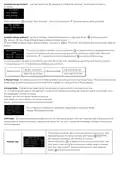




This parameter defines which sensor temperature will be displayed
on Home page.
Floor Temp: floor temperature (external sensor) .
Home Temp: indoor air temperature.
Display
Temperature Set
This parameter can also be configured through Advance Config
parameter [23].
Select
OTHER SET on Home Interface to enter into OTHER SET
interface as follow:
Short press button
to select the item you would like to modify,
Other Set
then short press move up and down buttons to modify value of
selected item, then short press button to save and quit, short
F
button only quits without saving.
pressing
The displayed temperature may has big tolerance caused by the
sensor or other factors, so it is necessary to do
temp compensation to room sensor and floor sensor.
Compensation range is -5 ~ +5°C, stepping is 0.5°C.
This parameter can a lso be configured through Advance Config
parameter [11] and [12] .
Temperature
Compensation
Device state after reset power of the device.
If set as “last status”, device will go to the status before power failure
after power on again.
Re-power
Status
If set as “default”, device will go to default mode after power on
again.
This parameter can also be configured through Advance Config
parameter [4].
To ensure the safety of the device, if the internal temperature of the
device (not displayed on the interface) is over a certain value during
heating process, the device will execute a short temporary action to
Internal Over
Heat Protection
turn off the relay, and the icon
will appear on the interface, after
the temperature decreasesto a certain value, the device will recover
to work.
Press and hold
and
buttons for over 10S,then the child lock
F
can be activated or cancelled. When child lock is activated, then icon
will appear on the display.
Child Lock
On the Home Interface, press and hold both
over 10S, during the process, the icon
and
will flash slowly, the Display
buttons for
F
Auto OFF function can be enabled or disabled, when the function is
Display Auto
Off Function
Activation
enabled, the icon
displayed.
will be displayed, otherwise the icon will not be
This parameter can also be configured through Advance Config
parameter [27] .

| General | Details |
|---|---|
| Name | namron Touch Z Wave 16A Thermostat Instruction Manual |
| Make | NAMRON |
| Language | English |
| Filetype | PDF (Download) |
| File size | 0.54 MB |
 (1 votes, average: 5.00 out of 5)
 Loading...


namron 1402746 Touch Thermostat Instruction Manual

namron 4512738 Touch Zigbee 16A Thermostat Instruction Manual

namron 4512737 Touch Zigbee 16A Thermostat Instruction Manual

namron 16A 2.0 Zigbee Touch Thermostat Instruction Manual


Aideepen STC-3028 Temperature Humidity Controller User Manual

Smart Temp SMT-850 Halo Thermostat User Guide

HYSEN HY518WE WIFI Digital Heating Thermostat User Manual

Danfoss RA 2000 Radiator Thermostat Installation Guide

ESI ESRTP6B WiFi Wireless Programmable Room Thermostat Instruction Manual

Ensto ECO16BT-IN-WW Floor Heating Thermostat User Guide

SUNRICHER SR-ZG9092A Zigbee Heating Thermostat Installation Guide

GREYSTONE TLDF Series Flexible Cable Duct Average Low Limit Thermostat Instruction Manual

Fudajo 52429 Chick Heating Plate with Thermostat Instruction Manual

GENERAL Life MITRA 250 Digital Room Thermostat User Manual