
namron Touch Z Wave 16A Thermostat Instruction Manual






Technical Data
Wireless Range
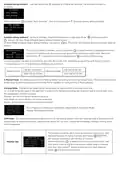
The LED indicator will stay solid on for 3 seconds if the device is removed from the network successfully. The
indicator will turn off if exclusion fails.
up to 100 m outside, on average up to 40 m inside buildings
Method 2: Factory reset the switch will force the switch to be excluded from a network. (please refer to the part
“Factory Reset” of this manual)
SDK
7.13.6.0
Yes
Explorer Frame Support
Note: Factory reset is not recommended for exclusion, please use this procedure only if the primary
controller/gateway is missing or otherwise inoperable.
Device Type
Generic Device Class
Specific Device Class
Role Type
On/Off Power Switch
GENERIC_TYPE_SWITCH_BINARY
SPECIFIC_TYPE_POWER_SWITCH_BINARY
Always On Slave (AOS)
Factory Res et
Press and hold down the action button for over 10 seconds, LED indicator flashes slowly, the switch will restart
and reset to factory defaults.
S cene C ontrol
Routing
Yes
Users can configure scenes using command class SCENE_ACTUATOR_CONF_SET, and activate the scenes
using command class SCENE_ACTIVATION_SET.
S upported C ommand C las s
Node Info
As s ociation
Z-Wave devices control other Z-Wave devices. The relationship between one device controlling another device
is called association. In order to control a different device, the controlling device needs to maintain a list of
devices that will receive controlling commands. These lists are called association groups and they are always
related to certain events (e.g. button pressed). In case the event happens all devices stored in the respective
association group will receive a common wireless command.
S ecurity C ommand S upported Report
COMMAND_CLASS_ZWAVEPLUS_INFO
COMMAND_CLASS_TRANSPORT_SERVICE
COMMAND_CLASS_SECURITY
V2 COMMAND_CLASS_MANUFACTURER_SPECIFIC
V2
V3
V2
COMMAND_CLASS_VERSION
V2
V1
COMMAND_CLASS_SWITCH_BINARY
As s ociation G roups :
COMMAND_CLASS_SECURITY_2
COMMAND_CLASS_SUPERVISION
COMMAND_CLASS_SCENE_ACTIVATION
OMMAND_CLASS_SCENE_ACTUATOR_CONF
V1
V1
V1
V1
Association
Groups
Group
Name
Max
Nodes
Description
1. When press and hold down “Reset” button for 10S to reset
the device, send "Device Reset Locally Notification" to
associated devices of this group to report factory reset
information.
COMMAND_CLASS_METER
COMMAND_CLASS_NOTIFICATION
COMMAND_CLASS_CONFIGURATION
COMMAND_CLASS_ASSOCIATION_GRP_INFO
V5
V8
V1
V1
V2
V4
V1
V1
V3
2. When over load detected, send "NOTIFICATION_REPORT"
to associated devices of this group.
Group 1
Lifeline
5
3. Report energy meter actively.
4. Send basic report automatically.
COMMAND_CLASS_ASSOCIATION
COMMAND_CLASS_FIRMWARE_UPDATE_MD
COMMAND_CLASS_POWERLEVEL
COMMAND_CLASS_DEVICE_RESET_LOCALLY
COMMAND_CLASS_INDICATOR
S et and u ns et as s ociations :
(Note: All association information will be cleared automatically once the switch is excluded from a network.)
Set association by operating primary controller/gateway to send packets to the switch:
The primary controller/gateway sends packets to the switch using “Command Class ASSOCIATION”
Notification R eport
Notification Type
Node Information F rame
The Node Information Frame is the business card of a Z-Wave device. It contains information about the device
type and the technical capabilities. The inclusion and exclusion of the device is confirmed by sending out a
Node Information Frame. Beside this it may be needed for certain network operations to send out a Node
Information Frame.
Triggerring E vent
POWER_MANAGEMENT_OVERCURRENT_
DETECTED(06)
NOTIFICATION_TYPE_POWER_MANA
GEMENT(08)
How to send out Node Information Frame:
When the switch is set to inclusion/exclusion mode again, it will send out Node Information Frame, there are 2
kinds of operation as follows:
1. Triple press the action button, the dimmer will be set to inclusion/exclusion mode, then send out Node
Information Frame.
POWER_MANAGEMENT_OVERLOADED_N
T_DETECTED(08)
NOTIFICATION_TYPE_POWER_MANA
GEMENT(08)
Over Current Alarm: When connecting to resistive load, over current protection value is 16A.
2. When the switch is under inclusion mode, there are two kinds of operation:
1) Triple press inclusion/exclusion button, the switch will be set to inclusion mode again, and send out Node
Information Frame.
2) Power off and power on the switch, it will be set to inclusion mode automatically, and send out Node
Information Frame.
Note: When over current or overload protection is enabled (value of configuration parameter 4 not configured
as 0), if the device detects that the load current is over 16A or power is over 3700W, the relay will be forced to
off, unless reset power of the device, otherwise the device will always be at alarm status, and report alarm
every 60 seconds.

| General | Details |
|---|---|
| Name | namron Touch Z Wave 16A Thermostat Instruction Manual |
| Make | NAMRON |
| Language | English |
| Filetype | PDF (Download) |
| File size | 0.54 MB |
 (1 votes, average: 5.00 out of 5)
 Loading...

namron 1402746 Touch Thermostat Instruction Manual

namron 4512738 Touch Zigbee 16A Thermostat Instruction Manual

namron 4512737 Touch Zigbee 16A Thermostat Instruction Manual

namron 16A 2.0 Zigbee Touch Thermostat Instruction Manual


bticino SX Series Smart Thermostat Installation Guide

EMERSON ST75W Sensi Touch Wi-Fi Smart Thermostat Installation Guide

Danfoss KPU 19 Thermostat Installation Guide

HIVE 81351 Thermostat Mini for Heating Installation Guide

Danfoss RET-MD Electronic Intelligent Dial Setting Thermostat Installation Guide

ENSTO ECO16BT-E Floor Heating Thermostat User Guide

PELICAN TC1 Commercial Connected Thermostat Installation Guide

MYSAir Roma Monochrome Backlit Touch Thermostat User Manual

GENERAL LIFE MITRA 250S RF Digital Room Thermostat User Manual

GREYSTONE TLDF Series Flexible Cable Duct Average Low Limit Thermostat Instruction Manual