
namron Touch Z Wave 16A Thermostat Instruction Manual


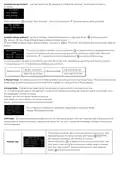




Schedule setting method 1: user can enters into
schedule on Z-Wave Set Interface, the schedule interface is
as follows:
Short press button
to select “Auto Schedule”, then short press button
Schedule weekly setting interface.
F
Schedule setting method 2: on Home Interface, meanwhile the device is under Auto Mode
, short press button
to enter into Auto Mode Schedule weekly setting interface quickly:
On Auto Mode Schedule weekly setting interface, use buttons
follows:
and
to enter into schedule setting of a certain week as
F
On Auto Day Schedule interface, short press button
would like to modify, then short press move up and down buttons to modify value, then short
press button to save and quit, short pressing button only quits without saving.
to select the time or temperature that you
F
For each schedule, the latter time should be later than the former time, otherwise saving will fail with the error remind
“Time setting error!!!”. The default time schedules are as follows:
7:30,24C-12:00,20C
18:00,16C-22:30,18C
7:30,24C-12:00,20C
18:00,18C-22:30,18C
Monday-Friday
Saturday-Sunday
3. Manual Mode: the device will control the heating system according to current set temperature. The temperature can be
set by move up and move down button on the Home interface, or configured by Z-Wave gateway.
4.Drying Mode: The device will judge the set temperature for heating within a short period of time.
I.e.: in order to dry the water in the bathroom in a short time, the device could be set to quickly heat to dry the floor. Enter
the configuration interface as follow:
Duration: set how long the dry mode should lasts
After Mode: set the mode after the drying mode ends
Remain: shows the remaining time of the drying mode
For configuration method and modification, please refer to Automatic Mode
(Energy Save Mode) Schedule:
5.Off Mode: this mode only enables the device to turn on the heating system when anti freezing mode is enabled and the
device meets all required conditions, otherwise the device will not work, meanwhile the standby interface will only show
room temperature.
The function of monitor set is real time monitor of over current, over
heat and freezing. On Home Interface, short press
SET to enter into monitor set interface a s follows:
MONITOR
Short press button
short press move up and down buttons to modify value of selected
item, then short press button to save and quit, short pressing
to select the item would like to modify, then
Monitor Set
F
button
only quits without saving.

| General | Details |
|---|---|
| Name | namron Touch Z Wave 16A Thermostat Instruction Manual |
| Make | NAMRON |
| Language | English |
| Filetype | PDF (Download) |
| File size | 0.54 MB |
 (1 votes, average: 5.00 out of 5)
 Loading...


namron 1402746 Touch Thermostat Instruction Manual

namron 4512738 Touch Zigbee 16A Thermostat Instruction Manual

namron 4512737 Touch Zigbee 16A Thermostat Instruction Manual

namron 16A 2.0 Zigbee Touch Thermostat Instruction Manual


HEAT DECOR HD-T1000 WIFI Thermostat User Guide

PURGEAR STC-2304 Digital Thermostat User Guide

Honeywell Home RCHT8610WF T5 Smart Thermostat Installation Guide

STELPRO STZW402+ Electronic Thermostat for The Smart Home Owner’s Manual

Klima C16 WiFi Floor Heating Thermostat User Guide

Honeywell T874H Multistage Thermostat Instruction Manual

Danfoss AN325057 Icon Wireless Room Thermostat Installation Guide

OUELLET OTH24 Low Voltage Non Programmable Electronic Thermostat Owner’s Manual

ENGO Controls EONE230W Internet Controlled Thermostat User Guide

GENERAL LIFE SENNA 300S RF Wireless Room Thermostat User Manual