
Home > WHITE RODGERS > WHITE-RODGERS 1F86-0471 Blue Single 1 1 Stage Thermostat Instruction Manual
WHITE-RODGERS 1F86-0471 Blue Single 1 1 Stage Thermostat Instruction Manual
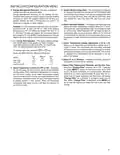
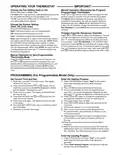
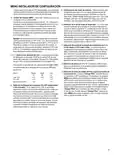
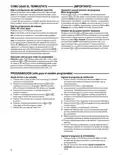
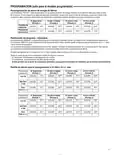
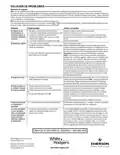


INSTALLER/CONFIGURATION MENU
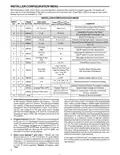
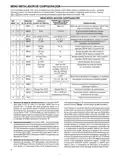
With thermostat in Heat, Cool or Auto, in normal operation, press the Menu button for at least 5 seconds. The display will
show item #1 in the table below. Press Menu to advance to the next menu item. Press
Shaded items are not available on 1F86.
or
to change an item option.
INSTALLER/CONFIGURATION MENU
MENU
REF
PRESS
DISPLAYED
Press
or
to
HP SS BUTTON (FACTORY DEFAULT)
COMMENTS
select from listed options
Reversing Valve Output (SS/HP switch
must be in the Heat Pump HP position)
1
2
3
4
5
6
1
2
3
4
MENU
MENU
On (Cool O)
P (2)
Heat b On
Selectable Programs Per Week
(For programmable thermostat only)
1
2
3
4
5
P 3, P 0
MENU Cool Saving CS (OFF)
Cool Saving CS On
6, 5, 4, 2, 1
Select Cool Savings on or off
MENU
CS (3)
Selects Cool Savings value 1 (low) to 6 (high)
Selects Energy Management Recovery (EMR)
on or off
MENU
E (On)
E OFF
FA, SL
SL
CR Heat
(ME)
Adjustable Anticipation (Heat) (only when
SS/HP switch is at the SS position)
MENU
MENU
CR Cool
(FA)
Adjustable Anticipation (Cool) (only when
SS/HP switch is at the SS position)
CR Heat Pump
(FA)
Adjustable Anticipation (Heat Pump)
(only when SS/HP switch is at the HP position)
7
8
5
6
MENU
MENU
SL
6
7
CL (OFF)
CL On
Compressor Lockout Time
Heat Cool Off,
Heat Off with Fan icon,
Heat Off without Fan
icon, Cool Off,
Auto Heat
Cool Off
System Mode Configuration
with Automatic Changeover
9
7
MENU
Auto Off
10
11
12
8
9
8
9
MENU
MENU
L (On)
0 HI
F
L OFF
Selects Display Light on or off
1 HI, 2 HI, 3HI, 4 HI,
1 LO, 2 LO, 3 LO, 4 LO
Adjustable Ambient Temperature Display
10 10 MENU
C
Selects Fahrenheit/Celsius Temperature Display
Selects Filter Change-out Indicator
MENU Change Filter (OFF)
MENU Change Filter 200 h
RUN
Change Filter On
13
14
11 11
12 12
25 h to 1975 h in
25-hour increment
When on, selects time in 25 hour increments
25-hour increment
Returns to Normal Operation
1) SelectReversingValveOutput(SS/HPswitchmustbeset
at HP, omitted if SS/HP switch is SS Position) – The O/B
option is factory set at "O" position. This will accommodate
the majority of heat pump applications, which require the
changeover relay to be energized in COOL. If the thermo-
stat you are replacing or the heat pump being installed
with this thermostat requires a "B" terminal, to energize the
changeover relay in HEAT, the O/B option should be set at
"B" position.
Cool Savings is an optional energy saving feature that can
reduce your cooling costs. It is based on the principal that
lower indoor humidity makes a slightly higher temperature
feelmorecomfortable.CoolSavingsoperatesduringperiods
ofhighdemandwhichnormallyoccuronthehottestsummer
days when the cooling system may run for hours to reach
thethermostatsetting. Longcoolingruntimesalsolowerthe
indoorhumidity.CoolSavingsveryslowlyadjuststhesetpoint
temperature to make the setpoint closer to the displayed
temperature, to a maximum number of degrees selected.
Adjusting the setpoint temperature over a long cooling run
time allows the system to reach your set temperature and
turn off. The room temperature will actually be higher than
the thermostat displays, but the reduction in humidity will
allow comfort at the slightly higher temperature. When Cool
Savings is making adjustments, "Save" will show next to the
setpoint temperature and the room temperature may vary
within the adjustment range selected.
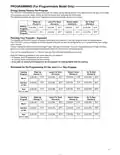
2) ProgramOptions1F80only–Thiscontrolcanbeconfigured
for 5/2 day or 5/1/1 day programming or non-programming
mode. The default setting is P2, indicating 5/2 day program-
ming. The programs per week can be toggled to P3 or P0
by pressing the
or
keys. A selection of 0 Days for
non-programmable will eliminate the need for EMR, and
that step in the menu will be skipped.
3) Select Cool Savings™ and value – Selects the Cool
Savings feature On or OFF. If selected On, press MENU
to select the amount of adjustment for the feature in Cool
mode with 1 (1°) being the least amount of adjustment and
6 (6°) being the most amount of adjustment. Default value
is 3 (3°). In normal operation "Saving" will appear under
"Fan".
If this feature is selected OFF, no change will occur when
the cooling system is continually running during periods of
high demand.
4

| General | Details |
|---|---|
| Name | WHITE-RODGERS 1F86-0471 Blue Single 1 1 Stage Thermostat Instruction Manual |
| Make | WHITE RODGERS |
| Language | English |
| Filetype | PDF (Download) |
| File size | 0.51 MB |
 (1 votes, average: 5.00 out of 5)
 Loading...

White-Rodgers 1E78 Non Programmable Heat Only Thermostat User Manual

White-Rodgers 1F97-1277 Big Blue Single Stage Thermostat User Manual

White-Rodgers 1F56N-444 Thermostat User Manual

White-Rodgers 1F83-277 Heating & Air Conditioning Auto Changeover Heat Pump Thermostat User Manual

White-Rodgers M30 Thermostat Instruction Manual

WHITE-RODGERS 1F51N-619 Low Voltage Evaporative Cooler Thermostat Instruction Manual

White Rodgers 1F78-151 Non Programmable Thermostat Instructions

WHITE RODGERS 1F80-51 Programmable Electronic Digital Thermostat Instruction Manual

WHITE-RODGERS 1F90-71 5-Day 2-Day Electronic Digital Thermostat Instruction Manual

WHITE-RODGERS 1F95-1277 Universal Thermostat Owner’s Manual


Micro-Air 359 Touchscreen Thermostat Instruction Manual

Honeywell TH1100DV PRO Series Non Programmable Thermostat Instruction Manual

King K302PE ClearTouch Programmable Thermostat Instruction Manual

Sygonix 2735095 Wireless Indoor Thermostat Instruction Manual
White Rodgers 1F78-151 Non Programmable Thermostat Instructions

HEAT DECOR HD-T1000 WIFI Thermostat User Guide

GENERAL LIFE ARUNA 304S RF Digital Room Thermostat User Manual

Generic HY610 WiFi Digital Heating Thermostat User Manual

PRO T755 Universal Thermostat Installation Guide

WarmlyYours TH115-AF-GA-08 SmartStat TH115 Series Thermostat Instruction Manual