
STELPRO STE402NP Smart Electronic Thermostat User Guide


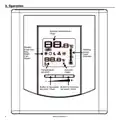






Ambient temperature
In order to manually switch
from one mode to the other,
simultaneously press down
the two buttons and release
them immediately.
+
-
The figures displayed above the
cate the ambient temperature,
Temperature can be displayed in degrees Celsius
or Fahrenheit (see “Display in degrees Celsius/
Fahrenheit”).
icon indi-
0.5 degree.
+
-
Night mode timer
The Night mode features a timer that automati-
cally returns to the Day mode after a selectable
time period. This timer allows the temporary use
of a temperature set point. The standard factory
adjustment of the timer is 8 hours. With this ad-
justment, the thermostat automatically returns to
Day mode 8 hours after being switched to the
Night mode.
Temperature set point
The figures displayed above the
icon indicate
the temperature set point. It can be displayed in
degrees Celsius or Fahrenheit (see “Display in de-
grees Celsius/Fahrenheit”).
To adjust the set point, just
+
-
press down the right button
to increase the value, or the
left button to decrease it. Set
points can be adjusted by in-
crements of 0.5°C or 1°F. To
quickly scroll through the set
point values, press and hold down the button. The
minimum set point is 3°C (37°F), and the maxi-
mum set point is 30°C (86°F).
+
-
For example, if you want a night temperature
lower than the day temperature, both Day/Night
modes set points will first have to be set at the
desired temperatures. Before bedtime, the Night
mode temperature set point will be activated by
switching manually to the Night mode. The timer
is set for the duration of the night. The thermostat
will automatically return to the Day mode at the
end of the night, and the Day mode temperature
set point, which is higher, will become effective
at this time.
In Day mode, you can turn off the thermostat by
lowering the set point below 3°C. The set point
value displayed will be --.-, and heating system
start up will be impossible.
Night mode timer adjustment procedure
Day mode and Night mode
1.If necessary, adjust the Day/Night mode set
points at the desired temperatures. If needed,
switch from one mode to the other by simul-
taneously pressing down the two buttons and
releasing them immediately.
The thermostat includes a Day mode and a Night
mode, both of them having their own indepen-
dently adjustable and recorded set point. When
switching from one mode to the other, the system
will automatically use the temperature set point
corresponding to the Day/Night mode selected.
The standard factory set point adjustment is 21°C
for the Day mode, and 18°C for the Night mode.
2.From the Night mode, simultaneously press
down the two buttons for more than 3 seconds
until the
the adjustment of the Night mode timer is effec-
tive. The figures displayed above the icon
indicate the current adjustment of the timer.
icon starts to blink, indicating that
The current Day/Night mode selection is indi-
cated on the display by the Sun or Moon icon.
5
INSSTE402NP0711

| General | Details |
|---|---|
| Name | STELPRO STE402NP Smart Electronic Thermostat User Guide |
| Make | StelPro |
| Language | English |
| Filetype | PDF (Download) |
| File size | 0.28 MB |
 (1 votes, average: 5.00 out of 5)
 Loading...


STELPRO STF362NP Floor Heating Thermostat Owner’s Manual

STELPRO ST302P Programmable Electronic Thermostat Owner’s Manual

STELPRO SAT402ZB Smart Thermostat User Guide

STELPRO ST252NPFF Non-Programmable Electronic Thermostat Owner’s Manual

STELPRO ST402PFF Programmable Electronic Thermostat Owner’s Manual

STELPRO ASMC402 Maestro Zigbee Smart Programmable Thermostat User Guide

STELPRO SIBTE12C Electronic Thermostat Owner’s Manual

STELPRO STZW402+ Electronic Thermostat for The Smart Home Owner’s Manual

STELPRO SIBTE13F Electronic Thermostat User Guide

STELPRO STCP MULTIPLE PROGRAMMING ELECTRONIC THERMOSTAT User Guide


TFC Group OP-WFSTAT Wi-Fi Programmable Thermostat User Guide

beca BAC-005 Series Thermostat User Guide

AVATTO TRV06 Wireless Smart Radiator Thermostat User Manual

ideal HEATING Halo Lite RF Combi Wi-Fi Wireless Boiler Thermostat Instructions

Tense STC-1000 Thermostat User Guide

ENGO CONTROLS EONEBATW, EONEBATB Internet Controlled Thermostat User Manual

GENERAL LIFE HT300S RF Digital Room Thermostat User Manual

expert4house BHT-2000 Series Zigbee Thermostat User Guide

emos P5684 Capillary Sensor Thermostat User Manual

WATTS BT-A03 RF Electronic Room Thermostat Installation Guide