
STELPRO STE402NP Smart Electronic Thermostat User Guide








If the Smart mode was already activated, the
same procedure should be used to deactivate
it.
buttons and wait for 5 seconds to exit the ad-
justment function.
Fan mode
4.When the adjustment is completed, release the
buttons and wait for 5 seconds to exit the ad-
justment function.
When the thermostat is used to control a heating
system equipped with a fan, the Fan mode MUST
be activated. This mode prevents the system to
continuously start and stop, which could cause
fan failure. The Fan mode is by default deacti-
vated at the factory. The status of this mode is
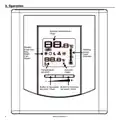
indicated on the display by the Fan icon.
NOTE: It is always possible to manually change
the Day/Night mode during a 24-hour cycle.
However, any manual return to the Night mode
will re-initialize the Night mode timer to the lat-
est value recorded, which modifies the cycle in
progress. In all cases, at the end of the 24-hour
cycle, the thermostat will return to the Night
mode and start a new cycle. It is thus not neces-
sary to readjust the Smart mode when a manual
change is made to the Day/Night mode.
Adjustment procedure for the Fan mode
1.From the Day mode, simultaneously press
down the two buttons for more than 3 seconds,
until the
icon starts to blink;
2.Press down the left button to activate or deac-
tivate the Fan mode. The Fan icon will be dis-
played or not, as applicable;
Frost-free warning
The Snowflake icon is displayed when the tem-
perature set point is between 3°C (37°F) and 5°C
(41°F). A minimum temperature will be maintained
to ensure frost control.
3.When the adjustment is completed, release the
buttons and wait for 5 seconds to exit the ad-
justment function.
Display in degrees Celsius/Fahrenheit
Security mode
The thermostat can display the ambient tempera-
ture and the set point in degrees Celsius (stan-
dard factory setting) or Fahrenheit.
It is possible to impose a maximum tempera-
ture set point by activating this mode. Then, it
becomes impossible to exceed this set point,
regardless of the current mode (Day/Night).
However, it is still possible to lower the set point
at your discretion. All the other functions remain
unchanged. To unlock the set point, you must cut
off the power supply of the thermostat for security
purposes.
Selection procedure for degree Celsius/
Fahrenheit display
1.From the Day mode, simultaneously press
down the two buttons for more than 3 seconds
until the
icon starts to blink;
2.Press down the right button to switch from the
degrees Celsius to the degrees Fahrenheit, and
conversely. The degree Celsius or Fahrenheit
symbol will be displayed;
Activating the Security mode
1.From the Day mode, adjust the set point at the
maximum desired value;
3.When the adjustment is completed, release the
2.From the Day mode, simultaneously press
7
INSSTE402NP0711

| General | Details |
|---|---|
| Name | STELPRO STE402NP Smart Electronic Thermostat User Guide |
| Make | StelPro |
| Language | English |
| Filetype | PDF (Download) |
| File size | 0.28 MB |
 (1 votes, average: 5.00 out of 5)
 Loading...


STELPRO STF362NP Floor Heating Thermostat Owner’s Manual

STELPRO ST302P Programmable Electronic Thermostat Owner’s Manual

STELPRO SAT402ZB Smart Thermostat User Guide

STELPRO ST252NPFF Non-Programmable Electronic Thermostat Owner’s Manual

STELPRO ST402PFF Programmable Electronic Thermostat Owner’s Manual

STELPRO ASMC402 Maestro Zigbee Smart Programmable Thermostat User Guide

STELPRO SIBTE12C Electronic Thermostat Owner’s Manual

STELPRO STZW402+ Electronic Thermostat for The Smart Home Owner’s Manual

STELPRO SIBTE13F Electronic Thermostat User Guide

STELPRO STCP MULTIPLE PROGRAMMING ELECTRONIC THERMOSTAT User Guide


MYSAir Roma Monochrome Backlit Touch Thermostat User Manual

MYS Air MS20,22,25 Thermostats User Manual

Honeywell FocusPRO P200 Series Programmable Thermostat Installation Guide

SALUS WQ610RF Wireless Slim Programmable Thermostat Installation Guide

BEOK CONTROLS TGT70 WIFI Fan Coil Thermostat Owner’s Manual

Beca BHT-8000 Heating Thermostat User Guide
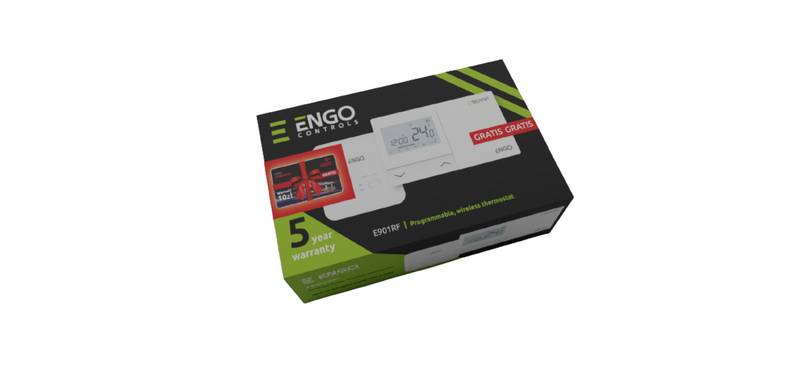
ENGO CONTROLS E901RF Wireless Programmable Thermostat User Guide

BEOK CONTROLS BOT-R6W Gas Boiler Thermostat Instruction Manual

TechPunt E1 Smart WiFi Radiator Thermostat User Guide

Honeywell RLV4300 5-2 Programmable Thermostat Owner’s Manual