
SALUS WQ610RF Wireless Slim Programmable Thermostat Installation Guide
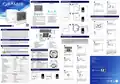


Button Functions
WQ610RF Wiring Diagram
8
7
WQ610 / WQ610RF Thermostat
WQ610RF Receiver
VOLT FREE
Receiver
WQ610 / WQ610RF
TX thermostat
If you select NO, thermostat will use
dafult settings and revert to normal
screen.
Once you have properly connected your
thermostat with the OpenTherm terminals
the OT message will be shown on the
screen. For more Opentherm details, go
to the Opentherm: Configuration section.
5
7
6
8
OPENTHERM
2
3
1
4
1. MENU - enter the menu options, press and hold
for 3 seconds to return to main screen without
saving changes.
5. ON - When in Manual Mode, ON will
turn the boiler on.
6. OFF - When in Manual Mode, OFF
will turn the boiler off.
7. AUTO - Receiver operates in automatic
mode according to the thermostat.
8. MANUAL - Receiver output is
controlled by the On/Off slide switch.
Accessing Advanced Settings Menu
TX thermostat
Receiver
Advanced Settings allow the installer / landlord to adjust the thermostat to suit individual installation
requirements. Do not adjust the settings unless you are competent to do so. The Advanced Settings may be
locked by the creation and activation of a 4 digit PIN code. Please keep your PIN safe and secure.
2. DOWN
-
through the menus.
decrease the temperature and move
3. UP - increase the temperature and move through
the menus.
2
1
4. TICK
-
confirm changes and enter menus.
Press and hold for 3 seconds to exit User Menu
and save changes. Press and hold to cancel
BOOST feature or temporary override (whilst in
normal screen).
230 V
Installer’s Quick Guide
N
L
LCD Icon Description
TX thermostat
COM
NO
Introduction
Press MENU.
Using UP or DOWN, navigate to Advanced
submenu and press TICK.
1
2
3
4
The SALUS QuantumWQ610 andWQ610RF thermostats are Boiler Plus compatible thermostats,
designed specifically to control central heating boilers and also in the case of the RF versions,
electrical panel heaters. They have our new load compensation (ITLC) software with Volt free
switch and also Opentherm 4.0 connections, so you can choose the method of control to suit
your boiler / installation. Please note that the Boilers need to have an OpenTherm Association
license to be fully compatible with WQ610 range(should you wish to connect to the OpenTherm
terminals A and B). Please verify if this requirement is met with your Boiler Manufacturer.
MAX
16 (5) A
4
3
N
L
Please ensure the boiler has 230 V switching before wiring in this way.
13
12
11
Power Up and Configuration
5
The WQ610RF thermostat contains a re-chargeable Lithium battery. When the battery level
is below 10%, the thermostat will display “PLEASE RE-CHARGE BATTERY”. Please re-charge
for a full 24 hours using a standard Micro USB charger. Thermostat operation will not be
affected during the charging period
Product Compliance
Press TICK to enter Daylight Saving Time
Menu.
Using UP or DOWN, select ON or OFF.
Press TICK to confirm.
10
9
8
7
6
This product complies with the essential requirements and other relevant provisions of the following EU
Directives:RED:2014/53/EUandRoHS2011/65/EU.FulltextoftheEUDeclarationofConformityisavailableon:
1. Menu/Settings description
2. Clock 24hr/AM/PM
3. Temperature unit
7. Holiday mode indicator
8. Temporary override mode
9. Settings icon
6
5
WQ610RF: 2405-2480MHz; <14dBm
4. Heating indicator (icon is animating
when there is heating demand)
5. RF Connection indicator
6. Current Temperature / Setpoint
Temperature
10. Battery indicator
11. Schedule program number
12. Schedule mode icon
13. Day indicator/ SET information
1
2
Safety Information
Use in accordance with national and EU regulations. Use the device as intended, keeping it in
a dry condition. Product is for indoor use only. Installation must be carried out by a qualified
person in accordance with national and EU regulations.
WQ610 Thermostat Terminals Description
Press TICK to select the type of heating
control you prefer.
ITLC helps to improve system efficiency
and end user comfort. Default is ITLC
Radiators (disabled if Opentherm
connected). Press TICK to confirm or
DOWN to see the next option.
WARNING! Always ensure the AC mains power is switched off before installing or working
on any components.
Terminal
Description
A/B
NO
OpenTherm Communication Wires only
Volt free connection (Switch)
Volt free connection (Common)
Supply (230 V AC)
To activate thermostat, press TICK button
for 3 seconds (RF version) only.
Language ”ENGLISH” is flashing, press
UP or DOWN, choose your language, then
TICK to confirm.
Technical Specification
COM
L;N
WQ610
Thermostat
WQ610RF
Thermostat
Head Office:
SALUS Controls
Units 8-10
Northfield Business Park
Forge Way
Parkgate
Rotherham
S60 1SD
Email: sales@salus-tech.com
3
4
Thermostat supply
230V AC
Lithium Battery (Rechargable)
WQ610RX Receiver Terminals Description
Thermostat rating max
OpenTherm terminals
3 (1) A
A / B
-
-
Terminal
B / A
Description
Voltage free
OpenTherm Communication Wires only
Volt free connection (Switch)
Volt free connection (Common)
Supply (230 V AC)
Outputs
-
NO / COM terminals
NO
Temperature range
5°C – 35°C
0.5°/ 0.1°C
0.5°C
5°C – 35°C
0.5°/0.1°C
0.5°C
COM
Using UP or DOWN, choose the time
format between 24 hr and 12 hr format.
Using UP or DOWN, set the hour and
then press TICK, which will then move
to minutes, that can be changed in the
same way.
Thermostat display accuracy
Thermostat display resolution
ErP control class
L; N
Class V
Class V
WQ610 Wiring Diagram
Radio Frequency
--
2.4 GHz
5
6
DO NOT connect to OpenTherm terminals unless your boiler is OpenTherm Association approved and
has the OpenTherm Logo.
Dimension [mm]
86 x 86 x 27 [mm]
86 x 86 x 11[mm]
SALUS Controls is a member of the Computime Group.
WQ610 Receiver
Maintaining a policy of continuous product development SALUS Controls plc reserve
the right to change specification, design and materials of products listed in this brochure
without prior notice.
Receiver supply
Receiver rating max
OpenTherm terminals
Outputs
230 V AC
16 (5) A
A / B
Using UP or DOWN, set the month and
then press TICK, which will then move
to days, that can be changed in the same
way.
Using UP or DOWN, set the year and then
press TICK.
Voltage free NO / COM terminals
2.4 GHz
Radio frequency
Dimension [mm]
Issue Date: Feb 2020
V007
98 x 98 x 32[mm]


| General | Details |
|---|---|
| Name | SALUS WQ610RF Wireless Slim Programmable Thermostat Installation Guide |
| Make | SALUS |
| Language | English |
| Filetype | PDF (Download) |
| File size | 1.16 MB |
 (1 votes, average: 5.00 out of 5)
 Loading...

SALUS IT800 WIFI Smart Thermostat Installation Guide

SALUS 091FLRF Wireless Room Thermostat User Guide

SALUS Thermostat Sensor TS600 User Guide

SALUS Thermostat and Smart Plug Installation Guide

SALUS Programmable Wired Thermostat VS30W/VS30B Installation Guide

SALUS Wired Thermostat Installation Guide

SALUS Wired Digital Thermostat – Non-programmable HTRS230 User Manual

SALUS RT520 Radiator Thermostat User Guide

SALUS RT310 Thermostat User Manual

SALUS Thermostat RT520 User Manual

Salus WQ610RF Slim Manual: Questions and Answers
Salus WQ610RF Slim specifications
| Power supply | 230V AC |
| Setpoint range | 5°C – 35°C |
| Radio frequency | 2.4 GHz |
How do I know the Salus WQ610RF is connected to Wi-Fi?
The RF Connection indicator icon on the display shows whether the wireless link is active. Installation Guide, p. 1
How do I charge the battery in my thermostat?
Recharge the battery fully using a standard Micro USB charger.
- Connect a standard Micro USB charger to the thermostat.
- Allow the battery to charge for a full 24 hours.
- The thermostat continues to operate normally during charging. Installation Guide, p. 1
Can the Salus WQ610RF Slim be used with any boiler, or does it require specific compatibility?
The boiler must have an OpenTherm Association license and the OpenTherm Logo to connect via the OpenTherm terminals A and B. Verify this requirement with your boiler manufacturer. Installation Guide, p. 1
Why does the Salus WQ610RF display 'PLEASE RE-CHARGE BATTERY'?
This message appears when battery level drops below 10%. Recharge immediately with a standard Micro USB charger for 24 hours. Installation Guide, p. 1
What do the LCD icons mean on the Salus WQ610RF?
| Icon | Meaning |
|---|---|
| Heating indicator (animating) | Heating demand is active |
| RF Connection indicator | Wireless link status |
| Battery indicator | Battery charge level |
| Holiday mode indicator | Holiday mode is on |
| Temporary override mode | Override is active |
| Settings icon | Settings menu access |
Salus WQ610RF Slim compared with other Salus thermostats
| Specification | Salus WQ610RF Slim | Salus DT500 | Salus RT310RF Central |
|---|---|---|---|
| Power supply | 230V AC | 2 x AA alkaline batteries | 230Vac 50Hz |
| Setpoint range | 5°C – 35°C | 5 °C – 35 °C | 5 ºC to 17 ºC |
| Radio frequency | 2.4 GHz | 868 MHz | 868MHz |
More Salus thermostat manuals

Honeywell Home PRO TH1000E1 Programmable Thermostat Installation Guide

Smart Radiator Thermostat Expansion Instruction Manual

Honeywell CT87N The Round Non Programmable Thermostat Owner’s Manual

HEAT DECOR HD305G Heating Film KIT without Thermostat Owner’s Manual

vtech Installing E-Smart W960 Thermostat User Manual

Living Heat Wi5 Wi-Fi Digital Heating Thermostat Instructions

SALUS HTRS-RF(30) Wireless Digital Room Thermostat User Manual

ENGO E55W230WIFI Wi-Fi Thermostat User Guide

Honeywell T834 Series Thermostat Owner’s Manual

LATICRETE 0804-0402-TW Programmable LCD Thermostat Instruction Manual