
Home > Vive Comfort > VIVE COMFORT TP-S-755 Cool Programmable Thermostat Instruction Manual
VIVE COMFORT TP-S-755 Cool Programmable Thermostat Instruction Manual


Installation Manual
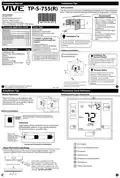
Installation Tips
Wall Locations
TP-S-755(R)
The thermostat should be installed approximately 4 to 5 feet above the
floor. Select an area with average temperature and good air circulation.
Vive Comfort
P.O. Box 3377
Springfield, MO 65808-3377
Toll Free : 888-776-1427
Do not install
thermostat in locations:
• Close to hot or cold air ducts
• That are in direct sunlight
• With an outside wall behind
the thermostat
• In areas that do not require
conditioning
• Where there are dead spots
or drafts
(in corners or behind doors)
Hours of Operation: M-F 9AM - 6PM Eastern
VM-T755-IM-2431
*VM-755-IM-2431*
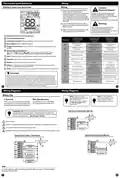
Power Type
Thermostat Application Guide
Battery Power
Description
Hardwire (Common Wire)
Hardwire (Common Wire) with
Battery Backup
Gas or Oil Heat
Yes
Yes
Yes
Yes
Electric Furnace
• Where there might be
concealed chimneys or
pipes
Heat Pump (No Aux. or Emergency Heat)
Heat Pump (With Aux. or Emergency Heat)
Multi-Stage Systems
Installation Tip
A trained, experienced
technician must install this
product.
Yes
Yes
Pick an installation location that is easy for
Heat Only Systems
the user to access. The temperature of the
location should be representative of the
building.
Cool Only Systems
Yes
Yes
Carefully read these
instructions. You could damage
this product or cause a
Millivolt
hazardous condition if you fail to
follow these instructions.
Table of Contents
Page
Subbase Installation
Installation Tips
Thermostat Quick Reference
Wiring
Wiring Diagrams
Features
2-3
4-5
6
7-9
10
Horizontal Mount
Vertical Mount
Una version en español de este
manual se puede descargar en
la pagina web de la compañia.
Installation Tip:
Electrical Hazard
Failure to disconnect the power before
beginning to install this product can
cause electrical shock or equipment
damage.
Technician Setup
Programming Thermostat
Specifications
11-19
20-23
24
Mercury Notice
All of our products are mercury free.
However, if the product you are
replacing contains mercury, dispose of
it properly. Your local waste
management authority can give you
instructions on recycling and proper
disposal.
For vertical mount put one screw on the top
and one screw on the bottom.
For horizontal mount put one screw on the
left and one screw on the right.
U.S. Registered Trademark. Patents pending
Copyright 2024 All Rights Reserved.
1
2
Rev. 2431
Installation Tips
Thermostat Quick Reference
Mount Thermostat
Getting to know your thermostat
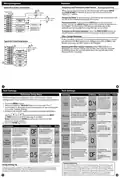
Align the 4 tabs on the subbase with
corresponding slots on the back of the
thermostat, then push gently until the
thermostat snaps in place.
Menu
Battery Installation
Battery installation is optional if thermostat is
hardwired (R and C terminal connected to 24V
power).
Menu
Important:
High quality alkaline batteries are recommended.
Rechargeable batteries or low quality batteries
do not guarantee a 1-year life span.
Insert 2 AA
Alkaline batteries
(included). High
quality alkaline
batteries are
recommended.
LCD Display
Located ont he back of the thermostat.
Glow in the dark light button
About The Private Label Badge
All of our thermostats use the same universal magnetic badge. Visit the
company website to learn more about our free private label program.
Fan Button
System Button
Temperature Setpoint Buttons
User Buttons
Gently slide a screwdriver into the
bottom edge of the badge. Gently turn
the screwdriver counter clockwise. The
Use the bevel on lower ridge
Private Label Badge
badge is held on by a magnet in the well
of the battery door. The badge should pry
off easily. DO NOT USE FORCE.
Magnet in door
4


| General | Details |
|---|---|
| Name | VIVE COMFORT TP-S-755 Cool Programmable Thermostat Instruction Manual |
| Make | Vive Comfort |
| Language | English |
| Filetype | PDF (Download) |
| File size | 0.44 MB |
 (1 votes, average: 5.00 out of 5)
 Loading...

Vive Comfort TP-S-955WH Programmable Thermostat Instruction Manual

VIVE COMFORT TP-N-721 Non Programmable Thermostat Instruction Manual

Vive TP-S-755 Manual: Questions and Answers
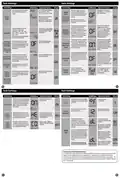
What does SS STAGING mean on the Vive TP-S-755 display?
Satisfy Setpoint Staging allows multiple heat or cool stages to stay energized until the setpoint is reached. Instruction Manual, p. 4
What's the difference between MIN COMP ON and COMP DELAY on the Vive TP-S-755?
MIN COMP ON sets how long the compressor runs once it starts. COMP DELAY prevents it from restarting for 5 minutes after it stops.
| Setting | Function |
|---|---|
| MIN COMP ON | Forces compressor to run for 3, 4, or 5 minutes minimum per cycle |
| COMP DELAY | Blocks compressor restart for 5 minutes after shutdown |
How do you set the display light on the Vive TP-S-755 to stay on all the time?
Press the buttons in Display Light settings to select HIGH. The display will stay at high intensity constantly. Instruction Manual, p. 4
More Vive thermostat manuals

Danfoss ECtemp Next Plus Electronic Intelligent Timer Thermostat Installation Guide

EcoNet UETST800SYS Smart Thermostat User Guide

SALUS RT510 Thermostat Instruction Manual

JBM 54342 Parts Cleaner Machine with Thermostat Instruction Manual

Netatmo NTH01-AMZ Energy Saving Smart and Connected Thermostat Instruction Manual

WATTS IOM-T-563 Tekmar WiFi Thermostat Installation Guide

Honeywell PRO 1000 Series Non-Programmable Thermostat Instruction Manual

Schneider Electric TC900 Series Space Logic Thermostat Instruction Manual

neptronic ITO3-C Wall Thermostat Owner’s Manual

Danfoss TPOne-M Electronic Programmable Room Thermostat User Guide