
htc HYT001 WIFI Digital Heating Thermostat User Manual


WIFI Digital Heating Thermostat User Manual
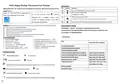
Operation key
NO
symbols represent
Many thanks for your selection of our products and services, and also for your trust and
support to us.
Turn ON/OFF:Short press to turn on/ turn off
1 Short press to reduce temp
A
B
Search for "Smart life" from google play or
2 Long press to unlock
Turn on the thermostat----press
---choose
App store to Download the Wifi App
1 Short press to increase temp
“General”---fill in “123456”---choose “No”
to “Yes” in “network connect “ item. then
you can start connect wifi.
C
2 in program mode ,short press to switch temporary manual mode
Short press to enter “information/General /Advanced /Programming” setting
D
Features
Menu function settings
(A) High resolution TFT IPS 480*480 screen
Information --General --Advanced---Programming Parameters
you should fill in password (123456) when you enter them each time.( you
can change it in advanced option
(B) 0.5°C accuracy keeps temperature within the level you set.
(C) Children lock to prevent misoperation by children
(D) Data memory when power is off.
(E) Holiday mode make you enjoy more comfortable temperature in holiday
(F) The temperature of external sensor can be checked
Product Specifications
1 Information
☆ Power: 90-240Vac 50/60Hz
☆ Range of temperature display::1~70°C
☆ Display accuracy::0.5°C
☆ Insulating condition: Normal environment
☆ Running program: Set per 1 week as a cycle
☆ Output: Switch relay
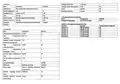
Item
Parameter (can’t change)
☆ Probe sensor::NTC(10k)1%
☆ Contact capacity::3A/(WW);16A/(WE)
☆ Limit temperature range::1~70°C
☆ Range of temperature adjustment::5~35°C
Current temperature
☆ Installation: recessed type (in the wall)
☆ Size(mm):86*86*15mm
External temperature (option)
Current humidity (option)
Description of icon
Local temperature (data from network)
Local humidity (data from new network)
Heating hours of the week
need connect to internet
need connect to internet
Open load time this week
Open load time this month
Open load total time since
thermostat is working
Programming mode
Manual mode
Heating hour this month
Temporary manual mode
Child lock
Total heating hour
Holiday mode, Holiday days and temperature can be set to run in countdown mode
Heating,,icon disappears to stop heating Clock
return to last menu
Fault alarm (the specific alarm cause can be inquired on the "Information" page)
Network Status
Alarm fault type
Activate window function


| General | Details |
|---|---|
| Name | htc HYT001 WIFI Digital Heating Thermostat User Manual |
| Make | HTC |
| Language | English |
| Filetype | PDF (Download) |
| File size | 0.2 MB |
 (1 votes, average: 5.00 out of 5)
 Loading...

HTC HYT001 Manual: Questions and Answers
How do I know if heating is active on the HTC HYT001?
A heating icon displays on screen when the unit is actively heating. The icon disappears when heating stops. User Manual, p. 1
How do I switch the HTC HYT001 to manual mode?
In program mode, press the increase temperature button briefly to switch to temporary manual mode. User Manual, p. 1

4512673 Heatit ZM Thermostat 16A User Guide

Honeywell T827 Series Programmable Thermostat Owner’s Manual

Honeywell PRO 1000 Series Non-Programmable Thermostat Instruction Manual

SALUS 091FLRF Wireless Room Thermostat User Guide

LATICRETE Strata Heat WiFi Thermostat Instruction Manual

EPH CONTROLS COMBIPACK2 Smart Thermostat with Automation and Optimum Start Instructions

Hotwire HWGL2 Dual Programming Thermostat Instructions

emos P56201UF GoSmart Digital Room Thermostat Instruction Manual

JABLOTRON TP-98TX Wireless Thermostat Instruction Manual

Honeywell Lyric T5 Wi-Fi Thermostat Installation Guide