
Tense STC-1000 Thermostat User Guide

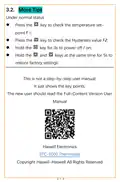


STC-1000 Thermostat
Quick Start Guide
(Version 22.11.32GEN)
STC-1000 thermostat offers two relays to wire one
refrigerator and one heater; it will auto-switch between
the heating and cooling mode; that’s why it was taken as
“All-Purpose Temperature Controller.”
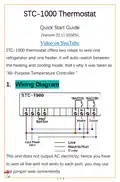
1. Wiring Diagram
This unit does not output AC electricity; hence you have
to wire all live and null wires to each port; you may use
the jumper wire conveniently.
1 / 3


| General | Details |
|---|---|
| Name | Tense STC-1000 Thermostat User Guide |
| Make | Tense |
| Language | English |
| Filetype | PDF (Download) |
| File size | 0.1 MB |
 (1 votes, average: 5.00 out of 5)
 Loading...


DIMPLEX ML2TA 2KW Convector Heater With Thermostat Instruction Manual

Infracomfort HY312W Wifi Digital Thermostat User Manual

Hydro Smart HSRADSTATWIFI HSRadStat Wi Fi Thermostat User Guide

FantiniCosmi CH123E 230V Flush Mounting Thermostat Installation Guide

AuVerte C504 Ondur Elegant Temperature Control Thermostat Installation Guide

sensi ST76 Series Touch 2 Smart Thermostat User Manual

GENERAL LIFE ARUNA 302S Digital Room Thermostat User Manual
ENGO CONTROLS E901RF Wireless Programmable Thermostat User Guide

PRO T751 Thermostat Installation Guide

Danfoss RT 9E Thermostat Installation Guide