
SALUS RT310SR Wireless Thermostat User Manual


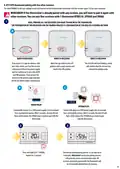


5. User settings
5.1 Manual mode - changing temperature setpoint
In manual mode, the thermostat maintains a constant temperature set by the user. To set temperature setpoint follow steps below:
1
2
Press or to set the new
temperature setpoint.
First, thermostat is displaying actual
room temperature.
3
4
Now wait 2 seconds timeout to
approve the changes.
Thermostat will display main screen
(actual room temperature).
12

| General | Details |
|---|---|
| Name | SALUS RT310SR Wireless Thermostat User Manual |
| Make | SALUS |
| Language | English |
| Filetype | PDF (Download) |
| File size | 0.6 MB |
 (1 votes, average: 5.00 out of 5)
 Loading...

SALUS IT800 WIFI Smart Thermostat Installation Guide

SALUS 091FLRF Wireless Room Thermostat User Guide

SALUS Thermostat Sensor TS600 User Guide

SALUS Thermostat and Smart Plug Installation Guide

SALUS Programmable Wired Thermostat VS30W/VS30B Installation Guide

SALUS Wired Thermostat Installation Guide

SALUS Wired Digital Thermostat – Non-programmable HTRS230 User Manual

SALUS RT520 Radiator Thermostat User Guide

SALUS RT310 Thermostat User Manual

SALUS Thermostat RT520 User Manual


Fantini Cosmi C800WIFI Programmable LED Thermostat Instruction Manual

UNDERFLOOR HEATING WORLD UM5 Thermostat Instruction Manual

75F HyperStat All In one Commercial Thermostat User Manual

19810-102 Digital Room Thermostat Libra Auraton Weekly User Manual

HIVE Thermostat Mini User Guide

International Environmental GoldringFan Coil Digital Thermostat Installation Guide

GENERAL LIFE FH252S Underfloor Heating Thermostat User Manual

SALUS RT310i Internet Thermostat Installation Guide

Danfoss TPOne-M Electronic Programmable Room Thermostat User Guide

Honeywell N100 Series Non Programmable Thermostat Installation Guide