Home > Fantini Cosmi > Fantini Cosmi C800WIFI Programmable LED Thermostat Instruction Manual

Fantini Cosmi C800WIFI Programmable LED Thermostat Instruction Manual
INSTRUCTIONS FOR USE  
C800WIFI  
PROGRAMMABLE LED THERMOSTAT WITH  
WIFI CONNECTION  
FANTINI COSMI S.p.A.  
Via dell’Osio, 6 20049 Caleppio di Settala, Milano - ITALY  
Tel. +39 02 956821 | Fax +39 02 95307006 | info@fantinicosmi.it  
GeneralDetails
NameFantini Cosmi C800WIFI Programmable LED Thermostat Instruction Manual
MakeFantini Cosmi
LanguageEnglish
FiletypePDF (Download)
File size13.75 MB
Download PDF
1 Star2 Stars3 Stars4 Stars5 Stars (1 votes, average: 5.00 out of 5)
Loading...
Fantini Cosmi CH180-230V Touch Screen Programmable Thermostat Instructions
Fantini Cosmi CH121E Flush Mounting Thermostat User Manual
Fantini cosmi C820RQ Dual Power Room Thermostat Instruction Manual
Fantini Cosmi C820RQ LED Thermostat User Manual
Fantini Cosmi CH141E Battery Operated Weekly Programming Thermostat Owner’s Manual

Fantini Cosmi C800WIFI Programmable LED Thermostat Instruction Manual
Get the free PDF manual for the Fantini Cosmi C800WIFI Programmable LED Thermostat Instruction Manual and access setup steps, usage instructions, and troubleshooting tips. 👉 View online or download now to keep your thermostat running smoothly!
Fantini Cosmi C800WIFI Programmable LED Thermostat Instruction Manual Overview
Summary of Contents

  • Page 1: Instructions for use C800WIFI Programmable LED thermostat with WiFi connection
  • Page 2: Programmable LED thermostat with WiFi connection. Thank you for purchasing a Fantini Cosmi S.p.A. product. Read this instructions manual carefully and always keep it handy for any consultation. The documentation reflects the characteristics of the product. Customers are advised to check the availability of updates to this documentation on the website. Package contents include 1 programmable thermostat (model C800WIFI), 2 screws for fixing on flush-mounted box (only on C800WIFIPRO), 1 quick guide, 1 mains power supply (optional accessory) (only on C800WIFIPRO), and AA alkaline batteries included.
  • Page 3: Programmable LED thermostat with WiFi connection Package contents Operation Editable functions/parameters Model C800WIFI Description of display keys Installation Programming guide Technical features General warranty conditions
  • Page 4: Programmable LED thermostat with WiFi connection. The C800WIFI is equipped with a temperature and relative humidity sensor for managing heating and cooling. It features a virtual graphic interface accessible via the app. The thermostat optimizes room heating and cooling using artificial intelligence algorithms. The aim is to provide comfort with minimal energy consumption. Temperature regulation can be done directly from the thermostat. Temperature can also be adjusted via the Intelliclima+ app. A table shows the functions managed by the programmable thermostat and app.
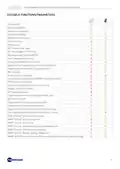
  • Page 5: Programmable LED thermostat with WiFi connection Editable functions/parameters Off mode (OFF) Manual mode (MAN) Automatic mode (AUTO) Temperature display Relative humidity display Key lock setting Operating modes (Summer/Winter) SMART function: Self-learning (AGC)
  • Page 6: Programmable LED thermostat with WiFi connection. Model C800WIFI. C800WIFIQ features a front with a square base. C800WIFIR features a front with a rectangular base. C800AL is for mains power supply. C800WIFIPRO combines C800WIFIQ with a rectangular base and C800AL.
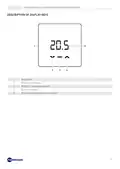
  • Page 7: Programmable LED thermostat with WiFi connection. Description of display keys. Reset switch. Down key - decreases. Mode key + heating/cooling LED. Up key - increases. Temperature and basic functions display.
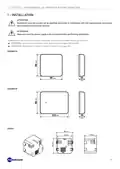
  • Page 8: Programmable LED thermostat with WiFi connection. Installation must be carried out by qualified personnel in compliance with the requirements concerning the installation of electrical devices. Make sure that the power supply is disconnected before performing installation. Depending on the version purchased, installation of the programmable thermostat differs. C800WIFIQ can be wall-mounted or flush-mounted in box types 500 and 502. C800WIFIR can be wall-mounted or flush-mounted in box type 503.
  • Page 9: Programmable LED thermostat with WiFi connection. It must be installed at a height of about 1.5 m above the floor in a suitable position to correctly detect the room temperature.
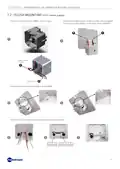
  • Page 10: Programmable LED thermostat with WiFi connection. Wall mounting instructions for battery-powered units. Break the feet behind the square or rectangular base. Connect the wires of the boiler contact to the relay. Fasten the base to the wall with two screws. Power the front with two AA batteries. Hook the front to the base. Example of connection with product disconnected. Note: The connection may vary depending on the type of installation.
  • Page 11: Programmable LED thermostat with WiFi connection. Flush mounting (230V mains supply). Connect the leads to the C800AL power supply. Connect the cables (boiler contact to relay + power supply) coming out of the C800AL to the base of the C800WIFI. Attach the 4 feet of the baseplate to the C800AL. Connect the leads to the terminal block as shown in the table.
  • Page 12: Programmable LED thermostat with WiFi connection. Attach the feet behind the base of the C800WIFI. Powering the C800AL requires 230 Vac. Square base is for box type 500 and 502. Rectangular base is for box type 503. Example of connection with product disconnected. The connection may vary depending on the type of installation. Fasten the base to the wall with the 2 screws. Hook the front to the base.
  • Page 13: Programmable LED thermostat with WiFi connection. Remove the front panel from the base. Remove the existing batteries and replace them with 2 new AA ones. 120s maximum battery change time to avoid losing programming time settings. When changing batteries perform a reset. Synchronization with the app is also recommended.
  • Page 14: Programmable LED thermostat with WiFi connection Electrical connections must be made by qualified personnel. Electrical connection operations must be done with the system’s power disconnected. Electrical connections must be made referencing the following diagrams. Mains power supply (with C800AL) Power supply 3.3 VDC (only from C800AL) Battery power supply
  • Page 15: Programmable LED thermostat with WiFi connection. If the C800WIFI is detached from the wall plate, it is insensitive to any stimulus. Once reconnected to the wall plate, the C800WIFI enters stand-by status. In stand-by status, the device shows the display always off. All the programmable thermostat LEDs are off in stand-by. To wake it up, press the MODE key for 2 seconds. When awakened, the measured room temperature is displayed. After a configurable time via App, the device returns to stand-by. Default time for returning to stand-by is 10 seconds.
  • Page 16: Programmable LED thermostat with WiFi connection. Reset the device by pressing the Reset Switch on the side with a tip. After a few seconds, the device enters stand-by. Press the MODE key for 2 seconds to wake up the device. The room temperature is displayed along with the heating/cooling status. Red LED indicates heating or cooling on. White LED indicates heating or cooling off.
  • Page 17: Programmable LED thermostat with WiFi connection. Press the MODE key to switch to the View Mode screen. Press the UP key or DOWN key to change the operating mode. Operating modes: MAN (manual), AUTO (automatic), OFF (off). After 10 seconds of inactivity, the device returns to standby.
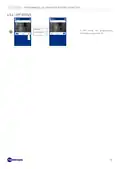
  • Page 18: Programmable LED thermostat with WiFi connection Change setpoint temperature From the View Temp screen, press the UP or DOWN key (for 3s) to switch to the View Setpoint screen. Press UP or DOWN key to change the setpoint temperature. In MAN: 2°C<Tman<40°C In AUTO: 2°C<Teco<Tcom<40°C OFF: ---,2°C<Toff<8°C After 10s during which no key is pressed, the device returns to Stand-by. Relative humidity display From the View Mode screen, press the MODE key (for 3s) to switch to the View Humidity screen.
  • Page 19: Programmable LED thermostat with WiFi connection. From the View Temp screen, press the MODE key for 3 seconds to switch to the View Communication screen. The status of the last communication is displayed. Pressing the MODE key returns you to the View Temp screen. After 10 seconds of no key press, the device returns to the stand-by state. Digit 1 indicates communication status: in progress, fail, or ok. Digit 2 shows RSSI levels from no connection to very good. Digit 3 indicates transmission status. To force a transmission, press and hold the UP or DOWN key.
  • Page 20: Programmable LED thermostat with WiFi connection. In the case of low batteries, pressing the MODE key switches to View Battery. The battery status is displayed, and pressing the MODE key returns you to the View Temp screen. Batteries OK indicates normal battery status. LO BAT means batteries are low but relay is active with no WiFi communication. OFF BAT indicates batteries are very low, and the relay is off. Press the Reset Switch on the side with a tip to check the firmware version. Pressing the MODE key displays the current firmware version.
  • Page 21: Programmable LED thermostat with WiFi connection. Press the Reset Switch on the side with a tip. Press the UP and DOWN keys simultaneously for 3 seconds. Put the device in AP to associate it with the Intelliclima+ AP. The MAC address and Serial Number of the device are indicated on the label inside the product.
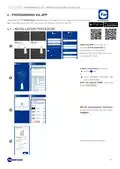
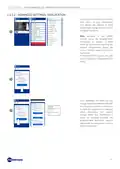
  • Page 22: Programmable LED thermostat with WiFi connection. Download the Intelliclima+ app, available free of charge from the Google Play Store and Apple App Store. Install the app and create an account on first activation by entering the username and password. Create a new home by pressing the add key and entering general settings. Enter the desired home name and confirm. Add the programmable thermostat by pressing the C800WIFI key and selecting add. Follow the guided procedure.
  • Page 23: Programmable LED thermostat with WiFi connection. The app automatically detects the network with the strongest signal. The user can switch networks. Enter the network password and press the NEXT key. Activate the access point mode on the programmable thermostat. Press the WiFi setting key to find the programmable thermostat. Select the programmable thermostat starting with FANxxxx and wait for the message “CONNECTED, INTERNET NOT AVAILABLE” to appear.
  • Page 24: Programmable LED thermostat with WiFi connection. Press the OK key when it turns green. Wait for the app to automatically search for the initial WiFi network. If more than 10 seconds pass, press the WiFi settings key to search for the network manually. When all side ticks turn green, press the NEXT key. Follow the guided procedure.
  • Page 25: Programmable LED thermostat with WiFi connection. It is possible to pair another device in the same home by swiping your finger on the display. After installing the app, force a transmission on the programmable thermostat to synchronize data with the C800WIFI. From the View Temp screen, press the MODE key for 3 seconds to switch to the View Communication screen. To force a transmission, press and hold the UP or DOWN key.
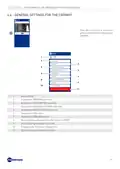
  • Page 26: Programmable LED thermostat with WiFi connection. Programming C800WIFI. Home name. Zone name. Season. Current relative humidity (RH). Current setpoint. General app settings. Home settings. General settings for programmable thermostat.
  • Page 27: Programmable LED thermostat with WiFi connection. In automatic mode, the programmable thermostat operates according to the time profiles set in programs. To preserve the programmable thermostat's battery life, the C800WIFI and the app do not communicate in real time. The variable communication interval can be changed via the app. Changes made by the app are not immediately taken over by the programmable thermostat. During this time, the programmable thermostat accepts one change at a time. In manual mode, the programmable thermostat works by following a single setpoint temperature throughout the day. Move the temperature slider to increase or decrease the setpoint temperature. Press confirm to save changes.
  • Page 28: Programmable LED thermostat with WiFi connection. In OFF mode, the programmable thermostat is switched off.
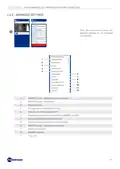
  • Page 29: Programmable LED thermostat with WiFi connection. General settings for the C800WIFI can be accessed through the icon shown. The settings list allows management of the C800WIFI. Options include accessing the program sub-menu and consumption sub-menu. Advanced settings and voice control can also be accessed. Users can change the zone name and background. The thermostat can be moved to another home or shared. Management options include deleting the programmable thermostat.
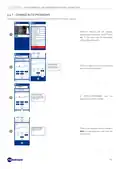
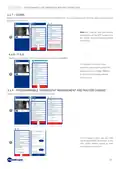
  • Page 30: Programmable LED thermostat with WiFi connection. Changing the weekly programs for AUTO mode is inherent to the chosen season. Different profiles can be created, edited, and duplicated from the app. Each day of the week can be associated with a different profile. Choice of days of the week can be associated with the profile/program. A profile/program can be duplicated and then edited. Press on the program name to change it. No two programs can have the same name.
  • Page 31: Programmable LED thermostat with WiFi connection. When you log in for the first time, the tutorial with an indication of how to edit the profile is automatically displayed. To display the tutorial again, press the help key. Follow the explanations. Edit the program and press the save key. To send profile changes to the programmable thermostat, press the send key.
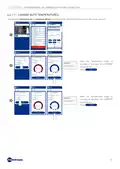
  • Page 32: Programmable LED thermostat with WiFi connection. Changing the comfort and economy temperatures for auto mode. Economy must be less than the comfort. Move the temperature slider to increase or decrease the economy temperature. Press confirm. Move the temperature slider to increase or decrease the comfort temperature. Press confirm.
  • Page 33: Programmable LED thermostat with WiFi connection. From the app, it is possible to view the consumption of the system. You can see hours of operation, battery charging, and energy savings achieved through smart functions. Display of system operating hours. Display of battery status and estimated battery life depending on the chosen communication time.
  • Page 34: Programmable LED thermostat with WiFi connection. Displays the CO2 savings obtained by activating the smart functions on the C800WIFI compared to traditional programmable thermostat operation. Saving CO2 is equivalent to planting new trees, while increasing emissions is equivalent to cutting them down. This page shows the ecological footprint achieved by using a smart system.
  • Page 35: Programmable LED thermostat with WiFi connection. Access the advanced settings list for managing the C800WIFI. SMART function - Adaptive Gain Control (AGC). SMART function - Geolocation. Changes season. Changes various temperature limits. Changes anti-freeze temperature. Changes communication time between C800WIFI and APP. Changes C800WIFI display brightness. C800WIFI key lock.
  • Page 36: Programmable LED thermostat with WiFi connection. Advanced settings: adaptive gain control. The programmable thermostat progressively learns the arrival time of the systems based on actual building conditions. This allows the C800WIFI to perform optimal start-up/shut-down control of the system. Activation of this SMART function is only possible in AUTO mode. If AGC is active, the GEOLOCATION function cannot be managed and vice versa. After 7 days, the AGC function is ready to optimize the switching on and off of the system. Press the ACTIVATE key. When the 7 days expire, an ALERT notification appears on the APP. Activate the system ANALYSIS function, which will last 7 days.
  • Page 37: Programmable LED thermostat with WiFi connection. Advanced settings: geolocation. This function calculates the distance from home of your smartphone and adjusts the setpoint to avoid unnecessary energy waste when you are away from home. Activation of this smart function forces the programmable thermostat to operate in manual mode by automatically changing the setpoint temperatures. If geolocation is active, the AGC function cannot be managed and vice versa. From general settings, you can change the action range, which indicates the maximum distance in kilometers in which the temperature is changed. When your smartphone is above the indicated threshold, the programmable thermostat setpoint reaches the economy value set in the auto configuration.
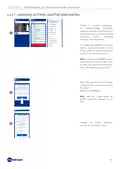
  • Page 38: Programmable LED thermostat with WiFi connection. Activates an alarm signal if the room temperature is lower than the set minimum temperature and/or higher than the set maximum temperature. Changes the season (Summer/Winter) of operation of the programmable thermostat.
  • Page 39: Programmable LED thermostat with WiFi connection. Advanced settings: temperatures allow changes to max. and min. limits of setpoint temperatures in winter and summer. Only qualified personnel should perform this modification. Move the slider to increase or decrease the limit temperatures. Advanced settings: anti-freeze temperature involves changing the anti-freeze temperature. Settable anti-freeze temperature ranges from 2° to 8°C with 0.1°C resolution. Only qualified personnel should perform this modification. Move the slider to increase or decrease the anti-freeze temperature.
  • Page 40: Programmable LED thermostat with WiFi connection C800WIFI. Changing communication between programmable thermostat C800WIFI and the AP. The shorter the set communication time, the higher the battery consumption. If the programmable thermostat is a C800WIFIPRO or powered via C800AL, we recommend setting communication to 1 minute. Changing the brightness of the C800WIFI display. From the app, you can change the brightness of the display. Decide whether to have the display always on (only recommended for the C800WIFIPRO powered by 230Vac). Move the slider to increase or decrease the brightness level of the display. Press confirm.
  • Page 41: Programmable LED thermostat with WiFi connection. From the app, you can change the control differential of the C800WIFI and the offset of the temperature read by the programmable thermostat. Both settings should be changed by trained personnel only. Differential can be set to values: Standard; 0.3°C to +5°C; resolution 0.1°C. Settable offset: -5°C to +5°C; resolution 0.1°C. Move the slider to increase or decrease the differential and/or temperature offset. Fantini Cosmi's adaptive algorithm adapts the desired setpoint temperature to the perceived temperature. The setpoint temperature will be compared to the perceived temperature for user comfort. By activating the perceived temperature function, the thermostat will display the perceived temperature instead of the room temperature.
  • Page 42: Programmable LED thermostat with WiFi connection. The app will display the perceived temperature instead of the room temperature read by the programmable thermostat. The C800WIFI will also show the perceived temperature on the display. Open window detection uses sudden temperature changes to detect whether a window is open. An alarm is sent and the programmable thermostat switches to Economy mode. It will remain in Economy mode until the window is closed or the alarm is reset.
  • Page 43: Programmable LED thermostat with WiFi connection. Activating the Key Lock function will lock the keys on the programmable thermostat. The user can decide whether or not to activate daylight savings automatically or manually. He or she can also set a time zone different from the one automatically taken by the smartphone. Example: the C800WIFI is installed in a city other than the one you normally live in, with a different time zone from the smartphone.
  • Page 44: Programmable LED thermostat with WiFi connection. Change the name of the zone where the programmable thermostat is installed. Change the background of the zone where the programmable thermostat is installed. You can take default photos or photos in your own gallery or take snapshots and insert them as wallpaper. It is possible to move the programmable thermostat from one home to another.
  • Page 45: Programmable thermostat can be shared with other users by entering their account name and pressing the ADD key. The sharing user has reduced functionality on the app compared to the owner user of the programmable thermostat. Questions and answers about the programmable thermostat C800WIFI are available online or directly from the app. If you change routers, you can connect the programmable thermostat to the new router without reinstalling it from scratch.
  • Page 46: Programmable LED thermostat with WiFi connection. Delete programmable thermostat allows the thermostat to be removed from the associated home. The operation cannot be restored with a click. You should reinstall the programmable thermostat from scratch, following all the steps. Alexa voice control allows operation via Amazon Alexa smart speakers. Available only in Italian language.
  • Page 47: Programmable LED thermostat with WiFi connection. Home settings allow you to change the name of the selected home. Home settings allow you to delete the name from the selected home. App settings include push notifications for alerts on mobile phones regarding anomalies in the operation of the Intelliclima+ system. Push notifications only work on WiFi devices and if you activate data service on your smartphone.
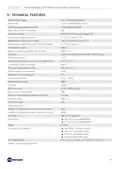
  • Page 48: Programmable LED thermostat with WiFi connection Technical features Battery power supply: 2 AA 1.5V alkaline batteries Battery life: >1 year (in standard mode) Temperature adjustment scale: 2 - 40 °C, increase 0.1°C Measurement scale/room T display: -50 to +50 °C, resolution 0.1 °C Measurement scale/room relative humidity display: 0 - 99 %, increase 1% WIFI connection: 2.4 GHz (802.11 b/g/n) Protection rating: IP32 Dimensions: 98 x 98 x 20 mm (C800WIFIQ) and 125 x 98 x 20 mm (C800WIFIR) Compliant with standards: EN 60730-1 and second parts
  • Page 49: Programmable LED thermostat with WiFi connection. The symbol of the crossed-out wheeled bin indicates that the products must be collected and disposed of separately from household waste. Batteries and integrated accumulators may be disposed of together with the product. A black bar indicates that the product was placed on the market after August 13th, 2005. Participating in the separate collection of products and batteries contributes to the correct disposal of these materials. The conventional warranty lasts 24 months, starting from the date the equipment is installed. The warranty covers all parts of the equipment, except those subject to normal wear and tear resulting from use.
  • Page 50: Page 50