
COPELAND 1F95G-1235GC Humidity Universal Thermostat Instruction Manual








INSTALLER/CONFIGURATION MENU
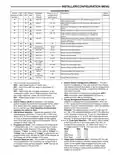
stage heat when the outdoor temperature is below the
temperature selected. This circulates warmer air than the
higher fan speed. The default is 80° (disabled), but can be
set from 20° to 79°. Select an outdoor temperature where
the air coming out of the ducts begins to feel cool and the
thermostat will lower the fan speed to circulate warmer air.
39. Humidity Display (Hd) – Selecting HD On enables the
display to alternately show the current time and the hu-
midity. If HD is selected OFF, the display will not show the
humidity. (See page 10 for Humidity setpoint range)
40. Adjustable Humidity Display – The display will show
the ambient humidity and 00 (default). The setting can
be changed from -20 and LO to 20 and HI. The displayed
humidity will change as the offset is changed. In Run
mode, the displayed humidity will be the ambient humidity
adjusted by the setting selected.
41. Auto Humidity Reduction (HR) – This feature au-
tomatically lowers humidity setting when the outside
temperature drops to prevent the interior windows/walls
from reaching the dew point where water condenses on
surfaces. This feature default is OFF. It can be changed
to select LO (low humidity reduction) or HI. To achieve
automatic humidity reduction, the thermostat lowers the
humidity when furnace cycles are long. When the outside
temperature rises, it increases humidity. "LO" indicates a
low amount of humidity reduction.
42. Automatic Humidification (AH) – This feature if enabled
allows for humidification independent of a call for heating
– useful in arid climates where addition humidification in
heating and/or cooling is desired. If enabled, will energize
the humidifier and circulator blower (“G” terminal and the
“HM” terminal) if the actual humidity is below the humid-
ity set point. The display indicates AH. Pressing the
key will cycle the display from OFF to H (feature enabled
in Heat mode) to C (feature enabled in Cool mode) to A
(feature enabled to Auto mode) and back to OFF.
43. Cycle Humidifier (CH) – This feature provides an op-
tion that reduces the water usage by up to 50% when a
flow-through humidifier is controlled by the thermostat. It
is recommended for use on flow-through humidifiers only.
The display indicates CH (Cycle Humidifier) with the de-
fort (OC) is enabled, this feature automatically reduces
indoor humidity with a call for Cooling if humidity is 2%
above humidity setpoint. Humidity is set by pressing the
Humidity key when in the appropriate mode, in this case
Cooling, and pressing the
or
keys to set desired
humidity (range 40% to 95%) level followed by pressing
Humidity key again. This dehumidification feature uses
less energy by maintaining temperature and dehumidify-
ing only when a call for Cooling is required. Optimal De-
humidification (Od) when enabled, this feature automati-
cally reduces indoor humidity with a call for Cooling if
humidity is 2% above setting. Humidity is set by pressing
the HUMIDITY key when in the appropriate mode, in
this case Cooling, and pressing the
or keys to set
desired humidity level followed by pressing Humidity key
again. This dehumidification feature may use more energy
by making dehumidification a priority initiating a call for
cooling if humidity is 2% above desired setting. This
feature may also over-cool the condition space by up to 3
degrees to achieve the desired humidity level. (Note: Both
dehumidification modes operate in Cooling mode only
with a call for cooling)
45 & 46. Change UV Lamp – This feature allows the thermo-
stat to display the words "Change UV Lamp" (Call for
Service of UV bulb) after a set time of UV bulb operation.
This is a reminder to maintain your UV system at opti-
mum level of operation. When enabled, the factory set
interval for "Change UV Lamp" to be displayed is 350
days of UV bulb operation and can be adjusted in 25 day
increments. This should be adjusted with respect to the
bulb’s recommended maintenance schedule.
When "Change UV Lamp" is displayed, you can clear it
by pressing Clean Display.
47 & 48. Change Humidifier Pad – This feature allows the
thermostat to display the words "Change Pad" after a set
time of humidifier operation. This is a reminder to main-
tain or clean your humidifier. The factory set interval for
"Change Pad" to be displayed is 100 hours of humidifier
operation. This should be adjusted with respect to the
humidifier’s recommended maintenance schedule.
When "Change Pad" is displayed, you can clear it by
pressing Clean Display.
fault indicating OFF. Pressing the
or
keys will toggle
the display from OFF to On and back to OFF. When CH is 49 & 50. Select Change Filter Run Time – This feature
enabled, the humidifier will cycle to turn off for 10 minutes
after it has run for 10 minutes. The blower and/or furnace
will continue to run during the humidifier off period.
allows thermostat to display "Change Filter" after a set
time of blower operation. This is a reminder to change
or clean your air filter. This time can be set from 25 to
1975 hours in 25 hour increments. A selection of OFF will
cancel this feature. When "Change Filter" is displayed,
you can clear it by pressing Clean Display. In a typical ap-
plication, 200 hours of run time is approximately 30 days.
44. Programmable Dehumidification Optimal Comfort
Mode (OC) or Optimal Dehumidification (Od) – This
item can be selected to OC (Optimal Comfort mode), Od
(Optimal Dehumidification), or OFF. When Optimal Com-
OPERATINGYOUR THERMOSTAT
Heating System.
Check Thermostat Operation
1. Turn on power to system.
NOTE
2. Press FAN key to ON position. The blower should begin
to operate.
To prevent static discharge problems, touch side of
thermostat to release static build-up before touching
any keys.
3. Press FAN key to AUTO position. The blower should
stop immediately.
If at any time during testing your system does not operate
properly, contact a qualified service person.
CAUTION
!
Donotallowthecompressortorununlessthecompres-
soroilheatershavebeenoperationalfor6hoursandthe
system has not been operational for at least 5 minutes.
Fan Operation
If your system does not have a G terminal connection, skip to
10

| General | Details |
|---|---|
| Name | COPELAND 1F95G-1235GC Humidity Universal Thermostat Instruction Manual |
| Make | Copeland |
| Language | English |
| Filetype | PDF (Download) |
| File size | 0.42 MB |
 (1 votes, average: 5.00 out of 5)
 Loading...

COPELAND ST55 Sensi Smart Thermostat Instruction Manual

COPELAND 1F76U-22WFB Series Sensi Lite Smart Thermostat Installation Guide

COPELAND 026-1739 Programmable Touchscreen Thermostat User Manual

COPELAND P-N 810-1600 Programmable Touchscreen Thermostat User Guide

COPELAND 1F86-0244 Blue 2 Inch Single Stage Thermostat Instruction Manual


Honeywell Home RTH Series X2S Smart Thermostat Installation Guide

Honeywell RTH8500 Wi-Fi Series Thermostat User Guide

STEGO ET 011 Electronic Thermostat User Manual

Danfoss RET2001OT Digital Open Therm Room Thermostat User Guide

Honeywell RTH2510/RTH2410 Thermostat Installation Guide

TELUS ASSORTED Smart Thermostat User Manual

heatmiser neoStat Touch-e Touchscreen Electric Floor Heating Thermostat Owner’s Manual

Honeywell Home DT92E Wireless Room Thermostat User Manual

HIVE Thermostat Mini User Guide

SALUS RT310SR Wireless Thermostat User Manual