
COPELAND 1F95G-1235GC Humidity Universal Thermostat Instruction Manual








PROGRAMMING
5:00
10:30
72°
66°
Enter the Cooling Program
1. Press the SYSTEM key until the "Cool" icon appears.
2. Follow Enter Heating Program instructions for entering
cooling times and temperatures.
Cooling Example:
1. In cool, press Auto Schedule once.
2. Press or to select a comfortable cooling tempera-
ture (example 75°).
Automatic Schedule
Auto Schedule Heat is a fast way to program all the heating
temperatures during the day to a comfortable temperature
and then lower the temperature 6° at night. Auto Schedule
Cool will program all of the cooling time periods to the same
temperature.
3. Press Auto Schedule again.Your thermostat is now
programmed for 75° for all cooling time periods.
Your cooling program for each day of the week will look like
this:
Note: Auto Schedule is available only when the thermostat
is first powered on, after the thermostat has been reset, or
anytime you turn AS on in the Configuration Menu (item 18
AS Heat or 19 AS Cool). After use in heating and cooling,
Auto Schedule on the display will change to Humidity.
6:30
8:00
75°
75°
75°
75°
5:00
10:30
Heating Example:
Programmable Fan Option
1. In Heat mode, press Auto Schedule once.
In the Set Schedule mode, the Fan key is used to select the
fan operation during a program period. The default state of
the Fan key is FAN Auto (fan runs during a call for cool but
not on a call for heat). It can be changed to FAN Prog (fan
runs during a program period). Each press of the FAN key will
change the mode of the fan between Auto and Prog.
2. Press
or
ture (example 72°).
to select a comfortable day time tempera-
3. Press Auto Schedule again.Your thermostat is now pro-
grammed for 72° from 6:30 AM until 10:30 PM at 72°. At
10:30 PM, your thermostat will set back 6° to 66°.
Your heating program for each day of the week will look like
this:
In the Run mode, when a program period that has FAN Prog
begins, the fan will turn on and stay on during the complete
period. The display will show FAN On Prog. Pressing the FAN
key will change FAN On Prog to On (fan running continuous-
ly) or Auto. To return to FAN On Prog, press Run Schedule.
6:30
8:00
72°
72°
Energy Saving Factory Pre-Program
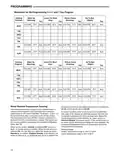
This thermostat is programmed with the energy saving settings shown in the table below for all days of the week. If this pro-
gram suits your needs, simply set the thermostat clock and press the RUN key.
The table below shows the factory set heating and cooling schedule for all days of the week.
* Wake Up
(Morning)
Leave For Work
(Day)
* Return Home
(Evening)
Go To Bed
(Night)
Heating Program
Cooling Program
6:00 AM
70°F
75°F
8:00 AM
8:00 AM
62°F
83°F
5:00 PM
5:00 PM
70°F
75°F
10:00 PM
62°F
78°F
6:00 AM
10:00 PM
* You can eliminate these two program periods in the configuration menu (reference #5) if the building is occupied all day.
Day period will change to 6:00 AM and 70° and can be programmed as required.
PlanningYour Program – Important
The Heating and Cooling Program schedules below allow you to pencil in your own program times and temperatures.
The thermostat comes configured for 7 day programming and can also be configured for 5+1+1 programming (see configura-
tion section).
Factory settings are listed on Monday, Saturday and Sunday. If you are re-programming a 5+1+1 day schedule, pencil in your
own times and temperatures directly below the factory times and temperatures.
If you are re-programming a 7 day schedule, fill in all lines with the times and temperatures you want.
Keep the following guidelines in mind when planning your program.
•InHeating,lowertemperatureswillsaveenergy.
•InCooling,highertemperatureswillsaveenergy.
•IfyouplanonusingAutoChangeover,donotprogramtheheatingtemperaturehigherthanthecoolingtemperature.
13

| General | Details |
|---|---|
| Name | COPELAND 1F95G-1235GC Humidity Universal Thermostat Instruction Manual |
| Make | Copeland |
| Language | English |
| Filetype | PDF (Download) |
| File size | 0.42 MB |
 (1 votes, average: 5.00 out of 5)
 Loading...

COPELAND ST55 Sensi Smart Thermostat Instruction Manual

COPELAND 1F76U-22WFB Series Sensi Lite Smart Thermostat Installation Guide

COPELAND 026-1739 Programmable Touchscreen Thermostat User Manual

COPELAND P-N 810-1600 Programmable Touchscreen Thermostat User Guide

COPELAND 1F86-0244 Blue 2 Inch Single Stage Thermostat Instruction Manual


SunTouch SunStat CommandPlus Programmable Thermostat Instruction Manual

beok BOT-323W Room Thermostat Instruction Manual

Danfoss 013R9355 Radiator Thermostat Instructions

GENERAL LIFE ARUNA HT300S Smart Room Thermostat User Manual

EPH CONTROLS RFR RF Room Thermostat Instruction Manual

White-Rodgers M30 Thermostat Instruction Manual

GENERAL LIFE HT500 SET Smart Room Thermostat User Manual

JBM 54342 Parts Cleaner Machine with Thermostat Instruction Manual

homematic IP HmIP-eTRV-E Series Radiator Thermostat Evo Installation Guide

sensi 1F87U-42WF Smart Thermostat Installation Guide