
COPELAND 1F95G-1235GC Humidity Universal Thermostat Instruction Manual




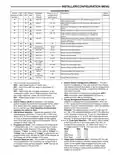




INSTALLER/CONFIGURATION MENU
CONFIGURATION MENU
Comments
Screen
SS1 HP1 Press
Displayed
Factory
(Default)
Option
Selected
Press
or
Reference MS2 HP2
Number
key
to select from
listed options
On
33
34
35
(OFF) dF
(35) dF
(05) dF
Selects Dual Fuel feature On or OFF (this item appears if HP1 or
HP2 is selected above).
-20 - 50
0 - 09
Selects Dual Fuel setpoint (°F), dF selected On with outdoor sen-
sor available.
Selects Dual Fuel setpoint (°F), dF selected On with no outdoor
sensor.
36
37
(60) Cd
(80) AO
0-99
Selects compressor off delay in seconds, dF selected On
-20 - 79
Selects Auxiliary Heat cut out temperature. This item appears
if HP1 or HP2 is selected and outdoor sensor is installed and
enabled.
38
(80) bP
79-20
Selects Blower balance point. Selection of 80 disables this feature.
This item appears if HP1 or HP2 is selected and outdoor sensor is
installed and enabled.
39
40
(OFF) Hd
On
Selects Humidity Display alternate with time.
Humidity 00
(Room Humidity)
-20 LO
20 HI
Selects Humidity Display adjustment.
41
42
43
44
45
(OFF) HR
(OFF) AH
(OFF) CH
OC (0)
LO, HI
H, C, A
On
Selects Auto Humidity reduction.
Selects Automatic Humidification.
Selects Cycle Humidifier.
od, OFF
On
Selects Optimum Comfort or Optimum Dehumidification or Off.
Selects Change UV Lamp feature.
(OFF) Change
UV Lamp
46
47
350 Days
25-1975
On
Change UV Lamp duration days.
(OFF)
Change Pad
Selects Change Humidifier Pad feature.
48
49
100 Hrs
25-1975
On
Change Humidifier Pad duration hours.
Selects Change Filter feature.
OFF
Change Filter
50
200 Hrs
25-1975
Change Filter duration hours.
6. System Switch Configuration (MS2/SS1) – This ther-
mostat is configured for Heat and Cool with Auto change-
over default (Cool-Off-Heat-Auto). It can be configured as
Heat & Cool (Cool-Off-Heat), or Heat Only (Off-Heat), or
Cool Only (Cool-Off).
1. This control can be configured for:
MS2 – Multi-Stage System (2 heat/2 cool)
HP1 – Heat Pump with one stage of compressor (2
heat/1 cool)
HP2 – Heat Pump with two stage compressor or two
compressor system, Gas or Electric backup; (Dual Fuel
see screen reference number 33) (4 heat/2 cool)
SS1 – Single Stage System (3 wire zone see wiring
diagrams.
When the control is in heat pump configuration (HP1/
HP2), the system switch configuration will have an
additional mode, Em for Emergency.
7. Energy Management Recovery (EMR) – (this step is
skipped if configured as non-programmable). When set
to "On" causes the thermostat to start heating or cooling
early to make the building temperature reach the program
setpoint at the time you specify.
Example: The heating program is 65°F at night and 70°
at 7 AM. If the building temperature is 65°F, the difference
is 5°F. Allowing 5 minutes per °F rise, the thermostat set-
point will change to 70° at 6:35 AM. Cooling allows more
time per °F, because it takes longer to reach temperature.
8, 9 & 10. Cycle Rate Selection – The factory default setting
is fast cycle (FA Cr) in all modes (Heat, Cool, Em). To
2. GAS or Electric (ELE) fan operation. If the heating
system requires the thermostat to energize the fan, select
ELE. Select GAS if the heating system energizes the
fan on a call for heat. Note: Resetting the thermostat
switches the option to GAS.
3. O/B Terminal selection – Selects the operation of the
reversing valve (when item 1 is set to HP1 or HP2 only).
When set to "O" the changeover valve will be energized
in COOL to accommodate the majority of heat applica-
tions. If the heat pump requires the changeover valve to
energize in HEAT, select "B".
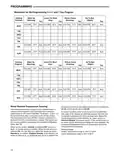
change to slow cycling (SL, Cr), press touch keys
toggle between FA & SL. The cycle rates are below:
or
4. Programs per week – This control can be configured for
7 independent day or 5/1/1 day programming or nonpro-
grammable modes. Default is 7-day mode. The display
indicates "7 Days" as default. Other options "5 Days" or
"0 Days" can be selected. If "0 Days" is selected for non-
programmable mode, the step for EMR will be skipped, as
this feature will not be available in this mode.
Mode
Heat
Med
Slow
1.5°F
1.7°F
1.7°F
1.7°F
0.6°F
1.2°F
1.2°F
0.6°F
Cool
Heat Pump
Emer Heat
11. Stage Cycle Completion (SC) – Selecting (SC On) will
cause the thermostat to complete heating and/or cooling
cycles on the highest stage engaged during the cycle.
Thermostat will not reduce heating or cooling stages
before the heating or cooling cycle is satisfied and all
stages are turned off.
5. Program Steps per day – Not available if configured for
non-programmable. This control can be configured for 4
or 2 program steps per day. Default is "4 PS" and can be
toggled between 4 PS and 2 PS.
7

| General | Details |
|---|---|
| Name | COPELAND 1F95G-1235GC Humidity Universal Thermostat Instruction Manual |
| Make | Copeland |
| Language | English |
| Filetype | PDF (Download) |
| File size | 0.42 MB |
 (1 votes, average: 5.00 out of 5)
 Loading...

COPELAND ST55 Sensi Smart Thermostat Instruction Manual

COPELAND 1F76U-22WFB Series Sensi Lite Smart Thermostat Installation Guide

COPELAND 026-1739 Programmable Touchscreen Thermostat User Manual

COPELAND P-N 810-1600 Programmable Touchscreen Thermostat User Guide

COPELAND 1F86-0244 Blue 2 Inch Single Stage Thermostat Instruction Manual


LuxPro T10-1141 Heat Thermostat Instruction Manual

hysencontrol HY01RF Wireless Thermostat User Manual

GENERAL FH101S Underfloor Heating Thermostat User Manual

STELPRO STCP Floor Heating Thermostat Multiple Programming User Guide

EPH CONTROLS RDTP-24 24V Recessed Room Thermostat Instruction Manual

EBERLE UTE Series Flush Mounted Room Thermostat Owner’s Manual
STELPRO STE241 Low Voltage 24V Electronic Thermostat User Guide

Honeywell T4098A Deluxe Electric Heat Thermostat Instruction Manual

SALUS Wired Digital Thermostat – Non-programmable HTRS230 User Manual

WarmlyYours TH115-AF-GA-08 SmartStat TH115 Series Thermostat Instruction Manual