
Home > WHITE RODGERS > WHITE-RODGERS 1F86-444 Non Programmable Electronic Digital Thermostat Instruction Manual
WHITE-RODGERS 1F86-444 Non Programmable Electronic Digital Thermostat Instruction Manual


OPERATION
Before you begin using your thermostat, you should be familiar
with its features and with the display and the location and
operation of the thermostat buttons. Your thermostat consists of
two parts: the thermostat cover and the base. To remove the
cover, gently pull it straight out from the base. To replace the
cover, line up the cover with the base and press gently until the
cover snaps onto the base.
1
2
WHITE-RODGERS
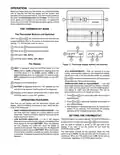
THE THERMOSTAT BASE
FAN ON
AUTO
COOL OFF HEAT
The Thermostat Buttons and Switches
Other than
and
, the following buttons and switches are
located behind the door on the bottom of the thermostat cover
(see fig. 11). Pull the door down to open it.
3
4
(Red arrow)
(Blue arrow)
Raises temperature setting.
Lowers temperature setting.
1
2
3
4
5
HEAT
6
COOL
FAN switch (ON, AUTO).
BATTERY
SYSTEM switch (COOL, OFF, HEAT).
7
8
6
5
The Display
Figure 11. Thermostat display, buttons, and switches
HEAT is displayed when the SYSTEM switch is in the
5
HEATposition. COOL isdisplayed(non-flashing)whenthe
SYSTEM switch is in the COOL position. COOL is dis-
played (flashing) when the compressor is in lockout mode.
OFF is displayed when the SYSTEM switch is in the OFF
position.
• °F/°C CONVERTIBILITY— After ten seconds of no key
activity, when the thermostat is in the temperature display
adjustment mode, or 30 seconds after power up, pressing
and
atthesametimewillswitchtheLCDtemperature
display between Fahrenheit and Celsius.
Displays current temperature.
6
7
• TEMPERATURE DISPLAY ADJUSTMENT — Your new
thermostathasbeenaccuratelysetinourfactory.However,
if you wish, you may adjust your new thermostat tempera-
ture display to match your old thermostat. This can be
accomplished (within a ±4° range) as follows:
BATTERY is displayed when the 3 “AA” batteries are low
and should be replaced. Nothing else will be displayed.
Displays current setpoint temperature (this is blank when
SYSTEM switch is in the OFF position).
8
1. Press
applying power.
2. Press or
and
at the same time within 30 seconds of
OPERATING FEATURES
to adjust the displayed temperature to
Now that you are familiar with the thermostat buttons and
display, read the following information to learn about the fea-
tures of the thermostat.
your desired setting.
3. After setting your desired temperature, do not press any
buttons for ten seconds. The thermostat will continue
operating at the changed temperature setting.
• SIMULTANEOUSHEATING/COOLINGSTORAGE—You
can enter both your heating and cooling setpoints at the
same time. There is no need to reset the thermostat at the
beginning of each season.
SETTING THE THERMOSTAT
This thermostat is very easy to operate. Set the SYSTEM button
• LOW BATTERY INDICATOR — If the 3 “AA” alkaline
batteries are low and should be replaced, the display will be
blank except for the word BATTERY. When the batteries
are low, pressing any button will cause the display to
operate for ten seconds. After ten seconds, the display will
be blank except for the word BATTERY. When the duration
of a low battery condition exceeds four weeks, the setpoint
is altered by 10 degrees to signal that the batteries must be
replaced.
to either HEAT or COOL, then press
or
until the tempera-
ture you want to maintain is shown on the right side of the
display. If you want to turn the system off, just move the
SYSTEM switch to OFF.
The FAN switch controls the fan operation. When the FAN
switch is set to AUTO, the fan will cycle with the furnace or air
conditioner. When the FAN switch is set to ON, the fan will run
continuously, regardless of SYSTEM switch position.

| General | Details |
|---|---|
| Name | WHITE-RODGERS 1F86-444 Non Programmable Electronic Digital Thermostat Instruction Manual |
| Make | WHITE RODGERS |
| Language | English |
| Filetype | PDF (Download) |
| File size | 0.11 MB |
 (1 votes, average: 5.00 out of 5)
 Loading...

White-Rodgers 1F97-1277 Big Blue Single Stage Thermostat User Manual

White-Rodgers 1F56N-444 Thermostat User Manual

White-Rodgers 1F83-277 Heating & Air Conditioning Auto Changeover Heat Pump Thermostat User Manual

White-Rodgers 1E78 Non Programmable Heat Only Thermostat User Manual

White-Rodgers M30 Thermostat Instruction Manual

WHITE-RODGERS 1F51N-619 Low Voltage Evaporative Cooler Thermostat Instruction Manual

White Rodgers 1F78-151 Non Programmable Thermostat Instructions

WHITE RODGERS 1F80-51 Programmable Electronic Digital Thermostat Instruction Manual

WHITE-RODGERS 1F86-0471 Blue Single 1 1 Stage Thermostat Instruction Manual

WHITE-RODGERS 1F90-71 5-Day 2-Day Electronic Digital Thermostat Instruction Manual


iO HVAC Controls UT32 Titan 3H or 2C Touchscreen Thermostat Owner’s Manual

HIVE HAH2INSTAMZ-01 Active Heating Thermostat User Guide

PRO T755 Universal Thermostat Installation Guide

KING ELECTRIC HW120 – Hydronic Electronic Line Voltage Non-Programmable Thermostat User Manual

ENGO CONTROLS EFAN-24W, EFAN-24B Fan Coil Thermostat User Guide

bandary FC660 Smart Thermostat User Guide

Honeywell CT3500 Programmable Thermostat User Guide

HEARTH AND HOME Technologies E474962 Smart Stat Hht Remote Thermostat Instruction Manual

REPTIZOO TC04 Timing Thermostat Instruction Manual

TechPunt E1 Smart WiFi Radiator Thermostat User Guide