
VENSTAR Fan Coil Thermostat T2100 / T2150 User Guide






Step 9 - Set Up Wi-Fi Connection
Overview
At minimum, the first 3 tasks below must be completed to access your
thermostat remotely from a browser. The 4th step is optional (highly
recommended) and only is needed to access your thermostat(s) from
a mobile device.
These steps are:
1. Successful connection to a local Wi-Fi Access Point with internet
access.
2. Confirm receipt of a Skyport generated verification email (this only
occurs once during the Skyport account setup).
3. A 6-digit code obtained from the thermostat is successfully
entered into a Skyport account.
4. Successfully download and install the Venstar Skyport app on your
mobile device(s).
Your thermostat operates on the 2.4 Ghz, Wi-Fi b/g/n band.
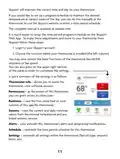
TABLE OF BUTTON PRESSES TO ENTER MENUS
TO ENTER MENUS
BUTTON PRESS
Setup Steps............................MODE & FAN for 5 seconds
Time Schedule......................MODE & Up for 2 seconds
Emergency Heat...................Up & FAN for 2 seconds
Lockout Buttons..................MODE, Up & Down for 2 seconds
Calibration ..............................MODE & Down for 2 seconds, then MODE
Wireless Setup......................FAN for 5 Seconds
7

| General | Details |
|---|---|
| Name | VENSTAR Fan Coil Thermostat T2100 / T2150 User Guide |
| Make | VENSTAR |
| Language | English |
| Filetype | PDF (Download) |
| File size | 0.34 MB |
 (1 votes, average: 5.00 out of 5)
 Loading...


Hotwire HWGL2 Dual Programming Thermostat Instructions

Wiser CCTFR6400 Room Thermostat User Manual

SASWELL SAS908XWHB-7 Thermostat User Manual

HELTUN Fan Coil Thermostat HE-FT01 User Manual

SITERWELL GS368 Smart Programmable Thermostat User Manual

HYSEN HY511 WiFi Heating Thermostat Owner’s Manual

BUDDERFLY BTS-U2 Thermostat User Manual

olympia electronics BS-850-KIT Wireless Programmable WiFi Electronic Chrono Thermostat User Manual

Danfoss RET2001OT Digital Open Therm Room Thermostat User Guide

BEOK TDS21WIFI-AC Fan Coil Thermostat Instruction Manual