
VENSTAR Fan Coil Thermostat T2100 / T2150 User Guide






Quick Start - Connect to Skyport
Although there is more than one way to create a Skyport account, the
steps below illustrate account creation from a browser. To create a
Skyport account a thermostat must be joined to the account.
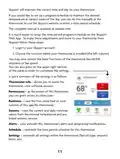
If the thermostat is connected to the local Wi-Fi Access Point, but you
do not have a Skyport account, you may create an account and join
the thermostat to the account by doing the following:
2. Select “Create account now”
Create Account Now
3. Follow on screen instructions to create an account and add a
thermostat to the Skyport account.
If the thermostat is connected to the local Wi-Fi access point but
not yet joined to an existing Skyport account, you may join the
thermostat to the account by doing the following:
1. Log in to your Skyport account.
2. Select the “Location” you want to add a thermostat into.
3. Select the “Thermostat tab”.
4. Select “+ Add Thermostat”. A screen will ‘pop-up’ asking for a six
digit code.
5. Press and hold the fan button on the thermostat for 5 seconds.
6. Press the Up button on the thermostat.
7. A six digit code will appear on the thermostat’s display.
8. Enter the six digit code into your Skyport account.
10

| General | Details |
|---|---|
| Name | VENSTAR Fan Coil Thermostat T2100 / T2150 User Guide |
| Make | VENSTAR |
| Language | English |
| Filetype | PDF (Download) |
| File size | 0.34 MB |
 (1 votes, average: 5.00 out of 5)
 Loading...


SASWELL SAS919WHB-0 Thermostat User Manual

Carrier 53DFS250-SL Programmable Digital Thermostat Owner’s Manual

vtech T961 Wired Thermostat Owner’s Manual

SIEMENS RDZ100ZB Zigbee Room Thermostat Owner’s Manual

sensi Lite Zigbee Smart Thermostat Installation Guide

GLOBAL WiFi Heating Thermostat User Manual

Honeywell VisionPRO TH8000 Series Touchscreen Programmable Thermostat Instruction Manual

uponor D Plus RH T-247 BUS Smatrix Base Thermostat Instruction Manual

hansgrohe Ecostat 1001 SL Shower Thermostat Instruction Manual

Danfoss TP5001B-TP5001RF Programmable Room Thermostat User Guide