
VENSTAR Fan Coil Thermostat T2100 / T2150 User Guide


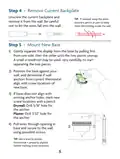


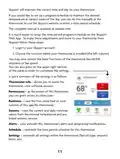


Step 3 - Label & Disconnect Wires
TIP: Before
1) One by one, apply
a label designated
to each wire you
disconnect from
your current
disconnecting
any wires, take
a photo of your
current wire
configuration
with your
thermostat.
mobile device.
Wire from the
old thermostat
terminal marked
Install on the
new thermostat
connector marked
Function
Wire
Color
G1, GL
G2, GM
G3, GH
Y, Y1
Low Fan Speed
Middle Fan Speed
High Fan Speed
G
G2
G3
Y1
chilled water valve
(4 pipe) or hot/chilled
water valve (2 pipe)
W, W1
hot water valve (4 pipe)
or strip heat (2 pipe)
W1
H/C, WATER
2 pipe water temp sensor
(open = hot,
closed = chilled)
H20
SWITCH
Dry contact for
condensate overflow,
occupancy sensor,
door switch
CK1
RS
REMOTE
wired remote
10K thermistor
R, Rh, M, Vr, A
C
power (24v)
common
R
C
4

| General | Details |
|---|---|
| Name | VENSTAR Fan Coil Thermostat T2100 / T2150 User Guide |
| Make | VENSTAR |
| Language | English |
| Filetype | PDF (Download) |
| File size | 0.34 MB |
 (1 votes, average: 5.00 out of 5)
 Loading...


MRCOOL 16117100003415 Versa Pro Wired Thermostat Owner’s Manual

Danfoss RAS-C2 Combi Radiator Thermostat Installation Guide

GENERAL LIFE HT300S Digital Room Thermostat User Manual

Robertshaw RS9220 Programmable Thermostat Installation Guide

nVent RAYCHEM AT-TS-13 Surface Sensing Thermostat Instruction Manual

GENERAL LIFE 300S RF Wireless Room Thermostat User Manual

BEOK CONTROLS BOT-R6W Boiler Thermostat User Guide

White Rodgers 1E78 5 2 Day Programmable Thermostat Instruction Manual

Milesight WT201 Airteq Smart Thermostat User Guide

SASWELL SAS908XWHB-7 Thermostat User Manual