
SALUS Thermostat RT520 User Manual










5. Factory Reset
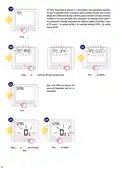
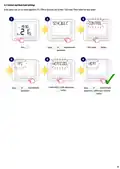
To RESET RT520 thermostat to it’s factory default settings please follow steps below:
1
2
3
To reset the thermostat press and
hold together
buttons for 5 seconds.
Thermostat has been reseted.
PLEASE NOTE: User settings will not
+
+
be deleted.
6. Error codes
Thermostat will display errors only when it’s connected to the boiler by OPENTHERM terminals (A / B). Please refer then to boiler manual. Each
boiler can have different error codes.
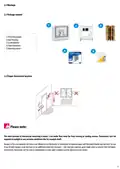
7. Battery change
Turn the thermostat over so that the back is in front of you. Now look at the picture below:
INSERT THE BATTERIES, PAYING ATTENTION TO THEIR POLARITY!
25

| General | Details |
|---|---|
| Name | SALUS Thermostat RT520 User Manual |
| Make | SALUS |
| Language | English |
| Filetype | PDF (Download) |
| File size | 1.76 MB |
 (1 votes, average: 5.00 out of 5)
 Loading...


SALUS IT800 WIFI Smart Thermostat Installation Guide

SALUS 091FLRF Wireless Room Thermostat User Guide

SALUS Thermostat Sensor TS600 User Guide

SALUS Thermostat and Smart Plug Installation Guide

SALUS Programmable Wired Thermostat VS30W/VS30B Installation Guide

SALUS Wired Thermostat Installation Guide

SALUS Wired Digital Thermostat – Non-programmable HTRS230 User Manual

SALUS RT520 Radiator Thermostat User Guide

SALUS RT310 Thermostat User Manual

SALUS iT500 Internet Thermostat Installation Guide


DAIKIN S21 One Lite Smart Thermostat User Guide

Danfoss RMT-24 Room Thermostat Installation Guide

STELPRO SIBTE13F Electronic Thermostat User Guide

BOSCH RT_II_230V Room Thermostat Instructions

DEVIreg 330 Electronic Thermostat Installation Guide

Danfoss RT 8L Thermostat Installation Guide

HBX THM-0100 Programmable Thermostat Instruction Manual

EPH CONTROLS CRTP2 Room Thermostat Instruction Manual

PRO1 T755 Heat 2 Cool Dual Fuel Thermostat User Manual

Danfoss CAS 178 Thermostat Installation Guide