
SALUS Thermostat RT520 User Manual






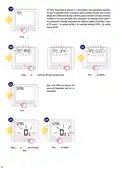


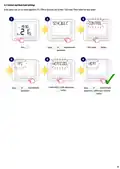


4.8 Holiday mode
Holiday mode is a special program temperature setpoint which thermostat will maintain for specified days. How to set HOLIDAY MODE:
1
2
3
Press
.
Press
to enter
Using
or
move between
holiday mode settings.
parameters.
4
5
6
Using
or
, set the year
.
Using
or
, set the month
Using
or
, set the day
and then press
and then press
.
and then press
.
7
8
9
Now do the same steps
to set holiday mode’s final day.
Using
or
, set the hour
.
Using
or
, set the
and then press
minutes and then press
.
10
11
12
To abort holiday mode just
press any button and then
confirm HOLIDAY STOP by
button. Plane icon will
disappear and thermostat will
go back to previous work mode.
3
According to set period of time the
Using
or
, set the
plane icon will appear on the main
screen and thermostat is working in
holiday mode.
temperature which should be
maintaned during holiday mode and
then press
.
23

| General | Details |
|---|---|
| Name | SALUS Thermostat RT520 User Manual |
| Make | SALUS |
| Language | English |
| Filetype | PDF (Download) |
| File size | 1.76 MB |
 (1 votes, average: 5.00 out of 5)
 Loading...


SALUS IT800 WIFI Smart Thermostat Installation Guide

SALUS 091FLRF Wireless Room Thermostat User Guide

SALUS Thermostat Sensor TS600 User Guide

SALUS Thermostat and Smart Plug Installation Guide

SALUS Programmable Wired Thermostat VS30W/VS30B Installation Guide

SALUS Wired Thermostat Installation Guide

SALUS Wired Digital Thermostat – Non-programmable HTRS230 User Manual

SALUS RT520 Radiator Thermostat User Guide

SALUS RT310 Thermostat User Manual

SALUS BTR230 Room Thermostat User Guide


sinope Smart Floor Heating Thermostat TH1310WF Installation Guide

BOSCH RT_II_230V Room Thermostat Instructions

Honeywell FocusPRO 5000 Series Digital Thermostat User Guide

Honeywell YT43MRFBT32 Room Thermostat Instructions

emos P5686 Immersion Thermostat Instructions

sensi ST76 Series Touch 2 Smart Thermostat User Manual

75F HyperStat All In one Commercial Thermostat User Manual

SALUS RT310RF Digital Wireless Central Heating Room Thermostat User Manual

eurotronic Comet Zigbee Energy Saving Radiator Thermostat Instruction Manual

Robertshaw RS9220 Digital Programmable Wall Thermostat Instruction Manual