
SALUS Thermostat RT520 User Manual










4. User settings
4.1 Manual mode
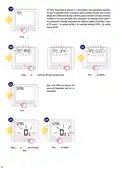
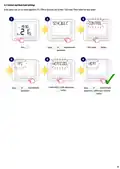
In manual mode, the thermostat maintains a constant temperature set by the user. To exit mode, press and hold
is displayed when manual mode is active.
button for 3 seconds. A hand icon
1
2
3
A hand icon will appear, which means
that thermostat is in manual mode.
To set temperature use
or button.
Press
button.
4
5
3
Confirm your choice using
button.
Thermostat will maintain the
temperature until manual change or
manual mode exit (press and hold
button for 3 seconds).
15

| General | Details |
|---|---|
| Name | SALUS Thermostat RT520 User Manual |
| Make | SALUS |
| Language | English |
| Filetype | PDF (Download) |
| File size | 1.76 MB |
 (1 votes, average: 5.00 out of 5)
 Loading...


SALUS IT800 WIFI Smart Thermostat Installation Guide

SALUS 091FLRF Wireless Room Thermostat User Guide

SALUS Thermostat Sensor TS600 User Guide

SALUS Thermostat and Smart Plug Installation Guide

SALUS Programmable Wired Thermostat VS30W/VS30B Installation Guide

SALUS Wired Thermostat Installation Guide

SALUS Wired Digital Thermostat – Non-programmable HTRS230 User Manual

SALUS RT520 Radiator Thermostat User Guide

SALUS RT310 Thermostat User Manual

SALUS BTR230 Room Thermostat User Guide


micro-Air EasyTouch 352 Thermostat User Manual

Honeywell RTH9580 Wi-Fi Color Touchscreen Programmable Thermostat User Guide

STELPRO STZW402+ Electronic Thermostat for The Smart Home Owner’s Manual

GENERAL LIFE HT330S Digital Room Thermostat User Manual

Honeywell TH5220D1003 Heater Thermostat Owner’s Manual

HYSEN HY312 Wi-Fi Digital Heating Thermostat Instruction Manual

Robertshaw RTC500 WIFI Thermostat Instruction Manual

BEOK CONTROLS TDS72 Digital Screen Thermostat Instruction Manual

Honeywell VisionPRO Series 7 Day Programmable Thermostat User Guide

Comfortmaker TSTATIIEWF-01 Ion Gray Smart Thermostat Owner’s Manual