
Home > Pro1 Technologies > Pro1 Technologies T855iSH Wall Thermostat Instruction Manual
Pro1 Technologies T855iSH Wall Thermostat Instruction Manual
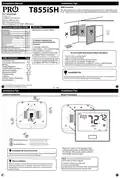
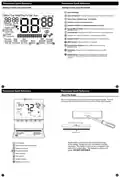
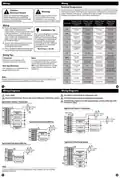
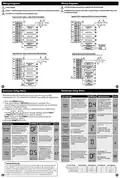


Technician Setup Menu
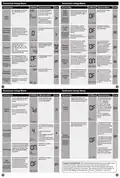
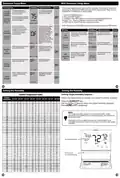
WIFI Technician Setup Menu
Tech Setup Steps
LCD Will Show Adjustment Options
Default
These steps/options are only used for trouble shooting, re-setting or
restoring to default the WIFI settings of the thermostat. They are not
needed for installation or initial setup.
This tech setting will select
the desired humidity level for
Summer Away Mode.
Use the and buttons
to select the humidity level
for Summer Away Mode.
Summer
Away Mode
Humidity
1. Press the MENU button.
2. Press the WIFI button.
3. Configure the WIFI options as desired using the table below.
Use the + or - keys to change settings and the NEXT
or PREV key to move from one step to another.
Note: The thermostat will default
to the Dehumidify set point when
75
OFF
(Only displayed
if summer away this feature is enabled.
Humidity %
mode is turned
“ON”)
SUMMER AWAY
Note: Only press the DONE key when you want to exit the WIFI Menu
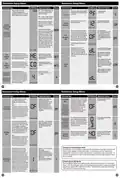
This feature uses both air
If ON is selected the ambient
temperature will operate
off of a combination of the
air temperature and the
relative humidity. When OFF
the ambient temperatures
will operate off of the air
temperature and the relative
humidity to control the indoor
temperature based on how
WIFI Menu
LCD Will Show Adjustment Options
Default
Comfort
it actually feels for people to
Temperature
This step shows the SSID number
of the thermostat. (The network it
is connected to)
Press NEXT to move to the
SSId
maximize comfort.
next step. Press DONE to exit.
OFF
OFF
OF
SSID
Number
(Only displayed
if humidity is
turned “ON”)
temperature only. The
N/A
SSId HERE
thermostat will show the
comfort index in the ambient
temp area and drive the
heating and cooling based
Press NEXT to move to the
next step. Press DONE to exit.
This step shows the version of
firmware that is installed on the
thermostat.
on this.
COMFORT TEMP
Firmware
Version
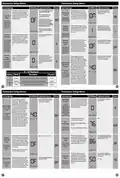
Enables a reminder for the user to
change the humidity pad.
Use the or
key to
N/A
N/A
select OFF, 600, 1000, 1500,
or 2000. These represent
hours of heat operation.
OFF
Humidity
Pad
Reminder
Press and hold YES for three
seconds to reset.
DELETE
This step allows you to reset the
thermostats WIFI connection
to change to a different WIFI
network.
WIFI
Provisioning
Reset
HUMIDITY PAD
NETWORK
Enables a reminder for the user to
change the UV light bulb.
Use the or key to
select OFF, 1 YR, 2 YR
OFF
UV Lamp
Reminder
OFF
OFF
UV LAMP
Enables a reminder for the user
to change the IAQ Cell after
25,000 hrs.
Use the or buttons to
select OFF, or 25 (stands for
25,000 hours).
OFF
IAQ Cell
Reminder
IAQ CELL
33
34
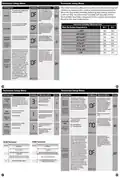
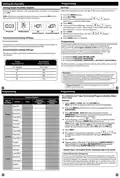
Setting the Humidity
Setting the Humidty
Setting Target Humidity Setpoint
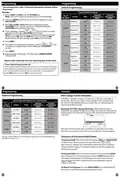
Comfort Temperature Index
Ambient
Temperature
Follow the steps below to change your target humidity setpoint.
20%-25% 26%-35% 36%-45% 46%-55% 56%-65% 66%-75% 76%-85% 86%-90%
Press the HUMIDITY key
50
51
52
53
54
55
50
50
50
50
50
51
52
53
54
55
56
56.9
58.1
59
50
51
52
53
54
55
56
56.9
58.1
59
50
51
52
53
54
55
56
56.9
58.1
59
50
Use the
Press DONE when completed.
or
key to select the target humidity setpoint.
50.6
51.2
52.3
52.9
53.5
54.1
54.7
55.8
56.4
57
50.7
51.5
52.5
53.3
54
50.7
51.5
52.5
53.3
54
54.7
55.4
56.6
57.3
58
59.1
60.1
61.4
62.4
63.5
64.3
65.1
66.4
67.2
68
69.1
70.3
71.7
72.9
74
74.9
75.7
77.3
78.1
79
80.3
81.7
83.3
84.7
86
87.3
88.6
90.4
91.7
93
50.9
51.7
52.8
53.6
54.5
55.3
56.2
57.3
58.2
59
60.1
61.1
62.4
63.4
64.5
65.3
66.1
67.4
68.2
69
70.1
71.3
72.7
73.9
75
76.1
77.2
78.8
79.9
81
51.2
52.5
53.5
54.8
56
Note:
The target humidity setpoint is not programmable. Unlike
temperature, humidity does not change quickly and should not
be programmed.
54.6
55.2
56.3
56.9
57.5
58.5
59.4
60.6
61.6
62.5
63.3
64.1
65.4
66.2
67
68.2
69.3
70.7
71.9
73
73.9
74.7
76.3
77.1
78
57
56
57
58
59
60
61
62
63
64
65
66
67
68
69
70
71
72
73
74
75
76
77
78
79
80
81
82
83
84
85
86
87
88
89
90
57.9
59.1
60
60
60
60
61
Humidity is only energized during heat. Dehumidify is only
energized during cool. Heat and Cool each have their own target
setpoints.
58
60.9
61.9
63.1
64.1
65
65.9
66.8
68.2
69.1
70
71.1
72.3
73.7
74.9
76
77.1
78.2
79.8
80.9
82
60.9
61.9
63.1
64.1
65
65.9
66.8
68.2
69.1
70
71.4
72.8
74.2
75.6
77
78.6
80.2
81.8
83.4
85
86.6
88.1
89.9
91.4
93
95.8
98.5
100.5
103.2
106
61.1
62.1
63.4
64.4
65.5
66.5
67.6
68.9
70
61.9
62.9
64.1
65.1
66
66.9
67.8
69.2
70.1
71
72.6
74.3
75.8
77.4
79
80.6
82.7
84.3
86.2
88
58.9
60.1
61
62
62.7
63.4
64.6
65.3
66
67.2
68.3
69.7
70.8
72
72.9
73.8
75.2
76.1
77
77.9
78.7
80.3
81.1
82
71
72.4
73.8
75.2
76.6
78
79.6
81.2
82.8
84.4
86
88.3
90.6
92.4
94.7
97
100.5
104
106.1
109.5
113
Humidity Reading
Press key for
Humidity Reading
79.1
80.2
81.8
82.9
84
85.1
86.1
87.9
88.9
90
82.3
83.7
85.3
86.7
88
89.5
91.1
92.9
94.5
96
83.6
85.1
86.9
88.4
90
92
94.1
96
91
94.1
96
99
102
106.4
110.9
113.1
117.6
122
82.8
83.7
85.3
86.2
87
98
100
35
36

| General | Details |
|---|---|
| Name | Pro1 Technologies T855iSH Wall Thermostat Instruction Manual |
| Make | Pro1 Technologies |
| Language | English |
| Filetype | PDF (Download) |
| File size | 0.59 MB |
 (1 votes, average: 5.00 out of 5)
 Loading...

Pro1 Technologies Pro1 T701i WiFi Thermostat Installation Guide

Pro1 Technologies T751 Non-Programmable Digital Thermostat Instruction Manual


Smartica HY608W 3A Wifi Digital Heating Thermostat User Manual

BEOK CONTROLS TDR89 ZIGBEE Thermostat User Guide

EMOS P5601UF Floor Heating Thermostat User Manual

DOMETIC 3313192.XXX Single Zone LCD Thermostat Instruction Manual

EMERSON Programmable Touchscreen Thermostat Setup in E2 and Site Supervisor User Guide

GENERAL Life MITRA 250S RF Wireless Room Thermostat User Guide

IHAVC CONTROLS T-32-P Universal Thermostat Instruction Manual

SALUS AT10 Contact Thermostat User Manual

VIMAR 01910 Electronic Timer Thermostat Instruction Manual

iO HVAC CONTROLS Z-2000-T Thermostat Instruction Manual