
Home > Pro1 Technologies > Pro1 Technologies T855iSH Wall Thermostat Instruction Manual
Pro1 Technologies T855iSH Wall Thermostat Instruction Manual
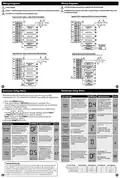
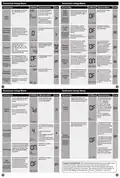
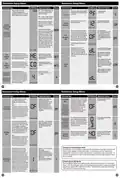
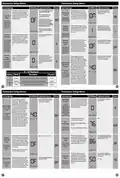
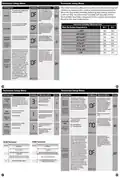
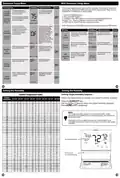
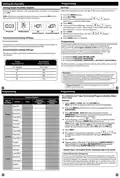
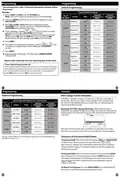


Technician Setup Menu
Technician Setup Menu
Tech Setup Steps
LCD Will Show Adjustment Options
Default
This table references different humidity levels the thermostat will
conform to, based on the outdoor temperature measurements.
When the Automatic Humidity Adjusting tech setting selection
is ON1 or ON2, the thermostat humidity will stay adjusted to
the humidity level that correspond to the outdoor temperature
based on the chart index below.
This feature adds humidity when
system key is in HEAT.
Use the and key to
turn on or off. If ON is selected
the humidity will be displayed
on the main screen and HUM
Humidify
terminal will energize when
OF
O
F
F
humidity setpoint is above
ambient humidity in Heat
mode.
HUMIDIFY
This feature removes humidity
when system key is in COOL.
Use the and key to
turn on or off. If ON is selected
the humidity will be displayed
on the main screen and DUM
Automatic Humidity Adjusting Index
On 2
When The Outdoor Temperature Is:
On 1
Dehumidify
terminal will energize when
OFF
O
OF
humidity setpoint is below
ambient humidity in Cool
mode.
> +40˚F
45%
40%
50%
45%
DEHUMIDIFY
+30˚F to 40˚F
This feature allows the installer
to change the calibration of the
ambient humidity displayed.
Use the left and right arrows
to adjust the calibration +/-3.
Each one unit of adjustment
amounts to approximately 5%.
+20˚F to 29˚F
+10˚F to 19˚F
0˚F to 9˚F
Humidity
Calibration
35%
30%
25%
20%
40%
35%
30%
25%
OF
(Only shows
if Humidify or
Dehumidify is set
to “ON”)
-1˚F to -10˚F
HUMIDITY CAL
-11˚F to -20˚F
<-20
15%
10%
20%
15%
This feature forces the A/C to run
longer to remove humidity when
needed. The A/C will “over cool”
the room a few degrees until
humidity reaches the desired
setpoint. The numbers below
are the maximum number of
degrees the thermostat will
overcool to satisfy humidity. For
example, If temperature set point
is 70 and humidity set point is
50 and swing is 1 degree and
“Dehumidify with AC”is set to
3 and the ambient is 68 and
indoor humidity is 60 … the
thermostat will continue to run
air conditioning until 67 degree
to try to satisfy the humidity set
point of 50
Use the and buttons
to select Off, 2, 3, 4, 5
If selected a number is
selected the thermostat will
use the air condition to “over
cool”to control humidity in
Cool mode. If Off is selected
the system will not use over
cooling.
Dehumidify
With AC
0FF
0F
(Only shows if
dehumidify is set
to “ON”)
DEHUMIDIFY AC
29
30
Technician Setup Menu
Technician Setup Menu
Tech Setup Steps
LCD Will Show Adjustment Options
Default Tech Setup Steps
LCD Will Show Adjustment Options
Default
The amount of over cooling
Use the and left and right
arrows to select the
maximum number of
degrees of over cool.
3
This feature will adjust the
Use the and buttons
to select OFF, ON 1 or ON 2.
When ON 1 or ON 2 is
selected and humidity level
is adjusted, the thermostat
will revert to the original
Over Cool
Limit
allowed when using A/C to
remove humidity. This screen is
only shown when ON is selected
in the Dehumidify with AC tech
setup step.
indoor humidity as the outdoor
temperature changes. When
OFF is selected, the humidity
will constantly stay at the same
percentage. When ON is selected,
the indoor humidity will fluctuate
based on outdoor temperature.
Automatic
Humidity
Adjusting
3
(Only displayed if
Dehumidify with
AC is turned “ON”)
Options are: 2,3,4,5
humidity level after four
OFF
NO
OF
OVER COOL LMT
hours. See Automatic
Humidity Adjusting chart for
humidity ranges.
(Only displayed
if remote sensor
setting is set to 2
and humidity is
turned“ON”)
Options for how the HUM
terminal energizes.
Use the left and right arrows to
select one of the four options.
HUM
Terminal
Please see revious page for
chart.
AUTO HUMIDITY
View the HUM terminal chart
below for an explanation of
these options.
1
See chart below
1
1
(Only shows if
humidify is set to
“ON”)
You can configure the D terminal
as Normally-Open or
Normally-Closed.
Use the or key to select NO
or NC. If NO is selected D will
energize to dehumidify.
If NC is selected D will be
normally energized. D will
de-energize to dehumidify.
HUM TERMINAL
Dehumidify
Relay
Options for how the DHM
terminal energizes.
Use the left and right arrows
to select one of the four
options.
NO = Normally Open
NC = Normally Closed
DUM
Terminal
(Only shows if
dehumidify is set
to “ON”)
See chart below
View the DHM M terminal
chart below for an
explanation of these
options.
1
(Only shows if
dehumidify is
set to“ON”)
DHM RELAY O/C
DUM TERMINAL
Summer Away Mode protects the
home in unoccupied long periods
of time, during hot and humid
weather. This is done by main-
taining programmed and desired
humidity and temperature set-
tings. Summer Away Mode will
show in the text field and allows
the thermostat to put the pro-
grammed set point and humidity
level in a permanent HOLD when
this setting is enabled (HOLD will
have to be manually removed).
Dehumidity tech setting must be
ON for this feature to be available.
Cycle Minimizer is turned ON
when Summer Away Mode is ac-
tivated by the user (usually cycle
minimizer is based on Unoccupied
and Leave time periods).
Use the and
buttons to select ON/OFF.
When ON is selected,
Summer Away Mode is
activated by pressing and
holding the “HOLD”key on
the thermostat screen, for 3
seconds.
DHM Terminal
HUM Terminal
HUM terminal energizes when the ambient
humidity is...
DUM terminal energizes when the ambient
humidity is...
OPTIONS
1
OPTIONS
1
Below the humidity setpoint and heat or
fan is energized.
Above the humidity setpoint and cool or fan
is energized.
Summer
Away Mode
Below the humidity setpoint and heat is
energized.
Above the humidity setpoint. It will also
energize the fan during a call for dehumidity.
2
3
4
2
3
4
(Only displayed
if dehumidity is
turned “ON”)
OFF
OF
Below the humidity setpoint. It will also
energize the fan during a call for humidity.
Above the humidity setpoint.
Above the humidity setpoint and the
compressor is not running.
Below the humidity setpoint.
Adds another Tech Setting:
following this one
SUMMER AWAY
31
32

| General | Details |
|---|---|
| Name | Pro1 Technologies T855iSH Wall Thermostat Instruction Manual |
| Make | Pro1 Technologies |
| Language | English |
| Filetype | PDF (Download) |
| File size | 0.59 MB |
 (1 votes, average: 5.00 out of 5)
 Loading...

Pro1 Technologies Pro1 T701i WiFi Thermostat Installation Guide

Pro1 Technologies T751 Non-Programmable Digital Thermostat Instruction Manual


Danfoss VICUQ24M Icon Programmable II Room Thermostat Installation Guide

SALUS RT100 Electronic Room Thermostat Instruction Manual

network thermostat X X7-WIFI Smart Touchscreen Thermostat Instructions

SALUS Wired Electronic Thermostat – Non-programmable HTR230 User Manual

TELUS Battery for Smart Thermostat Instructions

Danfoss RET 230 Electronic Heat Cool Thermostat Instruction Manual

LUTRON 653 Right Thermostat Control Datasheet

FURRION FACW12ZA-BL Multi Zone Wall Thermostat Instruction Manual

sinope TH1124NP Non Programmable Thermostat for Electric Heating Owner’s Manual

GENERAL HT100S Digital Room Thermostat User Manual