FURRION FACW12ZA-BL Multi Zone Wall Thermostat Instruction Manual
| General | Details |
|---|---|
| Name | FURRION FACW12ZA-BL Multi Zone Wall Thermostat Instruction Manual |
| Make | FURRION |
| Language | English |
| Filetype | PDF (Download) |
| File size | 0.48 MB |

FURRION FACW10ESSA-BL Standard Single Zone Wall Thermostat User Guide

FURRION FACW12ZA-BL Multi Zone Wall Thermostat Instruction Manual Overview
Summary of Contents
- Page 1: Multi zone wall thermostat instruction manual. Model: FACW12ZA-BL.
- Page 2: Welcome Thank you for purchasing this Furrion Multi Zone Wall Thermostat. Before operating your new product, please read these instructions carefully. This instruction manual contains information for safe use, installation and maintenance of the product. Please keep this instruction manual in a safe place for future reference. This will ensure safe use and reduce the risk of injury. Be sure to pass on this manual to new owners of this product. The manufacturer does not accept responsibility for any damages due to not observing these instructions.
- Page 3: About your thermostat Product features Control buttons LCD icons Installation What's in the box Thermostat installation Operation Turn on/off the thermostat Temperature format
- Page 4: About your thermostat Your Multi Zone LCD thermostat is equipped with a liquid crystal display (LCD) to indicate the temperature set-point in Fahrenheit(°F)/Centigrade(°C) and fan speed. The available operation modes will be different depending on the system installed in your RV. Liquid Crystal Display with Blue Backlight and Mode Indicators Auto Fan Room Temperature Display Fahrenheit(°F)/Centigrade(°C) Display Sleep Mode LED Mood Light Time Program Control buttons allow you to select zone, different mode, program 1 or 2, increase or decrease temperature set-point, turn on/off sleep mode, select fan speed, and turn on/off the air conditioner.
- Page 5: About your thermostat LCD icons Room Temperature or error code Time of day Sleep icon Program Operation mode Fan speed Zone
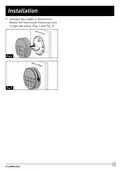
- Page 6: Installation What’s in the box Make sure you have all the following items included in the packaging. If any item is damaged or missing, contact your dealer. Thermostat x 1 Instruction Manual x 1 Warranty Card x 1 Self-tapping Screw x 2 Thermostat Cables Fix the base plate on the wall using 2 screws. Note: Make sure the base plate is not covering the hole and squeezing the thermostat cables. Thermostat installation Select a suitable location that is not under direct influence from light, sun or other heat sources. Rotate the thermostat cover counterclockwise and pull out the base plate. Use the base plate as a template and drill a hole on the vehicle wall. Extend the four wire cables from the cutout area. Refer to the cable tag label for each cable definition.
- Page 7: Connect the cables to the thermostat. Rotate the thermostat clockwise until it clips into place.
- Page 8: Your Furrion wall thermostat has been preprogrammed with factory default settings. Review the settings below and adjust to your comfort level. Factory default settings include heating at 68ºF / 20ºC and cooling at 72ºF / 22ºC. To toggle the temperature format between Centigrade and Fahrenheit, press both buttons for 3 seconds. Press the button to turn on the thermostat, illuminating the LCD with factory settings. The LCD will display the last setting if parameters have been changed. Press the MODE button repeatedly to toggle through available modes. The activated mode icon and temperature set-point will be displayed on the LCD. The thermostat will transmit the last selected operation mode command after 2 seconds without any operation. Press and hold the button for 3 seconds to turn off the thermostat.
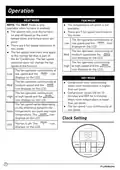
- Page 9: Operation There are 5 available modes: AUTO, COOL, HEAT, FAN, and DRY. COOL mode cycles the compressor on and off based on room temperature and set-point. The fan turns on after the compressor is running. HEAT mode is only available after the furnace is enabled. AUTO mode changes between COOL and HEAT based on room temperature. In AUTO mode, the system operates in HEAT when the temperature is below 68ºF and in COOL when above 77ºF. The system operates in Dry Mode between 68ºF and 77ºF. The fan operates continuously at different speeds depending on the mode. The AUTO icon and current temperature set-point display on the LCD.
- Page 10: Operation Heat mode is only available when the furnace is enabled. The system will cycle the furnace on and off based on the room temperature and temperature set-point. There are 3 fan speed selections in heat mode. The fan operates continuously at low speed and the icon displays on the LCD. There are 4 fan speed selections in fan mode. The fan speed selections only apply to the rooftop fan that is part of the air conditioner. In dry mode, the compressor runs continuously when room temperature is higher than set-point. The fan speed runs continuously at low speed in dry mode. The fan operates continuously at high speed and the icon displays on the LCD. The fan speed varies depending on the difference between the temperature set-point and room temperature.
- Page 11: Operation involves setting the time on the clock after power turns on. You can cancel the program setting by pressing and holding the PROGRAM button for 3 seconds. To enter clock setting mode, press the PROGRAM button for 3 seconds. Adjust the hour and minute using the designated buttons, and save by pressing the PROGRAM button. Zone selection allows you to choose between ZONE 1, ZONE 2, ZONE 3, or ZONE 4. Control buttons can be used to adjust the operation of the system in a specific zone. The system allows for setting 2 time programs. Change the time setting of PROG 1 by using the appropriate buttons after pressing the PROGRAM button. Select the desired operation mode and fan speed using the MODE and FAN buttons. The temperature set-point ranges from 60ºF to 86ºF (16ºC to 30ºC).
- Page 12: Operation Press the LIGHT button on the thermostat to turn on the mood light. Press the LIGHT button to toggle to your desired mood light. To turn off the mood light, press the LIGHT button repeatedly until the mood light turns off. The temperature set-point is not available in FAN mode. Press the MODE button repeatedly to toggle to your desired mode. Press the FAN button on the thermostat to select AUTO, HIGH, MEDIUM, or LOW fan speed. Press the SLEEP button on the thermostat to turn on SLEEP mode. The SLEEP icon and the current temperature set-point will be displayed on LCD. The fan speed selection is not available in DRY mode. The thermostat is designed with 7 predefined colors of LED light in the air.
- Page 13: Special features include auto fan and LCD error codes. In auto fan mode, fan speed varies based on the temperature difference between set-point and room temperature. Error codes displayed on the LCD indicate specific faults, such as indoor temperature sensor failure (E1) and evaporator temperature sensor failure (E2), which cause system shutdown. The compressor has a time delay of approximately three minutes when starting the cooling cycle to prevent damage. The multizone thermostat can store two timers for each zone to manage unique mode and fan selections. Timers can be programmed for specific times, such as a day condition in COOL mode at 8:00 AM and an evening condition in AUTO mode at 7:00 PM. In case of power interruption, the system will restart automatically with the last operational parameters once power is restored.
- Page 14: Wiring diagram Compressor Indoor motor Outdoor motor Capacitor Heat element Room sensor Analog therm control Optional components Passed dielectric
- Page 15: Specifications include DC input power, power consumption, baud rate, dimensions, weight, LCD viewing angle, and LCD backlight. The device operates at DC 12V with a power consumption of less than 0.5W and a baud rate of 9600bps. Its dimensions are 3 x 3 x 15/16 inches (75 x 75 x 22.5mm) and it weighs 0.11kg. The LCD viewing angle is specified as 12 o’clock, and it features a blue LCD backlight.
- Page 16: Warranty Furrion warrants for a period of 1 year from the date of retail purchase by the original end-use purchaser that this product, when delivered in new condition, is free from any defects in manufacturing, materials, and workmanship. In case of such defect, Furrion shall replace or repair the product at no charge. This warranty does not cover products where the original serial numbers have been removed or altered. Damage or loss caused by accident, misuse, abuse, neglect, or failure to follow instructions is not covered. This warranty only protects the original end-user and is not transferable. This warranty is only valid in the country of purchase. This warranty and remedies are exclusive and in lieu of all other warranties, remedies, and conditions. Furrion specifically disclaims any and all implied warranties. No Furrion reseller, agent, or employee is authorized to make any modification, extension, or addition to this warranty.
- Page 17: Warranty Furrion is not responsible for direct, indirect, special, incidental or consequential damages resulting from any breach of warranty or condition. Furrion’s total liability is limited to the repair or replacement of this product pursuant to the terms of this warranty. Some states do not allow the exclusion or limitation of incidental or consequential damages. This warranty gives you specific legal rights, and you may also have other rights that vary by state or country. No action or claim to enforce this warranty shall be commenced after the expiration of the warranty period. Keep your receipt, delivery slip, or other appropriate payment record to establish the warranty period. Service under this warranty must be obtained by contacting Furrion. Product features or specifications as described or illustrated are subject to change without notice.
- Page 18: Page 18
- Page 19: Page 19
- Page 20: Furrion Innovation Center & Institute of Technology Furrion and the Furrion logo are trademarks licensed for use by Furrion Ltd. ©2007-2018 Furrion Ltd.