
Home > Pro1 Technologies > Pro1 Technologies T855iSH Wall Thermostat Instruction Manual
Pro1 Technologies T855iSH Wall Thermostat Instruction Manual
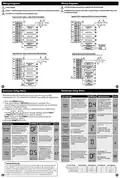
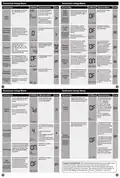
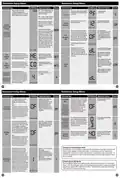
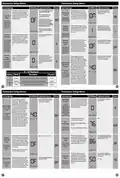
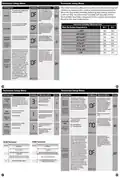
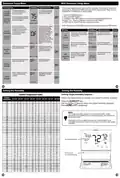
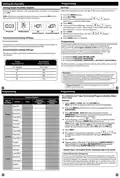
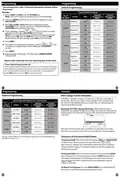
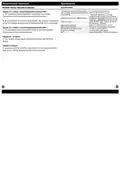


Technician Setup Menu
Technician Setup Menu
Tech Setup Steps
LCD Will Show Adjustment Options
Default
Tech Setup Steps
LCD Will Show Adjustment Options
Default
Use the and buttons
2H2C
2H/2C, 3H/1C, 3H/2C, 3H/3C,
Use the or
to turn on of off.
buttons
This setting allows you to select
the number of heat and cool
stages.
This feature allows the thermostat
Satisfy
Setpoint
to select 1H/1C, 2H/1C,
to keep multiple stages of heat or
cool energized until the setpoint
4H/2C, 4H/3C, 5H/3C.
Staging
is satisfied.
SET
System
Stages
OFF
STAGES
OF
(Only displayed
if there are more
than one stage of
heat or cool)
Note: Heat and cool choices
are limited based on
conventional, heat pump, or
PTAC system configuration.
2H
SS STAGING
Use the or
select OFF, 5, 10, 15, 30, 45,
60, or 90 minutes.
key to
This feature allows a delay to
occur if an additional stage is
needed. This allows the previous
stage extra time to satisfy the
setpoint.
Staging
Delay
This setting allows the O or B
Use the and buttons to
select O/B.
Third Stage of
terminal to be selected as the
Cool Terminal
Designation
third stage of cool. The selected
OF
(Only displayed
if there are more
than one stage of
heat or cool)
terminal will not be used for
OFF
OFF
ON
reversing valve functions in heat
0
O
Note: Will not show if using
outdoor sensor with balance point
temperature.
(Only displayed
pump mode.
STAGING
DELAY
if stages of cool
is set to three on
previous setting)
3 COOL TERM
You can set the minimum
compressor run time to
“OFF”, “3”, “4”, or “5”minutes.
If 3, 4 or 5 is selected, the
compressor will run for at
least the selected time
before turning off. Use the
and buttons to
change the setting.
This feature allows the installer
to select the minimum run
time for the compressor. For
example, a setting of 4 will force
the compressor to run for at
least 4 minutes every time the
compressor turns on, regardless of
the room temperature.
You can configure the system
switch for the particular
application. Heat - Off - Cool,
Heat - Off, Cool - Off, Heat - Off -
Cool – Auto.
Use the
or
buttons
until the desired application
is flashing. AUTO = (Auto
Changeover)
Minimum
Compressor
On Time
Heat
Off
SYSTEM SET
System Set
OF
AutoOff
Em.Heat
Cool
Note: Emergency Heat is available
in heat pump mode only.
Cool
MIN COMP ON
This setting allows the system
to run Gas, Oil, Propane or any
other types of auxiliary heat. The
thermostat will default to electric
auxiliary heat in heat pump
applications.
Use the and buttons
to select ON/OFF.
The compressor short cycle delay
protects the compressor from
“short cycling”. This feature will
not altlow the compressor to be
turned on for 5 minutes after it
was last turned off.
Selecting “ON”will not allow
the compressor to be turned
on for 5 minutes after the
last time the compressor was
on. Select “OFF”to remove
this delay. Use the and
buttons to change the
setting.
Dual Fuel
Auxiliary For
Heat Pump
Compressor
Short Cycle
Delay
OF
OFF
GAS
(Only displayed if
heat pump is set
to “ON”)
COMP DELAY
DUAL FUEL
Use
change the setting.
and buttons to
Select GAS to have the system
control the fan during a call for
heat, select Electric to have the
thermostat control the fan during
a call for heat.
The cooling fan delay setting will
delay the fan from coming on in
cool mode and keep it running
after the compressor shuts off
for a short time to save energy in
some systems.
You can set the cooling fan
delay to OFF, 10, 30, 60 or 90
seconds. If 10, 30, 60, or 90
is selected the fan will not
turn on for that many seconds
when there is a call for cool
and will run for that many
seconds after satisfying a call
for cool.
GAS
Electric or Gas
Fan Operation
Cooling Fan
Delay
OFF
OF
Note: If heat pump is set to “ON”this
step will not show, and will default
to ELECTRIC.
(Only displayed if
heat pump is set
to “ON”)
COOL FAN DL
FAN SET
18
17
Technician Setup Menu
Technician Setup Menu
Tech Setup Steps
LCD Will Show Adjustment Options
Default
Tech Setup Steps
LCD Will Show Adjustment Options
Default
Keypad lockout allows you to
configure the thermostat so some
or all of the keys don’t function.
Use the and buttons to
select OFF, BASC, PART, FULL
OF - OFF= keypad lock-
Use the and button
to select 7d for 7 day or 0d
for non-programmable.
You can configure this thermostat
to have a 7 day program or No
program.
out has been disabled.
Note: If 7d is selected, in set schedule
you will program all seven days
individually.
BA - BASIC = basic keypad
lockout locks the menu key.
PA - PARTIAL= partial keypad
lockout, which locks all the
keys except the or setpoint
keys.
FU - FULL= full keypad
lockout, which locks out all
the keys.
Keypad
Lockout
OFF
Program
Options
OF
If 0d is selected the thermostat
becomes non-programmable and
the Set Schedule button goes away
in Menu.
7d
7d
KEY
LOCKOUT
PROGRAM
Keypad lockout with code shows
only when Keypad Lock is set to
BASIC, PARTIAL or FULL
1. When ON you must enter
the code after pressing the
and buttons toegether
for 3 secounds to take the
thermostat in or out of keypad
lockout. You will then be taken
to a screen that allows you to
enter the code.
You can configure this thermostat
to have 2 or 4 programmable
time periods per day.
Use the and buttons to
select 4, 2C, or 4C time periods
per day.
Time Periods
4: Wake, Leave, Return &
Sleep.
2C: time periods are Occupied
& Unoccupied.
4C: time periods are Occupied
1, Unoccupied 1, Occupied 2, &
Unoccupied 2
4
TIME
PERIODS
4
(Only displayed if
program optioin is
set to 5d or 7d)
Keypad
Lockout Code
2. Use and to change
each number. Use the Previous
and Next keys to change from
one number to the next. The
number you are currently on
will blink.
OFF
(Only displayed
if keypad lockout
is set to Basic,
OF
This feature will start heating and
cooling early to bring the building
temperature to its programmed
setpoint by the beginning of the
WAKE, RETURN and OCCUPIED
time periods.
Use the
select on or off.
or
key to
Partial, or Full)
3. Press Done when
ON
completed. If entered correctly
the thermostat will be re-
moved from keypad lockout.
Pro Recovery
PRO
RECOVERY
KEY CODE
This setting maximizes efficiency
and equipment longevity by
increasing the heating and
Use the
select on or off.
or
key to
Cycle
Minimizer cooling swing settings to 2°
during the unoccupied and leave
time periods. This will result in
(Only displayed if
program optioin is significantly fewer system cycles.
set to 5d or 7d)
Keypad Lockout Note: The selected keypad lockout functionality must
be activated after exiting tech setup. If you do not perform this
procedure, all keys will function freely. To lock the keypad hold down
OFF
OF
the
unlock the display hold down the
and
keys for 3 seconds. You will see a lock in the display. To
and keys for 3 seconds.
CYCLE MIN
19
20

| General | Details |
|---|---|
| Name | Pro1 Technologies T855iSH Wall Thermostat Instruction Manual |
| Make | Pro1 Technologies |
| Language | English |
| Filetype | PDF (Download) |
| File size | 0.59 MB |
 (1 votes, average: 5.00 out of 5)
 Loading...

Pro1 Technologies Pro1 T701i WiFi Thermostat Installation Guide

Pro1 Technologies T751 Non-Programmable Digital Thermostat Instruction Manual


EZAIoT R7C RGB Colorful LCD Screen Thermostat User Manual

BEOK TDS72 Digital Screen Thermostat Instruction Manual

Danfoss Icon 2/ 24V RT Room Thermostat User Guide

SALUS Wired Digital Thermostat – Non-programmable HTRS230 User Manual

GEWiSS GW 10 794H KNX Timed Thermostat Instruction Manual

bryant SYSTXBBECC01-C Evolution Connex Control Thermostat Owner’s Manual

WHITE-RODGERS 1F75H-21PR Programmable Thermostat Owner’s Manual

GENERAL LIFE HT330S Digital Room Thermostat User Manual

Garza 400616B Digital Thermostat User Guide

Honeywell Lyric Thermostat THP2400A1019 Installation Guide