
PRO1 T725 Thermostat User Guide


Programming
Programming
Programming
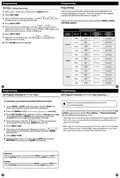
Set Time (If using programming)
All of our programmable thermostats are shipped with an
energy saving pre-program. You can customize this default
program by following the steps on page 15.
1. With system switch set to OFF, press the MENU button
2. Press SET TIME
3. Day of the week will be flashing. Use the
to select the current day of the week.
or
key
There are four time periods for each program (WAKE, LEAVE,
RETURN, SLEEP).
4. Press NEXT STEP
5. The current hour is flashing. Use the
or
key to
select the current hour. When using 12-hour time, make sure
the correct a.m. or p.m. choice is selected.
6. Press NEXT STEP
7. Minutes are now flashing. Use the
select current minutes.
or
key to
8. Press DONE when completed.
Programming
Programming
Set Program Schedule 5+1+1 or 7 Day
Set Program Schedule 5+1+1 or 7 Day (Continue... )
To customize your program schedule, follow these steps:
If using 7-Day Programming use previous steps for
every individual day.
1. Select HEAT or COOL with the system switch. Note: You
have to program heat and cool each seperately.
You can also use these time saving functions. You must be in Set
Sched Programming Mode (Press Menu >> Press Set Sched)
for the following functions to work:
2. Press the MENU button (If menu does not appear first press RUN SCHED)
3. Press SET SCHED. Note: Monday-Friday or (Monday if in 7 Day)
is displayed and the WAKE icon is shown. You are now
programming the wake time period for that day.
1) To copy ALL time periods and temperatures of current system and
day to ALL days, Press and Hold 2nd button down on left until the
Days and Time flash.
4. Time is flashing. Use the
time selection for that day’s WAKE time period.
or
key to make your
5. Press NEXT STEP
2) To copy ALL time periods (only times) for ALL days to the opposite
system (Heat to Cool / Cool to Heat), Press and hold the Glow in the
Dark Light button down until Set Time and Time flash.
6. The setpoint temperature is flashing. Use the
key to make your setpoint selection for that day’s WAKE
or
time period.
7. Press NEXT STEP
8. Repeat steps 4 thru 7 for that day’s LEAVE time period,
RETURN time period, and SLEEP time period.
Saturday:
Repeat steps 4 through 7 for the Saturday WAKE time period, LEAVE time
period, RETURN time period, and for the Saturday SLEEP time period.
Sunday:
Repeat steps 4 through 7 for the Sunday WAKE time period, LEAVE time
period, RETURN time period, and for the Sunday SLEEP time period.

| General | Details |
|---|---|
| Name | PRO1 T725 Thermostat User Guide |
| Make | PRO1 |
| Language | English |
| Filetype | PDF (Download) |
| File size | 0.38 MB |
 (1 votes, average: 5.00 out of 5)
 Loading...

PRO1 T751i Thermostat Installation Guide

PRO1 T731W Wireless PTAC Non-Programmable Thermostat Installation Guide

PRO1 T805 Non Programmable Thermostat Instruction Manual

PRO1 T701 Digital Non Programmable Thermostat Instruction Manual

PRO1 IAQ T721i Digital WIFI Programmable Thermostat User Manual

PRO1 R250W Wireless System Thermostat Owner’s Manual

PRO1 T755 Heat 2 Cool Dual Fuel Thermostat User Manual

PRO1 T771 Programmable Electronic Thermostat Instructions


Beca BAC-7000 Smart Knob Thermostat User Guide

Honeywell RTH8500 Wi-Fi Series Thermostat User Guide

MRCOOL MST04 Smart Thermostat Owner’s Manual

Arcoaire TSTATIIEWF-01 Gray Smart Thermostat Owner’s Manual

Homematic IP HmIP-WTH-B Wireless Wall Thermostat Instruction Manual

Honeywell DT4 Room Thermostat User Manual

MClimate MC-LW-V02 Smart Radiator Thermostat User Manual

Honeywell T6360 Room Thermostat User Manual

beca BAC-003 Series WiFi Thermostat Fan Coil

MoesGo 002 Series Wi-Fi Thermostat Instruction Manual