
Micro-Air 359 Touchscreen Thermostat Instruction Manual












Bluetooth (Account) Password Reset
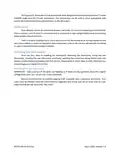
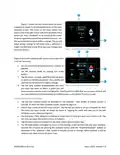
This screen is used to reset the saved Bluetooth password in the thermostat. This is the
password that must match your EasyTouch RV app account to make remote connections.
Only one account can have access to the thermostat. Use this whenever you reset the
password to your app account to regain remote access to the thermostat.
Bluetooth Password
Reset
Temperature Reading Adjustment
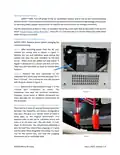
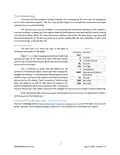
This setting allows you to calibrate the Inside temperature reading with an offset. For
example, if the inside temperature reads 72°F (22.2°C) and you feel it is 75°F (24°C), you
can use the up and down arrows on this page to increment the offset to +3°F (+1.8°C).
Temperature
Reading Adjustment
Temperature Gap (Hysteresis)
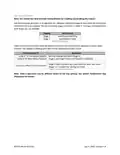
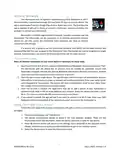
These settings under “heat” and “cool” headings determine the difference in temperature
required between setpoint and inside temperature before a heating or cooling cycle will
begin. This is helpful to prevent short cycling in large spaces or spaces with high thermal
loss, by running a cycle for longer amounts of time. This offset is applied to all logic that
an operational example.
Temperature Gap
Button
Inside
Temperature (°F) Setpoint (°F) Setting (°F)
Heating
Heating Gap
System Operation
69
66
65
None
None
Heating Cycle Begins
Heating Cycle Continues
Heating Cycle Terminates
6
8
3
67
69
Table 8 - Temperature Gap Operational Example
The setting “Auto-Fan High” determines the difference in temperature required between
to Fan High. If Fan High is called for during a cycle then it will remain high until the cycle
Inside
Cooling
Auto Fan Gap
Setting (°F)
System Operation with
Auto Fan
Temperature (°F) Setpoint (°F)
81
82
Cooling with Fan Low
Cooling with Fan High
Cooling with Fan High
78
4
79
Table 9 - Auto Fan Speed Gap Operational Example
Measurement Units
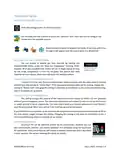
This setting determines how to display temperatures on the thermostat. Tap the Units
button to toggle between Fahrenheit and Celsius.
Units Button
17
©2023 Micro-Air Corp
July 3, 2023, revision 1.4

| General | Details |
|---|---|
| Name | Micro-Air 359 Touchscreen Thermostat Instruction Manual |
| Make | Micro-Air |
| Language | English |
| Filetype | PDF (Download) |
| File size | 0.5 MB |
 (1 votes, average: 5.00 out of 5)
 Loading...

micro-air EasyTouch 357 Multi Zone Replacement Thermostat Instruction Manual

Micro-Air EasyTouch RV 353 Touch Screen Thermostat Instruction Manual

Micro-Air EasyTouch RV 353 Thermostat Instruction Manual

micro-Air EasyTouch RV 351 Thermostat User Manual

Micro Air ETRV EasyTouch RV Thermostat Instruction Manual

micro-air EasyTouch RV 356 True Air RV Thermostat User Manual

micro-Air ASY-357-X02 EasyTouch 357 Touchscreen Thermostat User Manual

micro-Air EasyTouch 352 Thermostat User Manual

Micro-Air EasyTouch 355 Touch Screen Thermostat User Manual

Micro-Air 351 Air Conditioner Digital Thermostat User Guide


UNDERFLOOR HEATING WORLD UT5 Touch Screen Thermostat Instruction Manual

AJAX108846 White Smart Wifi Thermostat Instruction Manual

ECOSTAR AC603H WIFI Thermostat User Guide

Honeywell TC500A-N Commercial Thermostat User Guide

SIEMENS M3182 Room Thermostat Instruction Manual

Drayton 2290M Digistat 3rd Generation Programmable Room Thermostat Installation Guide

Vaillant VRC 700 Programmable Weather Compensating Thermostat Owner’s Manual

BOSCH 8750000270 Radiator Thermostat II Smart Home Radiator Thermostat Instructions

tado Smart Radiator Thermostat Installation Guide

MCO Home MH-4936 Z Wave Thermostat Instruction Manual