
Micro-Air 359 Touchscreen Thermostat Instruction Manual












Troubleshooting
The most common problems during installation are mismatching the wires and not seating the
wires in the connector properly. The first step should always be to recheck the instructions and make
sure the wires are seated properly.
The second most common problem is not knowing the thermostat operation. If the system is
running a heating or cooling cycle, the large numbers of the temperature set point will turn red for heating
and blue for cooling. When the large thermostat numbers turn white, the heat pump, heat strip and
furnace should all be off. The fan may continue to run for a while after the cycle completes. If a fan is left
in a manual mode, it will not shut off.
Testing an output
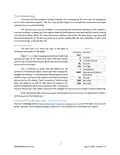
Figure 5
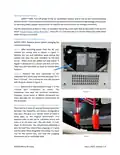
The first step is to check the fuse on the back of
EasyTouch and verify it is still good.
Terminal Function
label
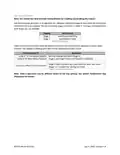
Figure 5 is a table showing the terminal label and
R
B
+12VDC
purpose for each of the thermostat wires. This information
can be used in troubleshooting to verify that the thermostat
has turned on an output.
-12VDC, Ground
GL Fan low
GH Fan high
Use a voltmeter to verify that the thermostat has
turned on an EasyTouch output. Set to voltmeter measure DC
voltage and check for ~0 volts between the blue (ground) wire
and the output terminal to be tested to see if the thermostat
has turned on the output. There should be 0 volts present
when the output is on and 12 volts when the output is off.
Further troubleshooting of the component (fan, compressor
Y
Compressor
WHP Heat pump (Valve) or
Heat Strip
W
Furnace
SEN Not used
SEN Not used
furnace, heat pump, heat strip) is required if the voltages are correct but the output is still not operating.
If the thermostat does not have power, test between the R and B wires to determine if there is
12-volt power to the thermostat.
EasyTouch RV Knowledge Bank – More Information
Visit our knowledge bank at http://www.micro-air.com/kb_easytouch_rv.cfm for the latest resources for
setup, operation, and troubleshooting, as well as our main website for contacting us for support
2
0
©2023 Micro-Air Corp
July 3, 2023, revision 1.4

| General | Details |
|---|---|
| Name | Micro-Air 359 Touchscreen Thermostat Instruction Manual |
| Make | Micro-Air |
| Language | English |
| Filetype | PDF (Download) |
| File size | 0.5 MB |
 (1 votes, average: 5.00 out of 5)
 Loading...

micro-air EasyTouch 357 Multi Zone Replacement Thermostat Instruction Manual

Micro-Air EasyTouch RV 353 Touch Screen Thermostat Instruction Manual

Micro-Air EasyTouch RV 353 Thermostat Instruction Manual

micro-Air EasyTouch RV 351 Thermostat User Manual

micro-air EasyTouch RV 356 True Air RV Thermostat User Manual

Micro Air ETRV EasyTouch RV Thermostat Instruction Manual

micro-Air ASY-357-X02 EasyTouch 357 Touchscreen Thermostat User Manual

micro-Air EasyTouch 352 Thermostat User Manual

Micro-Air EasyTouch 355 Touch Screen Thermostat User Manual

Micro-Air 351 Air Conditioner Digital Thermostat User Guide


SALUS Fan Coil thermostat FC600 User Guide

BEOK TDS72 Digital Screen Thermostat Instruction Manual

White-Rodgers 1F56N-444 Thermostat User Manual

ENGO CONTROLS EFAN-230W Fan Coil Thermostat User Guide

ENGO CONTROLS SE901WIFI Wireless Internet Wi-Fi Thermostat User Guide

GENERAL LIFE FC220 Digital Fan Coil Thermostat User Manual
Micro-Air EasyTouch 355 Touch Screen Thermostat User Manual

Honeywell T827 Series Programmable Thermostat Owner’s Manual

OUELLET OTH24 Low Voltage Non Programmable Electronic Thermostat Owner’s Manual

QC Manufacturing Inc IT-30003 Attic Fan Adjustable Thermostat User Manual