
Home > LUX > LUX TX9600TSA Smart Temp Universal 7 Day Programmable Touchscreen Thermostat Instruction Manual
LUX TX9600TSA Smart Temp Universal 7 Day Programmable Touchscreen Thermostat Instruction Manual





KEYPAD LOCKOUT: You can lock the touch-panel buttons to prevent unauthorized
tampering of your thermostat settings.
NOTE: These keypad lock instructions need to be performed in a timely manner,
as the thermostat will timeout and automatically exit the keypad lock screens
and return to the Normal Run screen after approximately 10 seconds without a
button press.
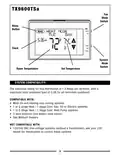
TO LOCK THE KEYPAD: The System Mode switch must be in either the Heat or
Cool position. Press the MENU button, then press the SCROLL button until “SET
KEYBOARD LOCK CODE” is shown, then press the OK button. The words “ENTER
CODE” will appear at the top of the screen, along with four digits at the left.
Select a 4-digit code that you would like to use for locking the thermostat. Press
the UP and DOWN buttons to change each digit individually, using the NEXT
button to cycle through which digit is selected. Pressing the OK button will lock
the thermostat touch panel using the 4-digit code that is shown on the screen,
and return to the Normal Run screen with a padlock shown to confirm that the
thermostat is now locked.
TO UNLOCK THE KEYPAD: Press the padlock icon, and the words “UNLOCK
KEYBOARD?” will appear at the top of the screen. Press OK to proceed with
entering the unlock code (or press the EXIT button to cancel). The words “ENTER
CODE” will appear at the top of the screen, along with four digits at the left. You
will need to enter the proper unlock code that was used for initially locking the
thermostat. Press the UP and DOWN buttons to change each digit individually,
using the NEXT button to cycle through which digit is selected. With the correct
lock code entered on the screen, pressing the OK button will unlock the
thermostat. If the code entered does not match the current keypad lock code,
the words “WRONG CODE” will flash briefly, and you may try to enter the correct
code again.
IF YOU FORGET YOUR KEYPAD LOCK CODE: The following steps can regain access
to the thermostat. Remove the front portion of the thermostat from the wall, and
briefly press the “HW RST” HARDWARE RESET button on the thermostat circuit
board. More information about the use of this button is described later in this
section.
AIR FILTER MONITOR: In most systems that use a blower fan and air ducts, there
is an air filter that is either replaceable or requires cleaning. The filter is usually
located in the air handler, where the blower fan is. This thermostat feature
assists you with keeping track of proper maintenance and/or periodic
replacement intervals for your system’s filter.
30

| General | Details |
|---|---|
| Name | LUX TX9600TSA Smart Temp Universal 7 Day Programmable Touchscreen Thermostat Instruction Manual |
| Make | LUX |
| Language | English |
| Filetype | PDF (Download) |
| File size | 0.24 MB |
 (1 votes, average: 5.00 out of 5)
 Loading...


LUX TX700U Universal Thermostat Instruction Manual

LUX PSP511A Smart Temp Electronic Thermostat Instruction Manual

LUX TX500Ub Non Programmable Thermostat Instruction Manual

LUX TX1500E Programmable Thermostat Instruction Manual

LUX CAG1500 SERIES Smart Temp Electronic Thermostat Instruction Manual

LUX PSP511A Series Programmable 5-2 Thermostat Instruction Manual

LUX PSPH521 Series Programmable Heat Pump Thermostat Instruction Manual

LUX DHP2120 Battery Powered Non Programmable Digital Heat Pump Thermostat Installation Guide

CH200SA Versatile Deluxe Low Voltage Thermostat Installation Guide

LUX TH10 Heating Only Mercury FREE Manual Thermostat Instruction Manual


EUROSTER 2006TXRX Wireless Programmable Thermostat Installation Guide

UNDERFLOOR HEATING WORLD UM5 Thermostat Instruction Manual

SALUS RT310i Internet Thermostat Installation Guide

Honeywell PRO 4110D Programmable Thermostat Installation Guide

CANPOL BABIES 77-053 4 in 1 Bottle Warmer and Sterilizer with Thermostat User Manual

ENGO CONTROLS EASYBATB Wired Thermostat User Guide

GENERAL LIFE FH104 Underfloor Heating Thermostat User Manual

tado ST02 Wired Smart Thermostat X Installation Guide

Cielo Smart Thermostat Eco Owner’s Manual

EUROTRONIC SPIRIT ZigBee Energy Saving Thermostat User Guide