
Home > LUX > LUX TX9600TSA Smart Temp Universal 7 Day Programmable Touchscreen Thermostat Instruction Manual
LUX TX9600TSA Smart Temp Universal 7 Day Programmable Touchscreen Thermostat Instruction Manual

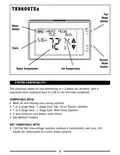




LCD DISPLAY BACKLIGHT: The display screen is lighted to assist viewing at
nighttime, or in locations with low light levels. A press of any area on the touch
panel will light the display for approximately 10 seconds. Any screen presses
that occur while the light is on will reset the 10-second timer, causing the screen
to remain illuminated for an additional 10 seconds.
TEMPERATURE OVERRIDE: While in the Normal Run screen, the set temperature
can be temporarily changed by pressing the Set Temperature digits, then
pressing the UP or DOWN buttons. The set temperature will return to the
programmed value stored in memory when the start time of the next upcoming
program period is reached (Morn, Day, Eve, Nite). While a Temporary Override is
in effect, the words “HEAT OVRRIDE” or “COOL OVRRIDE” will be shown in the
display screen. An Override may be cancelled by either pressing the HOLD
button two times, or by moving the mode switch to OFF, pausing briefly, then
switching back to the HEAT or COOL position. When in the Normal Run mode, the
display should say either “HEAT MODE” or “COOL MODE”.
MINIMUM RUN TIME: The thermostat has a default internal time delay of 5
minutes between load-on and load-off activations to prevent heating or cooling
system damage, which can occur from very frequent cycling. If heating or
cooling does not turn on right away with a manual change in set temperature,
please wait at least 5 minutes and the system should resume normal operation.
TEMPERATURE HOLD: A Temperature Hold is used for
maintaining a fixed set temperature. Once a Hold is
initiated, the thermostat will maintain the set
temperature indefinitely. A Hold may be used for
days, weeks, or even months at a time, as long as the
thermostat has adequate power. To enter Hold mode:
press the HOLD button one time and the words “HEAT
HOLD” or “COOL HOLD” will appear in the display, and
an additional bold frame will appear around the HOLD
button. To cancel a Hold, press the HOLD button one
more time. If a mains power failure occurs during a
Temperature Hold, the thermostat will continue to
remain in Hold mode even after the power comes back on.
HOLD = ON
HOLD = OFF
NOTE: If you plan to leave the thermostat in Hold mode for an extended duration
(unattended), it is advisable to install new Energizer® or DURACELL® "AA" size
alkaline batteries prior to leaving to ensure reliable operation of your heating and
cooling system.
23

| General | Details |
|---|---|
| Name | LUX TX9600TSA Smart Temp Universal 7 Day Programmable Touchscreen Thermostat Instruction Manual |
| Make | LUX |
| Language | English |
| Filetype | PDF (Download) |
| File size | 0.24 MB |
 (1 votes, average: 5.00 out of 5)
 Loading...

LUX TX700U Universal Thermostat Instruction Manual

LUX TX500Ub Non Programmable Thermostat Instruction Manual

LUX TX1500E Programmable Thermostat Instruction Manual

LUX CAG1500 SERIES Smart Temp Electronic Thermostat Instruction Manual

LUX PSP511A Smart Temp Electronic Thermostat Instruction Manual

LUX PSP511A Series Programmable 5-2 Thermostat Instruction Manual

LUX PSPH521 Series Programmable Heat Pump Thermostat Instruction Manual

LUX TH10 Heating Only Mercury FREE Manual Thermostat Instruction Manual

LUX DHP2120 Battery Powered Non Programmable Digital Heat Pump Thermostat Installation Guide

CH200SA Versatile Deluxe Low Voltage Thermostat Installation Guide


ADVENT AIR ACTH12 Digital LCD Thermostat Instruction Manual

GENERAL FH25S Underfloor Heating Thermostat Owner’s Manual

resideo T3 Programmable Thermostat Installation Guide

VENSTAR Fan Coil Thermostat T2100 / T2150 User Guide

nvent NUHEAT Signature Thermostat User Manual

GENERAL LIFE Mitra 260S RF Wireless Room Thermostat User Manual

COPELAND ST55 Sensi Smart Thermostat Instruction Manual

VASCO BHT-3000 Series Thermostat User Guide

BEOK CONTROLS TFT-LCD Heating Thermostat Instruction Manual

SALUS CONTROLS T105 Digital Programmable Thermostat User Guide