
Home > LUX > LUX TX9600TSA Smart Temp Universal 7 Day Programmable Touchscreen Thermostat Instruction Manual
LUX TX9600TSA Smart Temp Universal 7 Day Programmable Touchscreen Thermostat Instruction Manual





TEMPERATURE CALIBRATION DESCRIPTION: The internal temperature sensor in
this thermostat is accurately calibrated at the factory, and in most cases,
alterations to this setting should not be needed. The Temperature Calibration
feature allows you to manually offset the measured temperature by as much as
plus or minus 5°F (3°C) degrees from its original value. This feature can be
useful to match or synchronize this thermostat to another one or more, if multiple
thermostats are used in the same home.
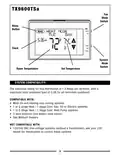
TO CHANGE THE SWING, OFFSET, AND CALIBRATION: Press the MENU button, then
press the SCROLL button until “SET/REVIEW SWING VALUE” is shown on the
screen, then press the OK button. The words “ADJUST VALUE SWING” will appear
at the top of the screen, along with a single flashing digit. Use the UP and DOWN
buttons to change the number value from #1 to #9. Press the NEXT button to
accept the Swing setting and proceed to the Offset setting.
After the Swing value has been accepted, the words “ADJUST VALUE OFFSET” will
appear at the top of the screen, along with a single flashing temperature digit.
Use the UP and DOWN buttons to change the number value between 0°F and 9°F
degrees (0°C to 5°C). The 0° (zero) degree setting will disable the 2nd heating
stage while in regular Heat mode. Press the NEXT button to accept the Offset
setting and proceed to the Calibration setting.
After the Offset value has been accepted, the words “ADJUST VALUE CAL” will
appear at the top of the screen, along with a single flashing temperature digit.
Use the UP and DOWN buttons to change the number value between –5°F and
+5°F (–3°C and +3°C). The 0° (zero) degree setting is the default value, and will
not alter the displayed room temperature from the measured reading. Press the
NEXT button to accept the Calibration setting and return back to the Swing
setting. You can keep pressing the NEXT button to review your three setting
values, or press the EXIT button to return to the Normal Run screen.
SETBACK FEATURE: The setback feature is similar to both a Temperature
Override and a Temperature Hold, in that both are used to maintain a fixed set
temperature instead of following a programmed daily routine. A Setback can be
considered the same as a Temperature Override, which can last for a longer
duration that you can adjust from 1-12 hours, or 1-30 days. By default, when a
Setback is activated in Heat mode, the set temperature used will be 5F (3C)
degrees lower than the current set temp. For Cool mode, the set temperature
used will be 5F (3C) degrees higher than the current set temp.
27

| General | Details |
|---|---|
| Name | LUX TX9600TSA Smart Temp Universal 7 Day Programmable Touchscreen Thermostat Instruction Manual |
| Make | LUX |
| Language | English |
| Filetype | PDF (Download) |
| File size | 0.24 MB |
 (1 votes, average: 5.00 out of 5)
 Loading...


LUX TX700U Universal Thermostat Instruction Manual

LUX TX500Ub Non Programmable Thermostat Instruction Manual

LUX TX1500E Programmable Thermostat Instruction Manual

LUX CAG1500 SERIES Smart Temp Electronic Thermostat Instruction Manual

LUX PSP511A Smart Temp Electronic Thermostat Instruction Manual

LUX PSP511A Series Programmable 5-2 Thermostat Instruction Manual

LUX PSPH521 Series Programmable Heat Pump Thermostat Instruction Manual

LUX DHP2120 Battery Powered Non Programmable Digital Heat Pump Thermostat Installation Guide

CH200SA Versatile Deluxe Low Voltage Thermostat Installation Guide

LUX TH10 Heating Only Mercury FREE Manual Thermostat Instruction Manual


GENERAL LIFE ARUNA HT300S Digital Room Thermostat User Manual

SALUS RT100 Electronic Room Thermostat Instruction Manual

GENERAL FH25S Underfloor Heating Thermostat Owner’s Manual

dahua TRV1 Smart Radiator Thermostat Owner’s Manual

GENERAL LIFE FH100S Floor Heating Room Thermostat User Manual

Micro-Air EasyTouch RV 353 Thermostat Instruction Manual

sensi ST765470 Thermostat Installation Guide

ENGO CONTROLS E10-MBUSW Wi-Fi Modbus Thermostat User Guide

WIFI Temp2 Battery Operated Thermostat Installation Guide

EPH CONTROLS COMBIPACK3 Wireless Non Programmable Thermostat User Guide