Home > EUROTRONIC > EUROTRONIC SPIRIT ZigBee Energy Saving Thermostat User Guide
EUROTRONIC SPIRIT ZigBee Energy Saving Thermostat User Guide
| General | Details |
|---|---|
| Name | EUROTRONIC SPIRIT ZigBee Energy Saving Thermostat User Guide |
| Make | EUROTRONIC |
| Language | English |
| Filetype | PDF (Download) |
| File size | 0.46 MB |

EUROTRONIC Sparmatic COMET Programmable Energy-Saving Radiator Thermostat User Manual

EUROTRONIC Programmable Energy-Saving Radiator Thermostat User Manual

eurotronic Comet Zigbee Energy Saving Radiator Thermostat Instruction Manual

EUROTRONIC COMET Programmable Energy Saving Radiator Thermostat User Manual

EUROTRONIC Spirit ZigBee Energy Saving Radiator Thermostat User Guide

EUROTRONIC SPIRIT ZigBee Energy Saving Thermostat User Guide Overview
Summary of Contents
- Page 1: Installation & operation guide
- Page 2: Scope of delivery Power configuration Warning instructions This is Spirit ZigBee Operating and display elements Commissioning Troubleshooting and error messages Cleaning Technical data Warranty information
- Page 3: Scope of delivery includes the Spirit ZigBee energy-saving thermostat, a screw, an adapter for Danfoss valves (RA / RAV / RAVL), and 2x AA batteries. If using a RAV adapter, you need to extend the valve stem with a RAV pin.
- Page 4: Warning This signal word designates a risk with an average degree of risk that can cause death or severe injury if it is not avoided. This signal word warns you against possible property damage. Safety information The Spirit ZigBee is designed for use in buildings. Only use the Spirit ZigBee as described in the operation guide. The Spirit ZigBee is only to be used in a dry and dust-free place and not be subjected to direct sunlight. Do not continue to use the device should it show obvious signs of damage. The Spirit ZigBee is not to be converted, modified or opened. An incorrect handling of batteries can result in an explosion. Leaking battery acid can cause chemical burns. Keep the thermostat and the packaging away from small children as they could swallow small parts and choke on them.
- Page 5: Spirit ZigBee is an energy-saving thermostat for the heating radiator that is compatible with the ZigBee wireless standard. As a heating radiator thermostat, the Spirit ZigBee uses the Home Automation Profile 1.2 as an HVAC compatible terminal device. Buttons include Minus, Boost, Plus, and a general Button. Pressing the Minus button reduces the target temperature by 0.5°. Pressing and holding the Minus button reduces the temperature continuously. Pressing the Plus button increases the target temperature by 0.5°. Pressing and holding the Plus button increases the temperature continuously. The general Button executes the displayed function and can switch to or terminate boost mode. Pressing the buttons for 10 seconds enables a works reset. Pressing the buttons together for 3 seconds activates or deactivates the child safety lock.
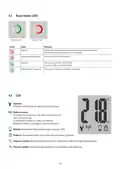
- Page 6: Boost button LEDs indicate various statuses. A flashing green light means an Over the Air update is in progress. A permanently illuminated red light indicates an error during operation. User confirmation is required when the red light is flashing. The boost button is used to start processes. A light illuminated for 5 seconds signifies successful process completion. The LCD provides information on mechanical processes and radio connections. The radio antenna indicates the status of the radio connection. The battery icon lights up when power is below 15%. The padlock icon shows when the child safety lock is activated.
- Page 7: Commissioning The Spirit ZigBee is not installed in a ZigBee network ex works. The Spirit ZigBee is to be added to an existing network before it can communicate with other ZigBee devices. This procedure is referred to as joining. The Spirit ZigBee can join any of the ZigBee networks, allowing it to operate with other ZigBee-certified devices. The Spirit ZigBee can also be removed from a network, a procedure referred to as leaving. All non-battery operated network nodes act as a repeater within the network, improving the reliability of the radio network. Both joining and leaving procedures are initiated by a primary ZigBee controller. Spirit ZigBee can communicate with other ZigBee devices in an encrypted form if supported. ZigBee devices can only join or leave the network if the primary controller is in the join/leave mode. Remove the cover of the battery compartment to insert the batteries, ensuring correct polarity.
- Page 8: Joining a ZigBee network involves several steps after inserting the batteries. The Spirit ZigBee is set in join mode at the factory, indicated by a flashing radio symbol on the LCD display. If the Spirit ZigBee successfully joins, the LCD displays a permanent radio symbol and the LED flashes green. The commissioning process continues by pressing the Boost button. Installation can proceed when the LCD displays INS. Refer to section 4.5 for mounting on the heating radiator. The join process is indicated by various messages on the display, including Join successful and Joining was successful. The Boost button will flash green and requires confirmation during the process. The installation is required as indicated by the display. Further instructions can be found on the next page.
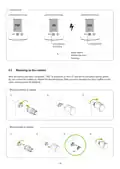
- Page 9: Joining error indicates that the join process is running but has failed. The Boost button can delete the error message. After successful joining, INS is displayed on the LCD and the Boost button flashes green. Do not confirm the button yet; follow the mounting steps. After mounting the Spirit ZigBee on the valve, continue with adapting. There are specific steps for mounting with and without an adapter.
- Page 10: Confirm the Boost button in order to start the adapting. Adaption process is running. Main screen with target temperature. Adapting error. Adaptation failed. Boost button deletes the error message.
- Page 11: Removing the Spirit ZigBee requires disconnecting it from the network by setting the ZigBee controller to leave mode. The device should display RES and the valve stem will move to the mounting position. If it does not leave automatically, manual removal from the ZigBee network is necessary. To restore factory settings, press the Boost, Plus, and Minis buttons until the LCD shows RES. Release the buttons only when RES is displayed. The reset process will begin shortly after releasing the buttons. The LCD will display PrP and the valve stem will move to the mounting position. Factory reset should only be used if the primary ZigBee controller is no longer functional.
- Page 12: Local operation involves the LCD displaying the setpoint temperature in thermostat mode or heating demand in actuator mode. The target temperature can be adjusted using the Plus and Minus buttons, affecting the setpoint temperature. Occupied and unoccupied heating setpoints can only be modified via RF. Changes to the target temperature take effect 10 seconds after the last adjustment. The target temperature range is between 5°C and 30°C. Increasing the temperature above a certain point activates Boost mode. The child safety lock can be activated or deactivated by pressing the Plus and Minus buttons for 3 seconds. Boost mode can be activated or deactivated by pressing the Boost button or the Plus button until ON appears. Comfort mode can be switched on using the Plus or Minus button if the device is not already in comfort mode.
- Page 13: Window open detection mode is activated if the temperature falls suddenly. The Spirit ZigBee switches to OFF mode for 15 minutes. The window open mode is automatically left after 15 minutes, restoring the setpoint temperature. The sensitivity of the window open detection can be configured. Window open detection can be terminated with a push of a button. Window open detection is not executed in actuator mode. It can be activated or deactivated by an external window contact. ZigBee operation includes various clusters and endpoints. Cluster IDs include 0x0000 for Basic and 0x0001 for Power Configuration. Additional clusters include Identify, Time, Thermostat, and OTA.
- Page 14: Basic cluster attributes include ZCL version, application version, stack version, and hardware version. Manufacturer name and model identifier are also key attributes. The date code follows a YYYYMMDD format. Power source and product code are important for identifying the device. The identify cluster includes the identify time attribute. Power configuration attributes include battery percentage remaining, battery size, and battery quantity. Each attribute has a specific data type and read/write status. Manufacturer reportable specifics indicate whether certain attributes are reportable. Default values are provided for each attribute. The document outlines the structure and specifications for various clusters and attributes.
- Page 15: Time cluster attributes include local temperature, heating demand, and setpoints. The thermostat's local temperature attribute is read-only. Heating demand is represented as a valve position percentage. Occupied and unoccupied heating setpoints can be adjusted. Minimum and maximum heat setpoint limits are defined. Remote sensing capabilities are included in the thermostat. Control sequence of operation specifies heating only mode. System mode can be set to TRV mode. Errors and current temperature set points are monitored. Host flags are available for configuration.
- Page 16: Application version attribute will be incremented with every release of the ZigBee microcontroller’s firmware. The heating demand attribute can only be read, representing the current valve position. 0 indicates the valve is closed, while 255 indicates the valve is opened. The error bit codes include various conditions such as valve not moving and movement too slow. Any value written to the thermostat heating setpoint attribute will automatically be copied to the current temperature setpoint attribute.
- Page 17: Attribute reporting details the configuration for various device types. The reporting interval for TRV is set to 43200 seconds (12 hours) with reports generated twice a day. Battery percentage remaining is indicated as 0. Local temperature and heating demand are reported every 1200 seconds and 600 seconds respectively. Occupied heating setpoint is reported with specific attribute IDs. Unoccupied heating setpoint reporting occurs on change or not at all. Errors are reported on change or not at all. Current temperature setpoint is reported similarly to other attributes. Host flags are also reported on change or not at all.
- Page 18: Troubleshooting and error messages section provides solutions for common issues. Battery icon indicates that batteries do not have enough power. Replace the batteries to resolve the issue. If the radiator does not heat up, check the boiler water temperature. Adjust the temperature of the boiler water if necessary. If the valve does not open, it may be calcified after a pause. Manually move the valve pin back and forth to fix it. If the radiator does not cool down, the valve may not close completely. Remove the Spirit ZigBee and check the valve seal for issues. The pressure piece can fall out if the device is not mounted correctly. Cleaning instructions emphasize avoiding submersion and abrasive materials.
- Page 19: Adapter options are available for all standard valve manufacturers. The Spirit ZigBee has specific technical data including dimensions of 56 x 68 x 89 mm. The article number for the Spirit ZigBee is 4260012711233. It operates on a supply voltage of 2 x 1.5V LR6/Mignon/AA batteries. The radio frequency is 2.4 GHz with a transmission power of +8 dBm. The weight of the device is 176g including batteries. It has a protection type of IP20 and a degree of contamination of 2. The threaded connector is M30 x 1.5mm. For technical support, customers can contact EUROtronic. Customer service hours are Monday to Friday from 8:00 to 16:30.
- Page 20: Warranty period is 24 months and commences on the date of purchase. Please retain the till receipt as proof of purchase. Defective energy-saving controllers can be sent to the service address postage paid during the warranty period. The repair or replacement does not result in the warranty period recommencing from the beginning. We only provide a warranty for the functioning of the devices and not for the functionality between the thermostat and the bottom part of the valve. Old devices are not to be disposed of in the household waste. Each consumer has a legal obligation to dispose of old devices separate from the household waste. Batteries and rechargeable batteries are not to be disposed of in the household waste. Dispose of the packaging after it has been sorted. EUROtronic Technology GmbH hereby declares that the Spirit ZigBee radiator thermostat is conform with directive 2014/53/EU.