
Home > EUROTRONIC > EUROTRONIC Spirit ZigBee Energy Saving Radiator Thermostat User Guide
EUROTRONIC Spirit ZigBee Energy Saving Radiator Thermostat User Guide
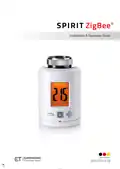









SPIRIT ZigBee®
Installation & Operation Guide
Made in Germany


| General | Details |
|---|---|
| Name | EUROTRONIC Spirit ZigBee Energy Saving Radiator Thermostat User Guide |
| Make | EUROTRONIC |
| Language | English |
| Filetype | PDF (Download) |
| File size | 0.48 MB |
 (1 votes, average: 5.00 out of 5)
 Loading...

EUROTRONIC Sparmatic COMET Programmable Energy-Saving Radiator Thermostat User Manual

EUROTRONIC Programmable Energy-Saving Radiator Thermostat User Manual

eurotronic Comet Zigbee Energy Saving Radiator Thermostat Instruction Manual

EUROTRONIC SPIRIT ZigBee Energy Saving Thermostat User Guide

EUROTRONIC COMET Programmable Energy Saving Radiator Thermostat User Manual

EUROTRONIC Spirit ZigBee Energy Saving Radiator Thermostat User Guide Overview
Summary of Contents
- Page 1: Installation & operation guide
- Page 2: Scope of delivery Power configuration Warning instructions This is Spirit ZigBee Operating and display elements Commissioning Troubleshooting and error messages Cleaning Technical data Warranty information
- Page 3: Scope of delivery includes the Spirit ZigBee energy-saving thermostat, a screw, an adapter for Danfoss valves (RA/RAV/RAVL), and 2x AA batteries. If using a RAV adapter, you need to extend the valve stem with a RAV pin.
- Page 4: Warning This signal word designates a risk with an average degree of risk that can cause death or severe injury if it is not avoided. This signal word warns you against possible property damage. The Spirit ZigBee is designed for use in buildings. Only use the Spirit ZigBee as described in the operation guide. The Spirit ZigBee is only to be used in a dry and dust-free place and not be subjected to direct sunlight. Do not continue to use the device should it show obvious signs of damage. An incorrect handling of batteries can result in an explosion. Prevent battery acid from coming into contact with the skin, eyes and mucous membranes. Keep the thermostat and the packaging away from small children as they could swallow small parts and choke on them. Consult a doctor without delay should batteries be swallowed.
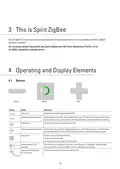
- Page 5: Spirit ZigBee is an energy-saving thermostat for the heating radiator that is compatible with the ZigBee wireless standard. As a heating radiator thermostat, the Spirit ZigBee uses the Home Automation Profile 1.2 as an HVAC compatible terminal device. Buttons include Minus, Boost, Plus, and a general Button. Pressing the Minus button reduces the target temperature by 0.5°. Pressing and holding the Minus button reduces the temperature continuously until the end value is reached. Pressing the Plus button increases the target temperature by 0.5°. Pressing and holding the Plus button increases the temperature continuously until the end value is reached. The general Button executes the displayed function and can switch to or terminate boost mode. Pressing the buttons for 10 seconds enables a works reset. Pressing the buttons together for 3 seconds activates or deactivates the child safety lock.
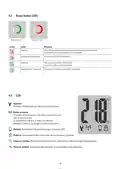
- Page 6: Boost button LEDs indicate various statuses. A flashing green LED signifies an Over the Air update of the controller software. A permanently illuminated red LED indicates an error when taking into operation. The user must provide confirmation for certain processes. A process is successfully completed when the LED is illuminated for 5 seconds. The spanner icon provides information on mechanical processes. The radio antenna icon indicates the status of the radio connection. The battery icon illuminates when power is below 15%. The padlock icon shows when the child safety lock is activated. Degrees Celsius and percent symbols illuminate in combination with target temperatures and setpoints, respectively.
- Page 7: Commissioning The Spirit ZigBee is not installed in a ZigBee network ex works. The Spirit ZigBee is to be added to an existing network before it can communicate with other ZigBee devices. This procedure is referred to as joining. Behaviour in the ZigBee network The Spirit ZigBee can join any of the ZigBee networks, allowing it to operate with other ZigBee-certified devices and applications from other manufacturers. The Spirit ZigBee can also be removed from a network again, referred to as leaving. Network security Spirit ZigBee can communicate with other ZigBee devices in an encrypted form if they support encrypted communication. ZigBee devices can only join or leave the network if the primary controller is in the join/leave mode. Inserting the Batteries Remove the cover of the battery compartment by pushing it upwards at the marked point and hanging it out. Ensure that the polarity is correct when inserting the batteries. The configuration of your Spirit ZigBee is retained should you replace the batteries later.
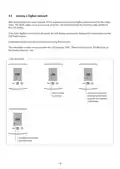
- Page 8: Joining a ZigBee network After the batteries have been inserted, PrP is displayed and the Spirit ZigBee prepares itself for the installation. The Spirit ZigBee is set in join mode at factory, indicated by a flashing radio symbol on the LCD display. If the Spirit ZigBee has successfully joined, the LCD display permanently displays the radio symbol and the LED flashes green. The commissioning process will continue by pressing the Boost button. The installation can be carried out when the LCD displays “INS”. Join successful. Joining was successful. Boost button flashes green and requires confirmation. Installation required. See next page.
- Page 9: Joining error indicates that the join process is running but has failed. The Boost button can delete the error message. After joining is completed, INS is displayed on the LCD and the Boost button flashes green. Do not confirm the button yet; follow the mounting steps. After mounting the Spirit ZigBee on the valve, continue with adapting. Instructions for mounting without an adapter and with an adapter are provided.
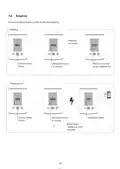
- Page 10: Confirm the Boost button in order to start the adapting. Adaption process is running. Main screen with target temperature. Adapting error. Adaptation failed. Boost button deletes the error message.
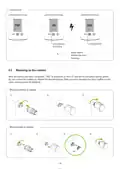
- Page 11: Removing the Spirit ZigBee involves disconnecting it from the network by setting the ZigBee controller to leave mode. The device should display RES and the valve stem will move to the mounting position. If it does not leave automatically, manual removal from the ZigBee network is necessary. To restore factory settings, press the Boost, Plus, and Minis buttons until the LCD reaches 10. Release the buttons when the LCD displays RES. The reset will begin shortly after. Only perform a factory reset if the primary ZigBee controller is no longer functional.
- Page 12: Local operation involves displaying the setpoint temperature in thermostat mode or heating demand in actuator mode. The target temperature can be adjusted using the Plus and Minus buttons, affecting the setpoint temperature. Occupied and unoccupied heating setpoints can only be modified via RF. The target temperature takes effect 10 seconds after the last adjustment. The entry range for the target temperature is between 5°C and 30°C. Increasing the temperature above a certain point activates Boost mode. The child safety lock can be activated or deactivated by pressing the Plus and Minus buttons for 3 seconds. Boost mode can be activated or deactivated by pressing the Boost button or the Plus button until ON appears. Comfort mode can be switched on using the Plus or Minus button if the device is not already in that mode.
- Page 13: Window open detection is activated if the temperature falls suddenly. The Spirit ZigBee switches to OFF mode for 15 minutes during window open detection. After 15 minutes, the window open mode is automatically left, and the setpoint temperature is restored. The sensitivity of the window open detection can be configured. Window open detection can be terminated with a push of a button. It is not executed in actuator mode (Manufacturer-Specific Mode). Window open detection can be activated or deactivated by an external window contact. ZigBee operation includes various clusters and endpoints. Cluster IDs include Basic, Power Configuration, Identify, Time, Thermostat, and OTA. The document contains technical specifications related to ZigBee operation.
- Page 14: Basic cluster attributes include ZCL version, application version, stack version, hardware version, manufacturer name, model identifier, version date code, power source, product code, and SW build ID. The identify cluster contains an attribute for identify time. Power configuration cluster attributes include battery percentage remaining, battery size, and battery quantity.
- Page 15: Time cluster attributes include local temperature, heating demand, and setpoints. The local temperature attribute is read-only, while the heating demand and calibration attributes are read/write. Occupied and unoccupied heating setpoints are defined with specific values. Minimum and maximum heat setpoint limits are established. Remote sensing capabilities are included in the thermostat cluster. Control sequence of operation is specified for heating only. System mode and TRV mode are adjustable settings. Errors and current temperature set points are monitored. Host flags provide additional configuration options.
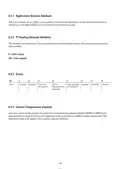
- Page 16: Application version attribute will be incremented with every release of the ZigBee microcontroller’s firmware. The heating demand attribute can only be read, representing the current valve position. 0 indicates the valve is closed, while 255 indicates the valve is opened. Error codes include issues such as valve not moving, valve adaptation failed, and movement too slow. Any value written to the thermostat heating setpoint attribute will be copied to the current temperature setpoint attribute.
- Page 17: Attribute reporting details the configuration and reporting intervals for various device types. Key attributes include battery percentage remaining, local temperature, heating demand, occupied heating setpoint, unoccupied heating setpoint, errors, current temperature setpoint, and host flags. Reporting intervals vary, with options for every 600 seconds or every 1200 seconds, and some attributes report only on change or not at all. The TRV (Thermostatic Radiator Valve) is a key device type mentioned in the reporting configuration. The reporting configuration includes a 12-hour interval for certain attributes. Each attribute has a specific attribute ID associated with it. The document outlines how often different parameters should be reported based on the device type. The configuration allows for flexibility in reporting based on user needs. Errors are reported on change, providing real-time updates on device status. The document emphasizes the importance of accurate reporting for effective device management.
- Page 18: Troubleshooting and error messages provide guidance for common issues. Battery icon indicates that batteries do not have enough power. Replace the batteries if the radiator does not heat up. Adjust the temperature of the boiler water if necessary. Remove the Spirit ZigBee to address valve issues. The radiator may not cool down if the valve does not close completely. Pressure piece can fall out if the device is not mounted correctly. Error messages can be cleared by pressing the Boost button. Ensure the device is correctly mounted on the radiator for proper function. Cleaning instructions emphasize avoiding submersion and abrasive materials.
- Page 19: Adapter options are available for all standard valve manufacturers. Technical data includes the designation Spirit ZigBee with an article number of 4260012711233. The dimensions are 56 x 68 x 89 mm. The supply voltage is 2 x 1.5V LR6/Mignon/AA. The radio frequency is 2.4 GHz with a transmission power of +8dBm. The weight is 176g including batteries. The protection type is IP20. The threaded connector is M30 x 1.5mm. For technical support, contact EUROtronic. Customer service hours are Monday to Friday from 8:00 to 16:30.
- Page 20: Warranty information includes a 24-month period starting from the date of purchase. Retain the till receipt as proof of purchase. Defective controllers can be sent for repair or replacement during the warranty period. The warranty covers device functionality but not compatibility with third-party valves. Technical data is warranted only with specific valve brands. After the warranty period, repairs incur costs. Consumers must dispose of old devices separately from household waste. Batteries and rechargeable batteries must also be disposed of properly. Packaging materials should be sorted and disposed of correctly. The product conforms to directive 2014/53/EU.

Honeywell CT50A Standard low volt Thermostat Instruction Manual

beok R6X Wireless Gas Boiler Thermostat Instruction Manual

MODINE DFG Mild Temperature Thermostat Installation Guide

GENERALLIFE MITRA 260S RF Wireless Room Thermostat User Manual

Danfoss ECtemp Touch Electronic Intelligent Timer Thermostat Installation Guide

Danfoss RET-MD Electronic Intelligent Dial Setting Thermostat Installation Guide

Honeywell Communicating Fan Coil Thermostat Instruction Manual

lae AC2-2 Two Stage Thermostat Instructions

ELMEKO THRV 22 Double-Thermostat Owner’s Manual

Danfoss VICUQ25H, 088N3663 Icon Programmable 230V Room Thermostat Installation Guide