
Home > EPH CONTROLS > EPH CONTROLS TRFPi2 COMBIPACK2 Programmable RF Thermostat Instruction Manual
EPH CONTROLS TRFPi2 COMBIPACK2 Programmable RF Thermostat Instruction Manual


Boiler Plus
Page 3 of 3
Operating Instructions
TRFPi2 Room Thermostat Wireless
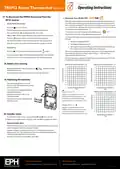
17. To disconnect the TRFPi2 thermostat from the
RF1A receiver
Optimum Start Mode (OS) Boiler Plus
When the thermostat is in Optimum Start mode, the thermostat will try to
reach the target temperature by the start time of the next switching time.
This is done by setting the Ti (time interval) on the thermostat in this menu
to 10, 15 or 20. This will allow the thermostat 10 mins, 15 mins or 20 mins to
increase the room temperature by 1°C.
On the TRFPi2 thermostat;
RF Connect
Press the
The thermostat will begin to search through the RF channels.
Press and hold the standby button for 10 seconds.
button.
20˚C
Ti can be set when OS is selected in the installer menu.
To return to main menu, press OK to select required Ti
‘AdL’ & ‘AdH’will flash intermittently on the screen of the thermostat.
Press the ‘OK’button twice to complete the unpairing process.
The thermostat TRFPi2 is now disconnected from the receiver RF1A.
Note: RF Connect may remain on the screen for a couple of minutes.
To achieve the target temperature when the program starts, the thermostat
will read:
1. The Room Temperature (RT)
2. The Setpoint Temperature (ST)
3. The Target Temperature Difference (TTD) is the difference between
the setpoint temperature and the room temperature .
On the RF1A
RESET
Press the
button and immediately press the
button.
The time (in minutes) that it will take to overcome (TTD) is called Optimum
Start Time (OST) and its maximum value is 3 hours = 180 mins. This is
subtracted from the start time.
Connect
The red and green lights will flash quickly followed by a solid red light.
The RF1A receiver is now disconnected from the TRFPi2 thermostat.
As the temperature increases the thermostat will recalculate the OST if the
temperature is increasing too quickly.
18. Battery low warning
Optimum Start Control Graph with Ti = 20
Optimum Start Control Graph with Ti = 15
0
0
20
40
15
30
When the batteries are almost empty, the
to flash on the screen.
symbol will begin
60
45
The batteries must now be replaced or the unit will shut down.
80
60
100
120
140
160
180
75
90
19. Replacing the batteries
105
120
135
Slacken the fastening screw on the
bottom of the thermostat with a philips
head screwdriver.
9
8
7
6
5
4
3
2
1
9
8
7
6
5
4
3
2
1
Target Temperature Difference ˚C
TTD
Target Temperature Difference ˚C
TTD
The thermostat is hinged and can be
opened 180 degrees.
Optimum Start Control Graph with Ti = 10
Example when Ti = 20
0
Replace the batteries with 2 x AA
Alkaline batteries.
Program 1 on the thermostat is 21°C for
06:30am and the room temperature is 18°C.
The thermostat will start the heating at
05:30am to reach 21°C for 06:30am @ Ti=20.
10
20
30
40
50
60
70
80
90
Close the thermostat and tighten the
fastening screw.
Example when Ti = 10
Program 1 on the thermostat is 21°C for
06:30am and the room temperature is 18°C.
The thermostat will start the heating at
06:00am to reach 21°C for 06:30am @ Ti=10.
9
8
7
6
5
4
3
2
1
20. Installer menu
Target Temperature Difference ˚C
TTD
To access the installer menu, you must hold OK and for 5 seconds.
When in the installer menu, press
or
and OK to navigate and select.
Normal Mode (Nor)
When the thermostat is in Normal mode, the thermostat will try to reach the
target temperature after the program changes.
Example: Program 1 on the thermostat is 21°C for 06:30am and the room
temperature is 18°C. The thermostat will start the heating at 06:30am and the
room temperature will start to increase then.
To return to main menu, press OK to select Nor
EPH Controls Ireland
EPH Controls UK
20230123_TRFPi2_OpIns_PK

| General | Details |
|---|---|
| Name | EPH CONTROLS TRFPi2 COMBIPACK2 Programmable RF Thermostat Instruction Manual |
| Make | EPH CONTROLS |
| Language | English |
| Filetype | PDF (Download) |
| File size | 0.34 MB |
 (1 votes, average: 5.00 out of 5)
 Loading...

EPH CONTROLS eTRV-HW Smart Cylinder Thermostat User Guide

EPH CONTROLS eTRV-HW Smart Hot Water Thermostat Instruction Manual

EPH CONTROLS eTRV Smart Radiator Thermostat Instruction Manual

EPH CONTROLS CDTP2 Hardwired Room Thermostat Instruction Manual

EPH CONTROLS 20221026 RFRA – RF Room Thermostat Instruction Manual

EPH Controls CDT2-24 24V Room Thermostat Installation Guide

EPH CONTROLS RFCA RF Cylinder Thermostat Instruction Manual

EPH CONTROLS PR092K7 RF Cylinder Thermostat Instruction Manual

EPH CONTROLS COMBIPACK2 Smart Thermostat with Automation and Optimum Start Instructions

EPH CONTROLS CRT2 Room Thermostat Instruction Manual


ESP ECSPST Fort Programmable Thermostat User Manual

Danfoss RMT-24 Room Thermostat Installation Guide

GENERALLIFE MITRA 220 RF Wireless Room Thermostat User Manual

COMFORT SENTRY OH-522 Programming Thermostat Instruction Manual

HEATIT Z-TRM3 Thermostat User Guide

EUROTRONIC Programmable Energy-Saving Radiator Thermostat User Manual

BEOK CONTROLS TDS75 Touch Screen Thermostat Instruction Manual

VIVE TP-N-751 Programmable Thermostat Installation Guide

heatmiser neoStat-Pro Smart Thermostat Instruction Manual

GENERAL Life FH254S Underfloor Heating Thermostat User Manual