
Home > EPH CONTROLS > EPH CONTROLS PR092K7 RF Cylinder Thermostat Instruction Manual
EPH CONTROLS PR092K7 RF Cylinder Thermostat Instruction Manual
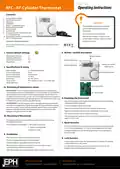


Page 1 of 2
Operating Instructions
RFC - RF Cylinder Thermostat
Contents
1. Factory default settings
2. Specification & wiring
3. Mounting
CAUTION!
4. Installation
5. Button / symbol description
6. Resetting the thermostat
7. Boost function
8. Lock function
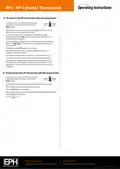
9. To connect the RFC thermostat to the
R_7-RF programmer
Only qualified electricians or authorised
service staff are permitted to open the
thermostat.
Ensure that this wireless enabled
thermostat is installed 1 metre from any
metalic object, television, radio or wireless
internet transmitter.
10. To disconnect the RFC thermostat from
the R_7-RF programmer
Important: Keep this document
Prior to setting the thermostat, it is neccessary to complete all required settings described
in this section.
5. Button / symbol description
1. Factory default settings
Temperature indicator:
Switching differential:
In built frost protection:
Keypad lock:
°C
Wireless symbol
5°C
5°C
Off
Heating ON symbol
Water temperature
Battery low symbol
Boost button
2. Specifications & wiring
Power Supply:
2 x AAA Alkaline Battery
Set point handwheel
Power consumption:
Battery replacement:
Temp. Control Range:
Dimensions:
50 uA
Once per year
10...90°C
84 * 84 * 30mm
Temp. sensor:
NTC 10K Ohm @ 25°C - 1.5m probe type
°C
Temp. indication:
Code button
3a Mounting of temperature sensor
ON CYLINDER: To ensure accurate control of your cylinder, the temperature
sensor should be mounted on the bottom 1/3 of the cylinder. It is essential that
the sensing element is in direct contact with the cylinder and that there is no
insulation between it and the cylinder. 60°C is the temperature level required in
order to prevent the build up of legionella bacteria. The temperature sensor can
be fixed to the cylinder using the provided foil tape.
Reset button
6. Resetting the thermostat
Press the
button on the bottom of the thermostat, the front housing
will detach from the baseplate.
ON PIPEWORK: To ensure accurate control, the temperature sensor should be
mounted on the pipework as tightly as possible. It is essential that the sensing
element is in direct contact with the pipework and that there is no insulation
between it and the pipework. The temperature sensor can be fixed to the
pipework using the provided foil tape.
Insert the batteries into the thermostat.
Press the reset button on the PCB, ‘NO’will flash on the screen.
Rotate the hand wheel clockwise until ‘YES’appears on the screen.
Press the hand wheel once to confirm the setting.
3b Mounting of thermostat
The thermostat has now been reset and the current temperature will
appear on the screen.
The thermostat should be mounted in a position that will make reading
the display conventient.
7. Boost function
The thermostat can be fitted to: 1. Recessed conduit boxes
2. Surface mounting boxes
Press the boost button once, twice or three times to boost the heating for
1, 2 or 3 hours respectively. +1H, +2H or +3H will appear on the screen.
3. Directly on walls
The boost function will override the programmer if the programmer is
timed to be Off.
4. Installation
Press the button on the bottom of the thermostat.
The front housing will detach from the baseplate.
Insert the batteries (provided) into the thermostat.
8. Lock function
To lock the thermostat, press the hand wheel for 10 seconds. The keypad
symbol will appear on the screen.
Mount the unit as described in section 3. Ensure the cable sensor is
connected to terminals Con 3 and Con 4.
To unlock the thermostat, press the hand wheel for 10 seconds. The
keypad symbol will disappear from the screen.
Offer the baseplate up to the thermostat. Snap it into position to close.
EPH Controls Ireland
EPH Controls UK
20221019_RFC-Renesas(PR092K7)_OpIns_PK


| General | Details |
|---|---|
| Name | EPH CONTROLS PR092K7 RF Cylinder Thermostat Instruction Manual |
| Make | EPH CONTROLS |
| Language | English |
| Filetype | PDF (Download) |
| File size | 0.12 MB |
 (1 votes, average: 5.00 out of 5)
 Loading...

EPH CONTROLS eTRV-HW Smart Cylinder Thermostat User Guide

EPH CONTROLS eTRV-HW Smart Hot Water Thermostat Instruction Manual

EPH CONTROLS eTRV Smart Radiator Thermostat Instruction Manual

EPH CONTROLS CDTP2 Hardwired Room Thermostat Instruction Manual

EPH CONTROLS 20221026 RFRA – RF Room Thermostat Instruction Manual

EPH Controls CDT2-24 24V Room Thermostat Installation Guide

EPH CONTROLS RFCA RF Cylinder Thermostat Instruction Manual

EPH CONTROLS COMBIPACK2 Smart Thermostat with Automation and Optimum Start Instructions

EPH CONTROLS CRT2 Room Thermostat Instruction Manual

EPH CONTROLS CDC2 Cylinder Room Thermostat User Guide

EPH Controls PR092K7 Manual: Questions and Answers
EPH Controls PR092K7 specifications
| Power supply | 2 x AAA Alkaline Battery |
| Differential | 5°C |
| Dimensions | 84 * 84 * 30mm |
Can EPH Controls work with RF programmers, or is wireless pairing not supported?
The thermostat pairs wirelessly with RF programmers via the Code button on the PCB. It displays the zone it's paired to, such as r1 or r2. Instruction Manual, p. 2
What do the symbols on the EPH Controls PR092K7 display mean?
| Symbol | Meaning |
|---|---|
| Wireless symbol | RF pairing active |
| Heating ON symbol | Heating is running |
| Battery low symbol | Replace batteries soon |
| Keypad symbol | Thermostat is locked |
What does the +1H, +2H or +3H message on a thermostat display indicate?
The boost function is active. Each press adds one hour of heating override, up to three hours maximum. Instruction Manual, p. 1
How do I reset the EPH Controls thermostat to factory settings?
Access the reset button on the PCB behind the front housing.
- Press the button on the bottom to detach the front housing.
- Press the reset button on the PCB. 'NO' will flash on screen.
- Rotate the hand wheel clockwise until 'YES' appears.
- Press the hand wheel once to confirm.
- The current temperature will display when reset is complete. Instruction Manual, p. 1
What does the Code button on the EPH Controls PR092K7 do?
The Code button initiates wireless pairing between the thermostat and an RF programmer. It is located inside the housing on the Printed Circuit Board. Instruction Manual, p. 2
EPH Controls PR092K7 compared with other EPH Controls thermostats
| Specification | EPH Controls PR092K7 | EPH Controls 2023-03-10 RFR-RF | EPH Controls CP4B | EPH Controls RFRA |
|---|---|---|---|---|
| Power supply | 2 x AAA Alkaline Battery | 2 x AAA Alkaline Battery | 2 x AA Alkaline Batteries | 2 x AAA Alkaline Battery |
| Differential | 5°C | 0.4°C | 0.4˚C | 0.2°C |
| Dimensions | 84 * 84 * 30mm | 84 * 84 * 30mm | 130 x 99 x 25mm | 84 * 84 * 30mm |
More EPH Controls thermostat manuals

hansgrohe AXOR STARCK Concealed Thermostat with Shut Off Valve Instruction Manual

BOSCH BCC110 Connected Control Wi-Fi Thermostat User Manual

HWGL2 Hotwire Thermostat Instructions

HYSEN HY518WE WIFI Digital Heating Thermostat User Manual

sensi 1F87U-42WF Smart Thermostat Installation Guide

WhisperKOOL Phantom 24V Thermostat Conversion Kit Installation Guide

DELTA DORE TYBOX 1127 Programmable Thermostat User Guide

PBU 2 Degrees 2 Save Thermostat User Manual

tecnoswitch EN60730-1 Electronic Recessed Thermostat User Guide

EMOS P56201UF Floor Heating Thermostat Instruction Manual