
Home > EPH CONTROLS > EPH CONTROLS TRFPi2 COMBIPACK2 Programmable RF Thermostat Instruction Manual
EPH CONTROLS TRFPi2 COMBIPACK2 Programmable RF Thermostat Instruction Manual


Boiler Plus
Page 2 of 3
Operating Instructions
TRFPi2 Room Thermostat Wireless
12. Temporary override (Manual)
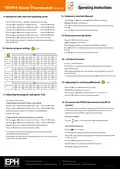
9. Setting the date, time and operating mode
Press the
or
buttons to adjust the temperature setpoint.
Set
Press the
Press the
Press the
Press the
Press the
Press the
Press the
Press the
button once. ‘Set Year’will appear on the screen.
‘Manual’will appear on the screen.
or
or
or
or
or
or
buttons to adjust the year.
Press the ‘OK’button.
Press ‘OK’or after 5 seconds the thermostat will operate in this temporary
override.
buttons to adjust the month. Press the ‘OK’button.
buttons to adjust the day.
buttons to adjust the hour.
Press the ‘OK’button.
Press the
button to return to automatic mode.
Press the ‘OK’button.
buttons to adjust the minute. Press the ‘OK’button.
13. Permanent override (Hold)
buttons to adjust from 5/2d to 7d or 24h mode.
Press the ‘+1hr’button for 3 seconds.
button or wait 30 seconds and the thermostat will return to
normal operation.
‘Hold’will appear on the screen.
Press the
or
buttons to adjust the temperature setpoint.
Press ‘OK’or after 5 seconds the thermostat will operate in this permanent
override.
10. Factory program setting
5 / 2d
Press the
button to return to automatic mode.
5/2D
P1
P2
P3
P4
P5
P6
06:30
21˚C
08:00
21˚C
08:00
18˚C
10:00
18˚C
12:00
21˚C
12:00
21˚C
14:00
18˚C
14:00
18˚C
17:30
21˚C
17:30
21˚C
22:00
16˚C
23:00
16˚C
Mon-Fri
Sat-Sun
14. +1hr Boost function
Press the ‘+1hr’button once.
Press the
or
button to select your desired boost temperature.
7D
Press the ‘OK’button.
P1
P2
P3
P4
P5
P6
The thermostat will operate in this mode for one hour before returning to
automatic mode.
06:30
21˚C
08:00
21˚C
08:00
18˚C
10:00
18˚C
12:00
21˚C
12:00
21˚C
14:00
18˚C
14:00
18˚C
17:30
21˚C
17:30
21˚C
22:00
16˚C
23:00
16˚C
Mon-Fri
Sat-Sun
To cancel the boost mode at anytime, press the button or the +1hr button.
15. Adjusting the switching differential
0.4˚C
24H
P1
P2
P3
P4
P5
P6
Everyday
06:30
08:00
12:00
14:00
17:30
22:00
Press the ‘OK’and ‘+1hr’buttons for 5 seconds.
21˚C
18˚C
21˚C
18˚C
21˚C
16˚C
‘H On 0.4˚C’will appear on the screen.
Press the
or
buttons to adjust from 0.2, 0.4, 0.6, 0.8 or 1˚C.
11. Adjusting the program settings for 5/2d
Press the ‘OK’ button to return to normal operation.
Set
Press the
button twice.
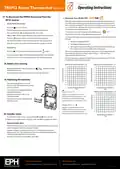
16. To connect the TRFPi2 thermostat to the RF1A
receiver
Programming for Monday to Friday is now selected.
Press the
Press the
or
or
buttons to adjust the P1 time. Press the ‘OK’button.
buttons to adjust the P1 temp. Press the ‘OK’button.
Please note, If you are installing a CombiPack2 the TRFPi2 thermostat and
the RF1A receiver will have a pre-established RF connection so it is not
necessary to carry out the RF connection process below.
Repeat this process to adjust P2 to P6 times and temperatures.
Set
Press the
button.
On the RF1A receiver:
Programming for Saturday to Sunday is now selected.
Press the
Press the
or
or
buttons to adjust the P1 time. Press the ‘OK’button.
Press the
button. The red and green light will begin to flash.
buttons to adjust the P1 temp. Press the ‘OK’button.
Connect
Repeat this process to adjust P2 to P6 times and temperatures.
Press the button to return to automatic mode.
On the TRFPi2 thermostat:
RF Connect
Press the
button.
If 7 D mode is selected, you can program each day of the week with 6
individual times and temperatures.
The thermostat will begin to search through the RF channels.
Once an RF connection has been established the thermostat will show ‘r01’
on the LCD screen.
If 24H mode is selected, you can only program each day of the week with the
same 6 times and temperatures.
Press the ‘OK’button to finish the process.
The thermostat is now connected to the RF1A receiver.
‘RF Connect’appears on the screen.
EPH Controls Ireland
EPH Controls UK
20230123_TRFPi2_OpIns_PK

| General | Details |
|---|---|
| Name | EPH CONTROLS TRFPi2 COMBIPACK2 Programmable RF Thermostat Instruction Manual |
| Make | EPH CONTROLS |
| Language | English |
| Filetype | PDF (Download) |
| File size | 0.34 MB |
 (1 votes, average: 5.00 out of 5)
 Loading...

EPH CONTROLS eTRV-HW Smart Cylinder Thermostat User Guide

EPH CONTROLS eTRV-HW Smart Hot Water Thermostat Instruction Manual

EPH CONTROLS eTRV Smart Radiator Thermostat Instruction Manual

EPH CONTROLS 20221026 RFRA – RF Room Thermostat Instruction Manual

EPH CONTROLS CDTP2 Hardwired Room Thermostat Instruction Manual

EPH Controls CDT2-24 24V Room Thermostat Installation Guide

EPH CONTROLS RFCA RF Cylinder Thermostat Instruction Manual

EPH CONTROLS PR092K7 RF Cylinder Thermostat Instruction Manual

EPH CONTROLS COMBIPACK2 Smart Thermostat with Automation and Optimum Start Instructions

EPH CONTROLS RFC RF Cylinder Thermostat Instruction Manual


Honeywell RTH9580 Wi-Fi Color Touchscreen Programmable Thermostat User Guide

Honeywell Home T10 Programmable Smart Thermostat Installation Guide

REPTITRIP HMT16N Reptile Heating Mat With Digital Thermostat User Manual

Orbegozo FDR 65 Litres Adjustable Thermostat Instruction Manual

SASWELL SAS908XWHB-7 Thermostat User Manual

expert4house BHT-8000 Heating Thermostat User Guide

Moes M30 x 1.5 Smart Radiator Thermostat User Manual

sauermann TST Electronic Thermostat User Guide

Schneider Electric TC-2931 Changeover Thermostat Instruction Manual

Satel ART-210 Wireless Radiator Thermostat Instruction Manual