
Home > ENGO CONTROLS > ENGO CONTROLS E901-RF Programmable Wireless Thermostat Instruction Manual
ENGO CONTROLS E901-RF Programmable Wireless Thermostat Instruction Manual






6. Operation
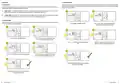
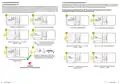
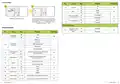
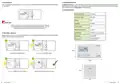
6.1.2 Economic mode
6.1 Manual mode
In the economic temperature mode, the thermostat is to maintain a reduced (night) temperature. This is to ensure a more economical operation of the
heating system when, for example, you are away from home. The economic temperature level is indicated by the moon icon. To set the economic (night)
temperature, see the steps below:
There are two temperature setpoint levels at our disposal. In manual mode chosen setpoint temperature level is maintained permanently until user
changes operation mode or set a different temperature for each level.
- Comfort Mode - in this mode, the thermostat is to maintain a constant day temperature. When the temperature is set manually, e.g. 23°C,
the thermostat maintains it until user switches to another operating mode or set a different temperature, e.g. 21°C.
1
2
- Economic Mode - in this mode, the thermostat is to maintain the reduced (night) temperature. When the temperature is set manually,
e.g. 17°C, the thermostat maintains it until user switches to another mode or set a different temperature, e.g. 19°C.
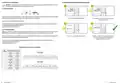
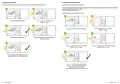
6.1.1 Comfort mode
In the comfort temperature mode, the thermostat is to maintain a constant day temperature. The comfort temperature level is indicated by sun icon.
To set the comfort temperature, see the steps below:
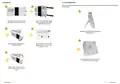
Press any button to highlight the display.
Press button to enter economic temperature mode.
The moon icon should be visible on the display.
1
2
3
4
Press any button to highlight the display.
Press button to enter comfort temperature mode.
The sun icon should be visible on the display.
Using or buttons set new economic temperature
value.
Confirm by button or wait until the thermostat will
approve your choice itself and display the main screen.
3
4
5
Using or buttons set new comfort temperature value.
Confirm by button or wait until the thermostat will
approve your choice itself and display the main screen.
3
5
The thermostat will return to the main screen and display
the actual room temperature.
3
The thermostat will return to the main screen and display
the actual room temperature.
14
15
E901RF FULL USER MANUAL
E901RF FULL USER MANUAL

| General | Details |
|---|---|
| Name | ENGO CONTROLS E901-RF Programmable Wireless Thermostat Instruction Manual |
| Make | ENGO CONTROLS |
| Language | English |
| Filetype | PDF (Download) |
| File size | 2.03 MB |
 (1 votes, average: 5.00 out of 5)
 Loading...

ENGO Controls EONE230W Internet Controlled Thermostat User Guide

ENGO CONTROLS EFAN-230W Fan Coil Thermostat User Guide

ENGO CONTROLS FAN-24W 24V Fan Coil Thermostat User Guide

ENGO CONTROLS EASY230W Non-Programmable Wired Thermostat User Guide

ENGO CONTROLS EONE230 Internet Controlled Thermostat User Guide

ENGO CONTROLS EONEBATW, EONEBATB Internet Controlled Thermostat User Manual

ENGO Controls E901WIFI Internet Wireless Thermostat User Guide

ENGO CONTROLS EONE-BATW, EONE-BATB Internet Controlled Thermostat User Guide

ENGO CONTROLS EFAN-24W Fan Coil Thermostat User Guide

ENGO CONTROLS EFAN-230W WIFI 230V Fan Coil Thermostat User Guide


ALARM ADC-T25 Smart Thermostat Installation Guide

Honeywell TH5220D1003 Heater Thermostat Owner’s Manual

DOMETIC Thermostat and Outdoor Products Instruction Manual

EZAIoT 723 IPS Wired Smart Thermostat Instruction Manual

nVent GM-TA Thermostat User Manual

Quality Heating Plug In Programmable WiFi Thermostat Instruction Manual

BlueLink 8205 Smart Wi-Fi Thermostat User Manual

Micro-Air EasyTouch RV 353 Touch Screen Thermostat Instruction Manual

GENERAL LIFE HT25 RF Wireless Room Thermostat User Manual

HASWILL ELECTRONICS STC-200 Thermostat User Guide