
Home > ENGO CONTROLS > ENGO CONTROLS E901-RF Programmable Wireless Thermostat Instruction Manual
ENGO CONTROLS E901-RF Programmable Wireless Thermostat Instruction Manual

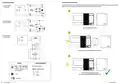
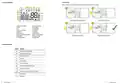
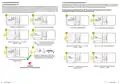



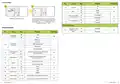


7.1 Transmission test
7
8
It is important to place the receiver and transmitter in places where nothing is interfering with the radio signal. The range of communication between
the transmitter and the receiver in an open area is up to 60m. The radio transmission is influenced by many factors that can shorten the working distance,
such as thick walls, drywall covered with aluminum foil, metal objects such as cabinets, general radio interference, etc. However, the range is sufficient
for most domestic applications. It is recommended that the radio transmission between devices has to be tested before mounting the thermostat to the
wall. The test can be performed by changing the set temperature, i.e. by activating or deactivating the heating.
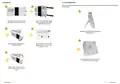
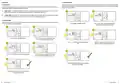
1
2
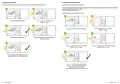
The flame icon will start to animate, which means that the
thermostat is sending a signal to heat.
Check that the orange LED on the
receiver is on. If so, it means that the
communication between the devices
is correct.
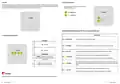
Check that the thermostat is not sending a signal to heat.
Press any button to highlight the display.
Press button to enter comfort temperature mode.
The sun icon should be visible on the display.
9
10
3
4
3
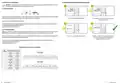
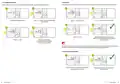
Set the temperature setpoint a few degrees lower than the
room temperature by repeating steps 1 to 5. Wait a few
seconds. The flames icon should stop animating...
...and the orange LED on the receiver
should go out.
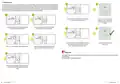
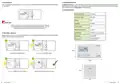
Using or buttons set new comfort temperature value.
Confirm by button or wait until the thermostat will
approve your choice itself and display the main screen.
Please note:
5
If the orange LED does not turn on / off as indicated by the transmitter flame icon, try moving the transmitter closer to the receiver and repeat all steps
from the beginning.
If it still doesn’t work, try the pairing process again.
The thermostat started sending a heating signal when the
screen went blank, which was signaled by the antenna
symbol.
30
31
E901RF FULL USER MANUAL
E901RF FULL USER MANUAL

| General | Details |
|---|---|
| Name | ENGO CONTROLS E901-RF Programmable Wireless Thermostat Instruction Manual |
| Make | ENGO CONTROLS |
| Language | English |
| Filetype | PDF (Download) |
| File size | 2.03 MB |
 (1 votes, average: 5.00 out of 5)
 Loading...

ENGO Controls EONE230W Internet Controlled Thermostat User Guide

ENGO CONTROLS EFAN-230W Fan Coil Thermostat User Guide

ENGO CONTROLS FAN-24W 24V Fan Coil Thermostat User Guide

ENGO CONTROLS EASY230W Non-Programmable Wired Thermostat User Guide

ENGO CONTROLS EONE230 Internet Controlled Thermostat User Guide

ENGO CONTROLS EONEBATW, EONEBATB Internet Controlled Thermostat User Manual

ENGO Controls E901WIFI Internet Wireless Thermostat User Guide

ENGO CONTROLS EONE-BATW, EONE-BATB Internet Controlled Thermostat User Guide

ENGO CONTROLS EFAN-24W Fan Coil Thermostat User Guide

ENGO CONTROLS EFAN-230W WIFI 230V Fan Coil Thermostat User Guide


Danfoss RTD 014G0251 Ally Radiator Thermostat User Guide

Carrier 33TWSPL-4 Wifi Stat Plus Thermostat Owner’s Manual

EPH Controls RFCP RF Cylinder Thermostat Instruction Manual

HYSEN HY510 WiFi Heating Thermostat Instruction Manual

PERRY TE541 Digital Thermostat User Manual

Honeywell PCR-100 Electronic thermostat Instruction Manual

BHT-001Series Round Thermostat User Guide

olympia electronics BS-830 Digital Electronic Thermostat Instruction Manual

DELTA DORE Tybox 5701FP Pilot Wire Thermostat User Guide

Beca BHT-9000 Smart Knob Thermostat User Guide