
Home > ENGO CONTROLS > ENGO CONTROLS E901-RF Programmable Wireless Thermostat Instruction Manual
ENGO CONTROLS E901-RF Programmable Wireless Thermostat Instruction Manual

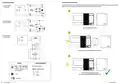
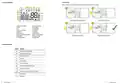
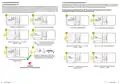



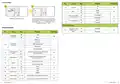


6.3 First type schedule programming
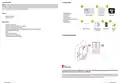
6.3.1 Default program settings (1-3)
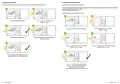
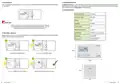
6.3.2 Choosing and programming user programs (4-9)
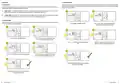
In order to program your own schedule its necessary to choose user program (4-9), because only user programs are editable. Then we must draw our own
timeline using Sun/Moon buttons. Thermostat will be switching between two setpoint temperatures (Comfort and Economy) which are represented by
Sun and Moon icons. Switching time is represented by timeline. See steps below how to programm your own schedule:
Within first type schedule mode there are 9 programs available. Programs 0 to 3 are factory-defined programs that cannot be changed. In this chapter you
will find detailed information on the built-in factory programs (1-3) in the E901. These are pre-programmed time settings for the comfort and economy
temperature that can be assigned to a selected day. To set up the program, see the steps below. The black squares on the timeline indicate the operating
time for the comfort temperature mode, while the absence of them - for the economy temperature mode. Under the chart of each program, there is time
(hour) when each mode is active. By default, program 1 is set for each day of the week.
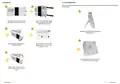
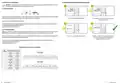
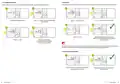
Example: below, program 4 will be defined for the MON - FR period with a comfort temperature from 8:00 to 16:00 and
economic from 0:00 to 8:00 and 16:00 to 0:00. Programming starts from 0:00.
1
2
1
2
Press any button to highlight the display.
Press
button to enter the programming mode.
PROG
Press any button to highlight the display.
Press
button to enter the programming mode.
PROG
3
4
3
4
Select the week period using or buttons.
Confirm by button.
Using or buttons choose program number (0-3).
Confirm by button. The thermostat will proceed to
program selection for the next day/days.
Select the week period (MON-FR) using or buttons.
Confirm by button.
Using or buttons choose program number 4.
5
6
5
6
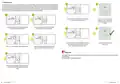
At the bottom of the display you can see the time line, i.e.
the program sequence. Comfortable temperature mode
(sun) is set from 6 to 8 and from 16 to 23 o’clock.
The thermostat will return to the main screen
saving the set program.
3
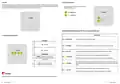
PLEASE NOTE!
Programs should be set for all days of the week.
From 8:00 to 16:00 set comfort temperature by pressing
several times button.
Use the button
several times to set the economic
temperature until 8:00.
18
19
E901RF FULL USER MANUAL
E901RF FULL USER MANUAL

| General | Details |
|---|---|
| Name | ENGO CONTROLS E901-RF Programmable Wireless Thermostat Instruction Manual |
| Make | ENGO CONTROLS |
| Language | English |
| Filetype | PDF (Download) |
| File size | 2.03 MB |
 (1 votes, average: 5.00 out of 5)
 Loading...

ENGO Controls EONE230W Internet Controlled Thermostat User Guide

ENGO CONTROLS FAN-24W 24V Fan Coil Thermostat User Guide

ENGO CONTROLS EFAN-230W Fan Coil Thermostat User Guide

ENGO CONTROLS EASY230W Non-Programmable Wired Thermostat User Guide

ENGO CONTROLS EONE230 Internet Controlled Thermostat User Guide

ENGO CONTROLS EONEBATW, EONEBATB Internet Controlled Thermostat User Manual

ENGO Controls E901WIFI Internet Wireless Thermostat User Guide

ENGO CONTROLS EONE-BATW, EONE-BATB Internet Controlled Thermostat User Guide

ENGO CONTROLS EFAN-24W Fan Coil Thermostat User Guide

ENGO CONTROLS EFAN-230W WIFI 230V Fan Coil Thermostat User Guide


Danfoss TP5001B-TP5001RF Programmable Room Thermostat User Guide

Honeywell 5000 Series Non Programmable Digital Thermostat Instruction Manual

SENNA-300-RF Digital Room Thermostat User Guide

BEOK TGW60 Wifi Heating Thermostat Instruction Manual

vtech W960 Installing E-Smart Thermostat Instruction Manual

Honywell UtilityPRO Series Thermostat User Manual

beca BAC-2000-ML Modulating Touch Button Thermostats User Guide

FRICO TD10 Electronic Thermostat Instructions

EZAIoT 723 IPS Wired Smart Thermostat Instruction Manual

Honeywell DT4R Wireless Modulating Room Thermostat Instruction Manual