×
- 1. Digital Thermostat (Menu Driven With Backlit Display → Flush-mounted Installation 3 Modules For Civil Series → Power Supply → Winter / Summer → Temperature Levels (t1 = Confort, T2 = Economy) → Input For Remote External Contact)
- 2. Device Presentation (Technical Data → Factory Settings → Key Functions → Display Features → Installation → Start The Thermostat)
- 3. Presentation (Warnings → Important)
- 4. Technical Data (Power Supply → Display And Key Back-lighting → Type Of Action, Disconnection And Device → Type Of Output → Degree Of Protection → Operating Mode → Erp Energy Classification)
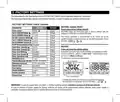
- 5. Factory Settings (Factory Settings Table (default) → Restore Installer Reset → Default → Restart → Room Temp. Correction → Temp. Adjustment Mode)
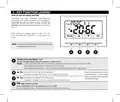
- 6. Key Function Legend (Display And Key Back-lighting → Multifunction Key Mode)
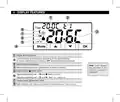
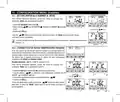
- 7. Display Features (Remote Thermostat Control (connected To An External Contact) → Heating Mode (winter) Active → Cooling Mode (summer) Active → Night Reduction Icon)
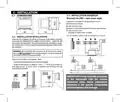
- 8. Installation (Dimensions → Installation Examples → Installation Regulations → Thermostat Installation: Independent - Fixed)
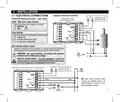
- 9. Installation (Electrical Connections → Attention! Disconnect The 230v~ Mains Voltage → Aux Terminals (remote Contact) → Multiple Installations → Connection To A Motorized Valve And To An External Contact)
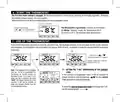
- 10. Start The Thermostat (Use Of The Thermostat → Setting The 't Set' Temperature Of The Current Level)
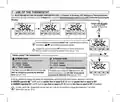
- 11. Use Of The Thermostat (Selecting And Setting The Desired Temperature Level → Normal Operation → Factory Preset T Set Temperatures → Winter Operation → Summer Operation)
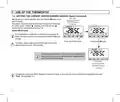
- 12. Use Of The Thermostat (Setting The Current Winter/summer Season (quick Command))
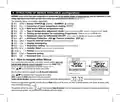
- 13. Structure Of Menus Available (configuration) (How To Navigate Within Menus → Season Winter (heating) / Summer → Correction Of Room Temperature Reading (offset) → Max And/or Min Set Temperature Locks → Type Of Temperature Adjustment Mode → Antifreeze Protection (inv))
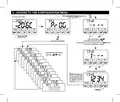
- 14. Access To The Configuration Menu (Normal Operation → Enter With Buttons → No Password Entered → Example Password Entered)
- 15. Configuration Menu (installer) (Setting Winter Or Summer → Correction Of Room Temperature Reading)
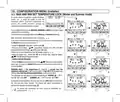
- 16. Configuration Menu (installer) (Max And Min Set Temperature Lock (winter And Summer Mode) → Max Temp. Lock Winter Mode → Min Temp. Lock Winter Mode → Max Temp. Lock Summer Mode → Min Temp. Lock Summer Mode → General Rule)
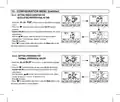
- 17. Configuration Menu (installer) (Type Temperature Adjustment Methods → Selection Of The Temperature Adjustment Mode (proportional Or Differential On/off))
- 18. Configuration Menu (installer) (Setting Period Duration For Modulating Proportional In Time → Setting Hysteresis For Thermal Differential On-off)
- 19. Configuration Menu (installer) (Set Off, Anti-freeze Protection (winter) Or Thermal Protection (summer) → Antifreeze Off Protection Range → Thermal Protection Off Range)
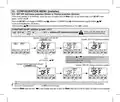
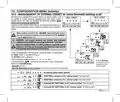
- 20. Configuration Menu (installer) (Management Of External Contact For Remote Thermostat Switching On/off → Multiple Installations)
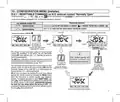
- 21. Configuration Menu (installer) (Resettable Command On N.o. External Contact 'normally Open' → Thermostat Operation → Contact Closure → Contact Opening → Resettable)
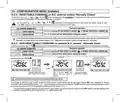
- 22. Configuration Menu (installer) (Resettable Command On N.c. External Contact 'normally Closed' → Non-resetcable Command On External N.o. Contact. Normally Open → Thermostat Operation → Contact Opening → Contact Closure)
- 23. Configuration Menu (installer) (Command Not Resettable On N.c. External Contact → Thermostat Operation → Display And Key Back-lighting)
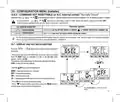
- 24. Configuration Menu (installer) (Brightness Adjustment (back-light))
- 25. Configuration Menu (installer) (Restore → Reset (restart))
- 26. Configuration Menu (installer) (Entering And Managing Passwords To Access The Menus → Password Modification Or Cancellation)
- 27. Configuration Menu (installer) (Keyboard Lock → Fault Signalling)
- 28. Possible Problems And Solutions (Disposal Of Old Electrical And Electronic Equipment)
×
PERRY TE541 Digital Thermostat User Manual
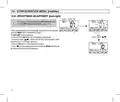
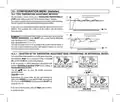
4 - DISPLAY FEATURES
1
2
8
3
7
6
5
4
Display Set temperature
1
Currently active set temperature depending on the desired setting:
t1 Confort or t2 Economy (saving) or OFF (antifreeze/thermal protection)
2
3
4
5
Detected room temperature
Note: further displays
are described in the
specific operation
paragraphs.
Remote thermostat control (connected to an external contact)
Heating mode ( Winter) active
Signalling operating user = ON and
Signalling operating user =Tand ON
Cooling mode (TSummer) active
fixed (e.g. boiler on)
86
fixed (e.g. conditioner on)
87
8
Night reduction icon (indicates the selection of the temperature set T: t2 «Economy»)
7
| General | Details |
|---|---|
| Name | PERRY TE541 Digital Thermostat User Manual |
| Make | PERRY |
| Language | English |
| Filetype | PDF (Download) |
| File size | 1.4 MB |


BEOK TDS75 Touch Screen Thermostat User Manual
KINGHOME WK-010WD1 Smart Thermostat Owner’s Manual

ELECTECK 701 Non-Programmable Digital Thermostat for Home Instruction Manual

HASWILL ELECTRONICS STC-200 Thermostat User Guide

HIVE SLT3 Thermostat User Guide

Somgoms TP528 WiFi Heating Room Thermostat User Guide

Roth Minishunt Plus Wireless Room Thermostat Installation Guide

Haswill Electronics STC-9200 Thermostat User Guide

Danfoss TPOne-RF Electronic Programmable Room Thermostat Installation Guide

Braeburn 8205-100-02 Universal Smart Wi-Fi Thermostat Instruction Manual
Table of Contents
- 1. Digital Thermostat - Menu Driven With Backlit Display →
- 2. Device Presentation - Technical Data →
- 3. Presentation - Warnings →
- 4. Technical Data - Power Supply →
- 5. Factory Settings - Factory Settings Table (default) →
- 6. Key Function Legend - Display And Key Back-lighting →
- 7. Display Features - Remote Thermostat Control (connected To A... →
- 8. Installation - Dimensions →
- 9. Installation - Electrical Connections →
- 10. Start The Thermostat - Use Of The Thermostat →
- 11. Use Of The Thermostat - Selecting And Setting The Desired Te... →
- 12. Use Of The Thermostat - Setting The Current Winter/summer Se... →
- 13. Structure Of Menus Available (configuration) - How To Naviga... →
- 14. Access To The Configuration Menu - Normal Operation →
- 15. Configuration Menu (installer) - Setting Winter Or Summer →
- 16. Configuration Menu (installer) - Max And Min Set Temperature... →
- 17. Configuration Menu (installer) - Type Temperature Adjustment... →
- 18. Configuration Menu (installer) - Setting Period Duration For... →
- 19. Configuration Menu (installer) - Set Off, Anti-freeze Protec... →
- 20. Configuration Menu (installer) - Management Of External Cont... →
- 21. Configuration Menu (installer) - Resettable Command On N.o. ... →
- 22. Configuration Menu (installer) - Resettable Command On N.c. ... →
- 23. Configuration Menu (installer) - Command Not Resettable On N... →
- 24. Configuration Menu (installer) - Brightness Adjustment (back... →
- 25. Configuration Menu (installer) - Restore →
- 26. Configuration Menu (installer) - Entering And Managing Passw... →
- 27. Configuration Menu (installer) - Keyboard Lock →
- 28. Possible Problems And Solutions - Disposal Of Old Electrical... →