×
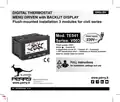
- 1. Digital Thermostat (Menu Driven With Backlit Display → Flush-mounted Installation 3 Modules For Civil Series → Power Supply → Winter / Summer → Temperature Levels (t1 = Confort, T2 = Economy) → Input For Remote External Contact)
- 2. Device Presentation (Technical Data → Factory Settings → Key Functions → Display Features → Installation → Start The Thermostat)
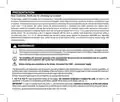
- 3. Presentation (Warnings → Important)
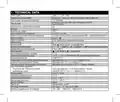
- 4. Technical Data (Power Supply → Display And Key Back-lighting → Type Of Action, Disconnection And Device → Type Of Output → Degree Of Protection → Operating Mode → Erp Energy Classification)
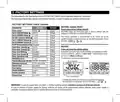
- 5. Factory Settings (Factory Settings Table (default) → Restore Installer Reset → Default → Restart → Room Temp. Correction → Temp. Adjustment Mode)
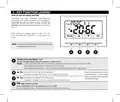
- 6. Key Function Legend (Display And Key Back-lighting → Multifunction Key Mode)
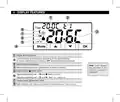
- 7. Display Features (Remote Thermostat Control (connected To An External Contact) → Heating Mode (winter) Active → Cooling Mode (summer) Active → Night Reduction Icon)
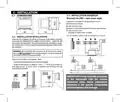
- 8. Installation (Dimensions → Installation Examples → Installation Regulations → Thermostat Installation: Independent - Fixed)
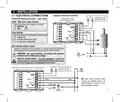
- 9. Installation (Electrical Connections → Attention! Disconnect The 230v~ Mains Voltage → Aux Terminals (remote Contact) → Multiple Installations → Connection To A Motorized Valve And To An External Contact)
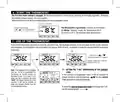
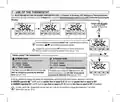
- 10. Start The Thermostat (Use Of The Thermostat → Setting The 't Set' Temperature Of The Current Level)
- 11. Use Of The Thermostat (Selecting And Setting The Desired Temperature Level → Normal Operation → Factory Preset T Set Temperatures → Winter Operation → Summer Operation)
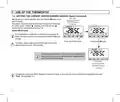
- 12. Use Of The Thermostat (Setting The Current Winter/summer Season (quick Command))
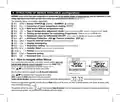
- 13. Structure Of Menus Available (configuration) (How To Navigate Within Menus → Season Winter (heating) / Summer → Correction Of Room Temperature Reading (offset) → Max And/or Min Set Temperature Locks → Type Of Temperature Adjustment Mode → Antifreeze Protection (inv))
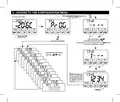
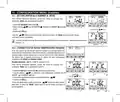
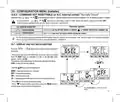
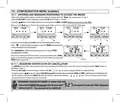
- 14. Access To The Configuration Menu (Normal Operation → Enter With Buttons → No Password Entered → Example Password Entered)
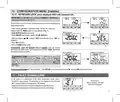
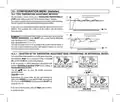
- 15. Configuration Menu (installer) (Setting Winter Or Summer → Correction Of Room Temperature Reading)
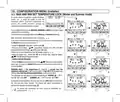
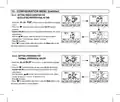
- 16. Configuration Menu (installer) (Max And Min Set Temperature Lock (winter And Summer Mode) → Max Temp. Lock Winter Mode → Min Temp. Lock Winter Mode → Max Temp. Lock Summer Mode → Min Temp. Lock Summer Mode → General Rule)
- 17. Configuration Menu (installer) (Type Temperature Adjustment Methods → Selection Of The Temperature Adjustment Mode (proportional Or Differential On/off))
- 18. Configuration Menu (installer) (Setting Period Duration For Modulating Proportional In Time → Setting Hysteresis For Thermal Differential On-off)
- 19. Configuration Menu (installer) (Set Off, Anti-freeze Protection (winter) Or Thermal Protection (summer) → Antifreeze Off Protection Range → Thermal Protection Off Range)
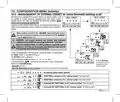
- 20. Configuration Menu (installer) (Management Of External Contact For Remote Thermostat Switching On/off → Multiple Installations)
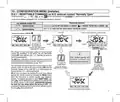
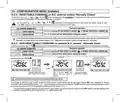
- 21. Configuration Menu (installer) (Resettable Command On N.o. External Contact 'normally Open' → Thermostat Operation → Contact Closure → Contact Opening → Resettable)
- 22. Configuration Menu (installer) (Resettable Command On N.c. External Contact 'normally Closed' → Non-resetcable Command On External N.o. Contact. Normally Open → Thermostat Operation → Contact Opening → Contact Closure)
- 23. Configuration Menu (installer) (Command Not Resettable On N.c. External Contact → Thermostat Operation → Display And Key Back-lighting)
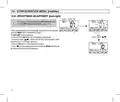
- 24. Configuration Menu (installer) (Brightness Adjustment (back-light))
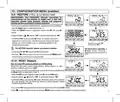
- 25. Configuration Menu (installer) (Restore → Reset (restart))
- 26. Configuration Menu (installer) (Entering And Managing Passwords To Access The Menus → Password Modification Or Cancellation)
- 27. Configuration Menu (installer) (Keyboard Lock → Fault Signalling)
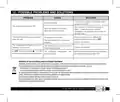
- 28. Possible Problems And Solutions (Disposal Of Old Electrical And Electronic Equipment)
×
PERRY TE541 Digital Thermostat User Manual
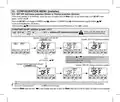
9 - ACCESS TO THE CONFIGURATION MENU
With previously entered password
(see par. 10.11 )
Normal operation
Press and hold
at least 6 sec.
1°
Enter with buttons
each digit confirming with OK
(in the event of an error, briefly press the Mode button
to return to the previous screen)
2°
No
password entered
scroll through the menus
with the
k
e
y
s
1°
2°
Example password entered
is displayed for
few seconds after
a
pressing the OK button
to indicate incorrect
password.
Screen only visible
if a password was
previously entered
Confirm
| General | Details |
|---|---|
| Name | PERRY TE541 Digital Thermostat User Manual |
| Make | PERRY |
| Language | English |
| Filetype | PDF (Download) |
| File size | 1.4 MB |


ideal HEATING Halo Combi RF Wireless Boiler Thermostat User Guide

EBECO EB-25 Regulator Thermostat Instruction Manual

Vine TJ-560 Smart Thermostat User Manual
SALUS TS600 Wireless Temperature Sensor Thermostat User Guide

technoswitch TE315 Recessed Touch Thermostat User Guide

EZAIoT 723 IPS Wired Smart Thermostat Instruction Manual

Smartica HY607B 3A Zig Bee Thermostat User Manual
Honeywell T874H Multistage Thermostat Instruction Manual

EUROLAMP HY08BW Digital Heating Smart Thermostat User Manual
SAVANT CLI-W220X-00 Multistat Smart Thermostat User Guide
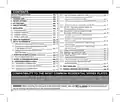
Table of Contents
- 1. Digital Thermostat - Menu Driven With Backlit Display →
- 2. Device Presentation - Technical Data →
- 3. Presentation - Warnings →
- 4. Technical Data - Power Supply →
- 5. Factory Settings - Factory Settings Table (default) →
- 6. Key Function Legend - Display And Key Back-lighting →
- 7. Display Features - Remote Thermostat Control (connected To A... →
- 8. Installation - Dimensions →
- 9. Installation - Electrical Connections →
- 10. Start The Thermostat - Use Of The Thermostat →
- 11. Use Of The Thermostat - Selecting And Setting The Desired Te... →
- 12. Use Of The Thermostat - Setting The Current Winter/summer Se... →
- 13. Structure Of Menus Available (configuration) - How To Naviga... →
- 14. Access To The Configuration Menu - Normal Operation →
- 15. Configuration Menu (installer) - Setting Winter Or Summer →
- 16. Configuration Menu (installer) - Max And Min Set Temperature... →
- 17. Configuration Menu (installer) - Type Temperature Adjustment... →
- 18. Configuration Menu (installer) - Setting Period Duration For... →
- 19. Configuration Menu (installer) - Set Off, Anti-freeze Protec... →
- 20. Configuration Menu (installer) - Management Of External Cont... →
- 21. Configuration Menu (installer) - Resettable Command On N.o. ... →
- 22. Configuration Menu (installer) - Resettable Command On N.c. ... →
- 23. Configuration Menu (installer) - Command Not Resettable On N... →
- 24. Configuration Menu (installer) - Brightness Adjustment (back... →
- 25. Configuration Menu (installer) - Restore →
- 26. Configuration Menu (installer) - Entering And Managing Passw... →
- 27. Configuration Menu (installer) - Keyboard Lock →
- 28. Possible Problems And Solutions - Disposal Of Old Electrical... →