
PERRY TE541 Digital Thermostat User Manual
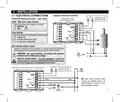
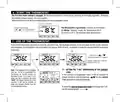
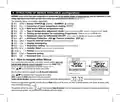
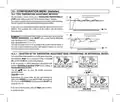
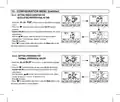
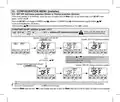
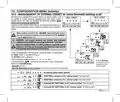
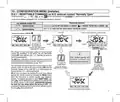
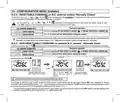
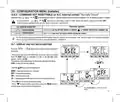
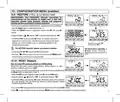


8 - STRUCTURE OF MENUS AVAILABLE (configuration)
WARNING: access to the Prog menu (configuration) is recommended for the qualified installer or experienced user since the modification of some
settings might affect correct system operation. Access to the menu can be password-protected (see par. 10.11 ).
The following menus are available sequentially:
1
2
3
4
5
6
7
8
9
10
= Season WINTER (heating) / SUMMER
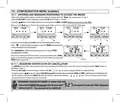
= Correction of room temperature reading (OFFSET)
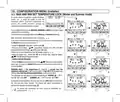
= MAX and/or MIN set temperature loks
= Type of temperature adjustment mode: Proportional modulating «PrOP» (Default) or Differential ON /OFF «On:OF»
(cooling)
( if Prop has been set in the SEt rEG menu )
= Setting period duration for modulating Proportional
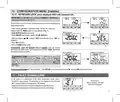
= Hysteresis value for Differential ON/OFF (Screen visible if the SEt rEG menu has been set to On:OF)
= Antifreeze Protection (INV ) Thermal protection (EST
= Input for external contact (deactivating the thermostat remotely)
= Display backlighting
)
= Brightness setting (menu visible if backlighting has not been switched off)
= Installer Reset (returns the device to factory settings)
11
12
13
14
= Restart (does not delete entered settings)
= Password setting
= Keyboard lock (menu only visible if a Password has been entered)
Normal stand-by
device operation
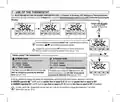
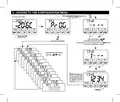
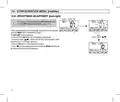
8.1 - How to navigate within Menus
From normal thermostat operation (with button symbols visible), press and
hold the Mode button for at least 6 seconds to access the PROG menu.
Access to menus can be password-protected (see par. 10.11 ).
Press
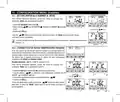
When the desired menu item is displayed, press OK, the current setting flashes,
press to change the chosen menu parameter or setting.
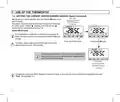
NOTE: pressing the Mode button returns to the previous screen.
Confirm with the OK button (the display shows a clockwise rotation of the following segments
Proceed to change another parameter or briefly press the Mode button to exit the menus and return to normal operation of the device, the display briefly
to scroll through the various menu items.
Normal operation reactive device
within 6 sec. press desired key
Briefly press a button
to indicate successful saving.
shows the flashing message
.
The automatic exit from the menus «
returns to normal operation, any unconfirmed last modification will not be retained..
» is also obtained when 60 seconds (Time-out) have elapsed since the last key was pressed, the thermostat
13

| General | Details |
|---|---|
| Name | PERRY TE541 Digital Thermostat User Manual |
| Make | PERRY |
| Language | English |
| Filetype | PDF (Download) |
| File size | 1.4 MB |
 (1 votes, average: 5.00 out of 5)
 Loading...


MI-HEAT MST1 Room Thermostat for Underfloor Heating User Manual

Vaillant VRC 700 Programmable Weather Compensating Thermostat Owner’s Manual

Roth 1135006445 Wireless Room Thermostat Touchline 230 V Instruction Manual

RATE R8 Weekly Programmable Handwheel Thermostat Instruction Manual

BEOK CONTROLS TGT70 WIFI Fan Coil Thermostat Owner’s Manual

Danfoss CAS 178 Thermostat Installation Guide
MClimate MC-LW-FCT-01 LoRaWAN Fan Coil Thermostat User Manual

stelpro STZW402 ELECTRONIC THERMOSTAT SMART HOME User Guide

COOKING PERFORMANCE GROUP 351030208 Retrofit Thermostat Instructions

Garza 401267C-401267G Smart Home Wi-fi Smart Thermostat Instruction Manual