Home > MClimate > MClimate MC-LW-FCT-01 LoRaWAN Fan Coil Thermostat User Manual

MClimate MC-LW-FCT-01 LoRaWAN Fan Coil Thermostat User Manual

MClimate Fan Coil Thermostat LoRaWAN®  
User manual  
GeneralDetails
NameMClimate MC-LW-FCT-01 LoRaWAN Fan Coil Thermostat User Manual
MakeMClimate
LanguageEnglish
FiletypePDF (Download)
File size3.74 MB
Download PDF
1 Star2 Stars3 Stars4 Stars5 Stars (1 votes, average: 5.00 out of 5)
Loading...
MClimate MC-LW-V02 Smart Radiator Thermostat User Manual

MClimate MC-LW-FCT-01 LoRaWAN Fan Coil Thermostat User Manual
Get the free PDF manual for the MClimate MC-LW-FCT-01 LoRaWAN Fan Coil Thermostat User Manual and access setup steps, usage instructions, and troubleshooting tips. 👉 View online or download now to keep your thermostat running smoothly!

MClimate MC-LW-FCT-01 LoRaWAN Fan Coil Thermostat User Manual Overview

Summary of Contents

  • Page 1: MClimate Fan Coil Thermostat LoRaWAN® User manual
  • Page 2: MClimate Fan Coil Thermostat LoRaWAN® installation instructions are provided in multiple languages. To find out how to install the thermostat, scan the QR code or visit the link next to it. Extended documentation for the MClimate Fan Coil Thermostat LoRaWAN® is accessible via the QR code. For more product information and related issues, visit the specified website.
  • Page 3: What’s inside the box? Introduction Technical details, safety instructions, legal notices & compatibility Installation guide User interface guide Wall mounting plate Operating instructions Connectivity and smart building Wiring diagrams Power module
  • Page 4: Introduction Overview of the product The Fan Coil Thermostat (FCT) is a LoRaWAN Thermostat for 2- and 4-pipe Fan Coil Units, accommodating 1-3 speed or ECM fans. Ideal for building retrofitting, it enables room-by-room monitoring and control, enhances energy efficiency and has great potential to reduce heating/cooling expenses significantly. With its 4.2” e-ink fast refresh display, it allows end-users to change the target temperature and see current indoor conditions. Its fully open and transparent communication protocol allows seamless integration into different systems including MClimate Enterprise platform. Functions The MClimate FCT is a Class C LoRaWAN device, available for EU868, US915, AS923 and AU915 regions. This means that there’s real-time communication between the FCT and the LoRaWAN network - commands can be sent to the FCT and it will respond as soon as possible. MClimate’s ultimate aim is to help decarbonize buildings. The Fan Coil Thermostat unlocks great retrofitting opportunities - one can gain quick access to control and monitoring on a room-by-room basis in the building. MClimate FCT can be integrated into existing BMS and BAS systems. The MClimate Fan Coil Thermostat (FCT) can be used with various FCU configurations. Technical wiring diagrams for the different configurations are available further in the document.
  • Page 5: Technical specifications Designed and manufactured by MClimate in the EU. Dimensions: 105 x 115 x 23mm Weight: 220gr Legal Notices All information is subject to change without notice. Materials: ABS, PC, Stainless steel Radio frequency range: 863÷870MHz / 902-928MHz Power supply: 110-240VAC, 50/60Hz, 5mA Operating conditions: Operating temperature: 0°C to +50°C IP rating: IP31 (EN60529) Safety Instructions Indoor use only; for altitude up to 2000m.
  • Page 6: Installation guide Tools required include a T5 torx screwdriver and a small flat screwdriver. Before installation, commission the device on your LNS. The device will initiate a LoRaWAN join-procedure using SF12 once powered. Ensure ADR is enabled in your LNS and/or mark the device as static. A lower spreading factor improves communication intervals from the FCT to the LoRaWAN gateway. Open your LoRaWAN Network provider access panel to add the device. Use the supplied Serial Number, DevEUI, AppEUI (JoinEUI), and AppKey for the setup. Follow the installation instructions provided by your LoRaWAN Network provider. DevEUI, AppEUI (JoinEUI), and AppKey information can be found in the LoRaWAN credentials .csv file. The data provided in the example should not be used.
  • Page 7: Installation guide Danger of electrocution The removal of the device from the metal mounting bracket exposes parts which carry mains voltage. The unit should be opened only by a qualified electrician or by the manufacturer‘s service personnel. Before starting any work on the electrical connections, separate the unit from the mains power supply. Danger - Electrical voltage Contact with components carrying dangerous voltages can cause electric shock and result in property damage, serious injury, or death. Disconnect the device from the power supply before making any electrical connections. Insulate and secure all unused cables and wires before applying voltage to the thermostat. The following conditions must be met or observed during the installation. Connection may only be performed when the system is disconnected from the electrical supply.
  • Page 8: Mounting Do not mount on a wall in niches or bookshelves, behind curtains, above or near heat sources, or exposed to direct solar radiation. Mount about 1.5 m (5 feet) above the floor. The room thermostat must be mounted in a clean, dry indoor place and must not be exposed to drip or splash water. Do not mount the device on a metallic surface. Use only valve actuators rated for AC 230 V. Comply with local regulations to wire, protect and earth the thermostat. Disconnect power supply before removing the thermostat from the mounting plate. The AC 230 V mains line must have a circuit breaker with a rated current of no more than 10 A. Properly size the cables to the thermostat, fan and valve actuators for AC 230 V mains voltage. It is recommended to use a 6A circuit breaker for each external consumer to reduce the risk of fire and injury due to short-circuits.
  • Page 9: Turn off the power supply to the existing thermostat and remove the thermostat without disconnecting the cables. Find out what is the correct wiring diagram. Further in this document, you’ll find wiring diagrams for different types of Fan Coil Units compatible with the Fan Coil Thermostat. Correctly identifying the wiring diagram is of paramount importance for the correct working of the Fan Coil Thermostat. Remove the power module from the Fan Coil Thermostat by lifting it. When connecting any wires to the FCT terminals, please do not leave any stranded wires or exposed wire metal not fully in the terminal. Connect the wires according to the chosen wiring diagram. Re-insert the power module into the FCT and restore the power using the breaker. Enter the Installer’s menu by turning the device off first, then hold the reset button and the fan speed button for 5 seconds. Check the connections every 6 months and tighten them again if needed.
  • Page 10: Mounting Validate that the Fan Coil Unit is reacting to adjusting the modes, fan speed and target temperature through the FCT. Once you enter the Installer’s menu, select the correct wiring diagram for your application. Do not use non-flat head screws for the mounting bracket. Mount the mounting bracket on the wall using the enclosed screws and if needed - dowels. Slide the FCT on the mounting bracket and tighten the security screw on the bottom.
  • Page 11: User Interface Guide The device has 4 visible physical buttons. ON/OFF/MODE: Short press turns the thermostat ON; long press 3 seconds turns the thermostat OFF. Down arrow: Decreases target temperature and navigates items in Installer’s menu. Up arrow: Increases target temperature and navigates items in Installer’s menu. Fan: Changes the fan speed according to the allowed fan speeds.
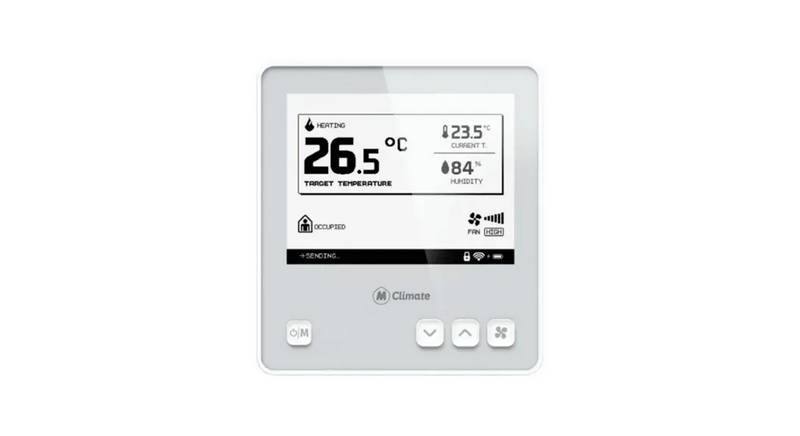
  • Page 12: User interface guide The device has a simple and intuitive user interface. Shows the current selected operational mode - heating/cooling/ventilation. Indicates the current temperature measured in the room. Indicates the current relative humidity measured in the room. Shows the current target temperature of the thermostat. Shows the selected fan speed. Occupied/not occupied. Determined by an additional sensor wired to IO1 and IO2 or set through a downlink. Indicates if any of the valves are currently open or closed. Only 1 valve can be opened at a time. Various messages displayed - Join Request/Join Accept/Join Failed/Sending, indicating the radio activity of the device. Shows in case some of the buttons are locked.
  • Page 13: Operating instructions Turning the thermostat ON/OFF The button on the far left of the thermostat serves two functions - turn it on and off and switch between modes. If the thermostat is currently off, a short press of the ON/OFF/MODE button will turn it on. The device should show more information, including measured temperature and relative humidity. If you want to turn the thermostat OFF, hold the ON/OFF/MODE button for 3 seconds. Temperature adjustment Use the up and down button to adjust the target temperature. The target temperature cannot be adjusted while in Ventilation mode. You can further configure the step of increase/decrease of the target temperature via a downlink.
  • Page 14: Operating instructions By default, the device supports 3 operating modes - heating, cooling, and ventilation. Depending on the wiring diagram of the Fan Coil Unit, some modes might be disabled by default. If you are using a 2-pipe fan coil unit, it can either heat or cool, but not both throughout the whole year. Short-pressing the ON/OFF/MODE button will switch between heating/ventilation or cooling/ventilation. If you are using a 10k NTC connected to IO1 and IO2, the FCT will determine the allowed operational modes independently. To change the fan speed, click the FAN button. You can change the fan speed based on the allowed fan speeds in your wiring diagram. ECM fans have 6 speeds. Using a downlink, you can limit the selection of the fan speed. You can configure it so that only the first and second speed can be used.
  • Page 15: Connectivity and smart building features Integration with building management systems (BMS) and building automation systems (BAS) Explanation of LoRaWAN Class C connectivity LoRaWAN Class C enables devices to constantly listen for commands from the gateways. The device will send information only on the keepalive interval or any change in the target temp/mode/fan speed selection. Unlike Class A devices, the FCT is able to receive commands from the application/network server in real-time. The device is compatible with MClimate Enterprise, which unlocks monitoring and controlling capabilities. For further instructions on how to add your MClimate FCT to the Enterprise, please refer to the available documentation. Integration into an existing BMS/BAS system is possible with a special gateway that translates the signal from LoRaWAN. Refer to our website for up-to-date information on available LoRaWAN <> BMS gateways.
  • Page 16: Wiring diagrams Heating and cooling with 3-speed fan 2-pipe ON/OFF 3-wire valve (220VAC) 1-3 speeds fan 4-pipe ON/OFF (220VAC) 2-pipe ON/OFF (220VAC) Multipurpose input/output (occupancy, auto change-over, etc.) Heating and cooling with ECM Fan 4-pipe ON/OFF (220VAC); ECM FAN 2-pipe 3-wire ON/OFF (220VAC)
  • Page 17: Page 17